If you need a dependable TEEMI TMSL-60 Barcode Scanner review from a buyer’s perspective, this desktop model makes a strong first impression.
It is built for fast point-of-sale scanning with minimal setup.
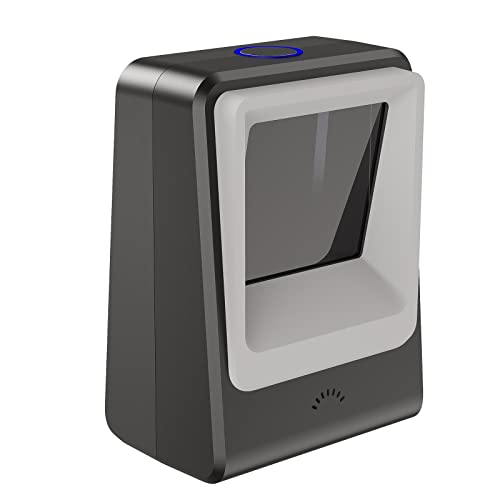
TEEMI TMSL-60 Review Summary
The TEEMI TMSL-60 Barcode Scanner is a smart buy for counters, checkout lanes, and reception desks where speed matters more than portability.
It combines hands-free desktop scanning, 1D/2D code support, and plug-and-play USB simplicity, which makes it especially appealing for retail and hospitality buyers who want a scanner that just works.
What stands out most is the way it balances convenience and everyday reliability.
If you are scanning barcodes from labels, paper tickets, loyalty cards, or phone screens, this model is designed to reduce friction at the point of sale.
In other words, it fits businesses that want a compact, low-maintenance workstation scanner rather than a premium software-heavy device.
Scorecard
| Category | Score | Buyer Takeaway |
|---|---|---|
| Scanning versatility | 9.0 | Reads both 1D and 2D codes from labels, paper, and screens. |
| Hands-free operation | 9.0 | Desktop presentation design supports automatic scanning and faster workflows. |
| Code capture reliability | 8.0 | Large target area and tolerance for damaged or fuzzy codes help in daily use. |
| Compatibility | 9.0 | USB plug-and-play support across Windows, Linux, and Mac OS. |
| Setup and ease of use | 9.0 | No driver installation required; multiple USB modes are available. |
| Business workflow features | 8.0 | LED confirmation, beeper controls, and scan modes suit busy counters. |
| Form factor and placement | 8.0 | Compact footprint makes it practical for POS stations. |
Overall, this is a good-value business scanner for buyers who prioritize reliable scanning, flexible operation modes, and simple deployment.
It is not the right pick for mobile inventory work, but as a fixed desktop scanner it checks the right boxes.
Key Features and Specifications of TEEMI TMSL-60
The TEEMI TMSL-60 Barcode Scanner is designed as a USB wired hands-free desktop barcode scanner for point-of-sale workflows.
Its feature set is practical rather than flashy, and that is exactly why many buyers will find it useful.
| Specification | Details |
|---|---|
| Brand | TEEMI |
| Model | TMSL-60 |
| Connectivity | USB cable |
| Power source | USB plug-and-play |
| Compatible devices | Laptop, tablet with USB port |
| Product dimensions | 2.5" D x 2.8" W x 5.7" H |
| Scan types | 1D, 2D |
| Scan modes | Hands-free, handheld, normal scanning, 1D fast scanning |
| Interface modes | USB HID, USB Virtual COM Port, HID-POS |
| Target area | 65 x 60 mm |
| Color | Black |
- Reads 1D and 2D barcodes for broader checkout compatibility.
- Captures codes from labels, paper, and phone or computer screens.
- Can read damaged, incomplete, and fuzzy barcodes, which matters in real-world retail.
- Top trigger for switching modes keeps operation straightforward.
- LED indication and programmable beeper volume provide clear scan feedback.
- No software or driver installation required for easier deployment.
- Works with Windows, Linux, and Mac OS, which helps mixed-device teams.
These specs point to a scanner built for counter-based efficiency.
The compact body is small enough to fit on a crowded POS station, while the USB-powered design keeps it simple for staff who do not want to troubleshoot wireless pairing or charging issues.
Pros and Cons of TEEMI TMSL-60
Every scanner has trade-offs, and the TEEMI TMSL-60 Barcode Scanner pros and cons are especially clear because this model focuses on business utility over versatility.
- Easy plug-and-play setup with no driver installation.
- Reads both printed and screen-based barcodes.
- Useful for busy checkout counters thanks to hands-free mode.
- Flexible operation with handheld and desktop presentation use.
- Compatible with common operating systems across mixed environments.
- Helpful scan confirmation lights and sound for staff feedback.
- USB wired design limits placement flexibility.
- Best suited to counter workflows rather than mobile scanning.
- Feature set is focused on scanning utility, not advanced inventory software.
The pros clearly outweigh the drawbacks for the right buyer, but the cons matter if you need a scanner that travels between stations or works away from a fixed desktop setup.
Who Should Buy TEEMI TMSL-60?
The TEEMI TMSL-60 Barcode Scanner is a strong fit for businesses that scan frequently at a fixed counter. It is especially useful when speed, simplicity, and screen-code support matter more than wireless freedom.
- Retail stores that need quick point-of-sale scanning.
- Restaurants, theaters, airports, and other high-traffic hospitality settings.
- Businesses that scan barcodes from phones, tablets, or computer screens.
- Users who want a simple USB scanner without driver installation.
- Shops that need a compact countertop scanner for frequent use.
Who should skip it? If you need a scanner for warehouse picking, roaming inventory counts, or mobile service work, a wireless handheld model will make more sense.
The TMSL-60 is best when it can stay parked at a station and do repetitive scanning all day.
How the Desktop Scan Modes Work
One of the better design choices in the TEEMI TMSL-60 Barcode Scanner is its combination of hands-free desktop mode and handheld operation.
For a buyer, that means the scanner can adapt to the workflow instead of forcing staff into one method.
In hands-free mode, the scanner behaves like a presentation scanner.
A barcode passes through the target area and the unit reads it automatically, which is ideal for checkouts and ticketing desks.
The listed 65 x 60 mm target area is large enough to make aiming easier, especially for quick transactions where staff cannot spend time lining up each code perfectly.
When more control is needed, the unit can switch into handheld use.
That gives the user a more direct way to capture codes on awkward packaging, curved surfaces, or items that sit outside the ideal scan window.
The added 1D fast scanning mode is a nice workflow feature for retailers that process many standard linear barcodes and want faster throughput.
From a buyer’s perspective, this versatility is one of the main reasons the scanner makes sense.
You are not paying for gimmicks; you are paying for speed at the counter.
Screen Barcode and Damaged Code Performance
A major advantage of the TEEMI TMSL-60 Barcode Scanner is its ability to read from phone screens and computer displays.
That is a real-world benefit in modern retail and hospitality, where digital tickets, membership passes, and mobile coupons are increasingly common.
The scanner is also described as capable of handling damaged, incomplete, and fuzzy codes.
That does not mean it will read every poor-quality barcode, but it does suggest a strong tolerance for the kinds of labels businesses actually encounter.
This is important if you process wrinkled receipts, worn product tags, or packages with less-than-perfect printing.
In practice, this makes the scanner more dependable than basic entry-level units that struggle once a code is faded or oddly lit.
If your team frequently works with mixed barcode quality, the TEEMI TMSL-60 offers a practical cushion.
Buyer takeaway: For daily retail use, this is the kind of scanner that reduces repeat scans and saves time at busy stations.
Best Uses for Retail and Hospitality
The TEEMI TMSL-60 Barcode Scanner is best understood as a front-of-house business tool.
It is designed for environments where throughput, consistency, and simple setup matter most.
- Retail checkout: Scan product labels quickly without complicated configuration.
- Restaurant order pickup: Read digital order numbers or mobile confirmations.
- Theaters and event entry: Scan tickets from phones or printed passes.
- Airports and travel desks: Handle screen-based codes and paper documents.
- Reception and service counters: Support frequent barcode or QR-code lookups.
Because it is USB-powered and compact, it also suits smaller counters where every inch of space matters.
The black finish is plain and professional, which is exactly what most commercial spaces want in a barcode scanner.
What it is not ideal for is active field work.
If you need to move between aisles, stockrooms, or off-site locations, the wired design is a limitation rather than an advantage.
USB Compatibility and Setup Options
Setup is one of the strongest parts of this product.
The TEEMI TMSL-60 Barcode Scanner supports USB plug-and-play operation and does not require software or driver installation.
For many business owners, that alone is enough to make it attractive.
It also supports multiple interface modes: USB HID, USB Virtual COM Port, and HID-POS.
That matters because different retail systems and point-of-sale setups may prefer different connection behaviors.
In practical terms, those options make the scanner easier to integrate into existing workflows without forcing a major software change.
The broad compatibility with Windows, Linux, and Mac OS is another plus.
If your business uses a mixed environment with desktops, laptops, or USB-equipped tablets, the scanner should slot in cleanly.
Setup verdict: This is a low-friction scanner for teams that want to get up and running quickly.
Trigger, LED, and Beeper Controls
Workflow feedback is often overlooked in product listings, but it makes a difference when employees scan all day.
The TEEMI TMSL-60 includes LED indication for scan confirmation and a programmable beeper volume, both of which are useful in noisy environments.
The LED confirmation gives immediate visual feedback, while the beeper tells staff when a code has been captured successfully.
In a busy restaurant, small shop, or ticket counter, that reduces uncertainty and helps workers move faster without second-guessing whether a scan registered.
The top trigger for switching modes is another thoughtful touch.
It keeps control simple, so employees can switch between normal scanning and other modes without digging through software menus.
For businesses training new staff, that simplicity is a real advantage.
These are small design decisions, but they improve day-to-day usability.
In barcode scanners, small usability improvements often matter more than flashy specs because they affect every transaction.
TEEMI TMSL-60 Barcode Scanner Review Compared With Alternatives
If you are comparing the TEEMI TMSL-60 Barcode Scanner against other Amazon-friendly options, it helps to think in categories rather than chasing a single spec sheet.
The TMSL-60 sits in the compact USB presentation-scanner lane, so its closest rivals are other fixed desktop models.
- TEEMI TMSL-72 hands-free barcode scanner – A natural alternative if you want to stay within the TEEMI lineup and compare similar desktop-oriented functionality.
- TEEMI T22N-AU USB wired 2D barcode scanner – Worth considering if you want a different TEEMI form factor with similar wired simplicity.
- USB presentation barcode scanner – A broader search if you want to compare other brands that offer fixed countertop scanning.
Compared with generic handheld scanners, the TMSL-60 has the edge in hands-free workflow efficiency.
Compared with more advanced inventory-focused devices, it is less feature-rich but much easier to deploy.
That trade-off will appeal to business owners who want to minimize setup time and keep staff training simple.
If you value countertop convenience over roaming mobility, this TEEMI model remains a sensible pick.
Is TEEMI TMSL-60 Worth It?
Yes, the TEEMI TMSL-60 Barcode Scanner is worth it for the right buyer. It is a focused, well-designed desktop barcode scanner that does the fundamentals well: 1D/2D scanning, screen-code capture, hands-free operation, and easy USB setup.
Its biggest strengths are the ones business users care about most: reliable workflow speed, minimal setup, and flexible scan modes.
The compact size, compatibility with major operating systems, and support for printed and screen-based codes make it a practical solution for retail and hospitality counters.
The main drawback is also easy to understand: it is a wired desktop scanner, not a mobile tool.
If that fits your workflow, you are getting a scanner that should be straightforward to use and easy to live with day after day.
Bottom line: Buy the TEEMI TMSL-60 Barcode Scanner if you need a compact, no-fuss POS scanner for frequent fixed-station use.
Skip it if your scanning needs are mobile, warehouse-based, or software-heavy.