The Rongta RP850 Thermal Receipt Printer review shows a simple truth: this is a workhorse for wired checkout setups.
If you need dependable receipt printing for a restaurant, retail counter, or back-office POS station, the Rongta RP850 Thermal Receipt Printer deserves a close look.
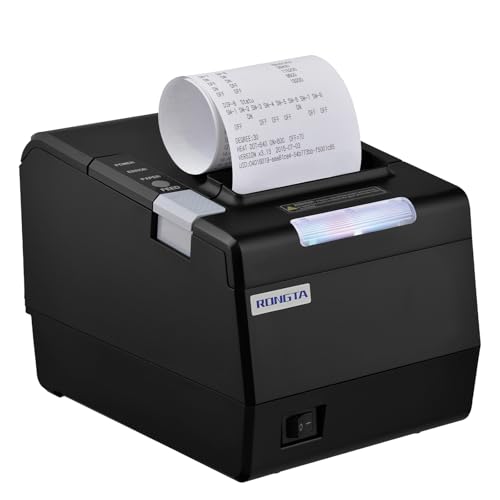
Rongta RP850 Review Summary
The Rongta RP850 Thermal Receipt Printer is best for buyers who want stable, no-drama receipt printing from a desktop POS environment. It focuses on wired reliability, fast thermal output, and useful front-of-house features like an auto cutter, cash drawer support, and order reminder alerts.
If your business runs on USB, serial, or Ethernet connections, the Rongta RP850 Thermal Receipt Printer can fit neatly into a checkout counter or kitchen pass-through without forcing you into a wireless ecosystem.
What makes this model appealing is its balance of practical POS features and broad desktop OS support.
It is especially attractive for operators who want a compact thermal receipt printer that works with Windows, Mac, and Linux, but do not need phone or tablet compatibility.
In other words, it solves the needs of traditional POS setups very well, while mobile-first businesses should look elsewhere.
Scorecard
| Category | Score | Why it matters |
|---|---|---|
| Printing performance | 8.0 | Fast monochrome thermal receipt output with an auto cutter for busy checkout and kitchen workflows. |
| Connectivity | 8.0 | USB, serial, and Ethernet connections with TCP/IP setup options for flexible wired integration. |
| Compatibility | 7.0 | Supports Windows, Mac, and Linux, but excludes phones, tablets, and many app-based delivery platforms. |
| Setup and control | 7.0 | Drivers, setup guides, ESC/POS and OPOS support, plus DIP switch controls help with configuration. |
| Paper handling | 8.0 | Handles 80mm and 58mm paper widths with practical direct thermal receipt sizing. |
| Convenience features | 7.0 | Sound/light reminders, closable alerts, wall-mount holes, and cash drawer support add real-world utility. |
| Build and footprint | 7.0 | Portable and fairly compact, though it still needs dedicated counter space. |
Overall verdict: the Rongta RP850 Thermal Receipt Printer is a smart buy for wired POS users who value compatibility with desktop systems more than mobile convenience.
Buying tip: If your checkout setup already uses a desktop computer, receipt rolls, and a cash drawer, this printer is a strong fit.
If your business runs from a phone or tablet, it is probably the wrong tool.
Key Features and Specifications of Rongta RP850
The RP850 is designed as a thermal receipt printer for POS use, not as a general-purpose printer.
It prints monochrome receipts and symbols, and it uses direct thermal paper rather than ink or toner, which keeps ongoing maintenance simple.
| Specification | Details |
|---|---|
| Brand / Model | Rongta RP850 |
| Printer type | Thermal receipt printer |
| Output | Monochrome |
| Connectivity | USB, Serial, Ethernet |
| Network setup | TCP/IP supported |
| Paper width support | 80mm and 58mm |
| Print width | 72mm / 48mm |
| Media | Direct thermal receipt paper |
| Auto cutter | Included |
| Cash drawer support | Yes |
| OS support | Windows, Mac, Linux |
| Device support | Laptops and desktop computers |
| Wireless | No Wi-Fi, no Bluetooth |
| Weight | 1.37 kg |
| Dimensions | 5.71 x 7.87 x 5.59 in |
| Special functions | Sound/light order reminders, wall-mount holes, printer tool settings, DIP switches |
| Drivers / support | 4 drivers, USB flash with user guide and setup manuals |
The specification sheet points to a printer built for routine, high-frequency receipt work.
It is not trying to be flashy.
Instead, the RP850 concentrates on the features that matter most in a service environment: stable connectivity, fast output, and low-friction paper handling.
One detail worth noting is the dual paper-width support.
Many buyers only discover too late that a printer accepts one common roll size but not another.
With the Rongta RP850 Thermal Receipt Printer, you can plan around either 80mm or 58mm media, which gives more flexibility when matching existing inventory or installation requirements.
Pros and Cons of Rongta RP850
Every buyer should weigh the Rongta RP850 Thermal Receipt Printer pros and cons before deciding.
This model is strong in traditional POS settings, but its limitations are important.
Pros
- Flexible wired connections for USB, serial, and Ethernet POS setups.
- Works with Windows, Mac, and Linux, which helps mixed-office environments.
- Auto cutter and cash drawer support suit restaurant and retail workflows.
- Sound/light reminders can improve order awareness in busy service areas.
- Wall-mount holes help save counter space and improve placement flexibility.
- Supports both 80mm and 58mm paper for broader receipt roll compatibility.
Cons
- No wireless options, so it is not ideal for flexible modern tablet workflows.
- Not compatible with phones or tablets, including iPhone, iPad, Android phones, and Android tablets.
- May require driver tools or DIP switch adjustments during setup.
- Monochrome output only, which is standard for receipts but limited for anything else.
- Compatibility must be checked carefully if you use cloud POS or delivery platforms.
Bottom line on the drawbacks: the RP850 is not difficult for the right user, but it is not forgiving if your POS environment is app-driven or mobile-first.
Who Should Buy Rongta RP850?
The Rongta RP850 Thermal Receipt Printer is a strong match for restaurants, small retail counters, service desks, and office POS stations that rely on a wired desktop or laptop setup.
It is also a sensible pick for buyers who want Ethernet-based receipt printing with a cash drawer connection.
This printer is a good fit if you:
- Need a reliable receipt printer for a fixed checkout area.
- Prefer USB, serial, or Ethernet over wireless convenience.
- Use Windows, Mac, or Linux on a laptop or desktop.
- Want an auto cutter and practical receipt roll support.
- Value simple, direct thermal printing with minimal consumables.
It is less suitable if you:
- Run your business from an iPhone, iPad, Android phone, or Android tablet.
- Depend on Wi-Fi or Bluetooth printing.
- Use a cloud POS or delivery app that requires specific certified hardware.
- Want a printer that needs almost no configuration.
Best-fit buyers are traditional POS operators who want dependable wired printing and are comfortable installing drivers.
Rongta RP850 Setup and Driver Support
Setup is one of the more important decision factors in any receipt printer purchase, and the RP850 is reasonably well supported.
It ships with a USB flash drive that includes the user guide and a driver setup guide, plus a Mac OS driver install manual.
It also supports ESC/POS and OPOS, which is useful because those standards remain common in many POS environments.
That said, this is not a “plug it in and forget it” printer in every case.
Some buyers may need to use the printer tool to adjust fonts, toggle reminder sounds, or change settings.
DIP switches on the bottom also allow configuration of the auto cutter, language, sound/light indicator, print density, and related options.
This is a strength if you want control, but it can feel like extra work if you are used to consumer peripherals.
For buyers comfortable with standard driver installation, it should be manageable.
For buyers who want app-based setup from a phone, this is the wrong category entirely.
Paper Size, Receipt Width, and Auto Cutter
Paper handling is one of the RP850’s better practical features.
The printer supports both 80mm and 58mm paper widths, and its print width is listed at 72mm or 48mm depending on the paper choice.
That matters because receipt layout, logo placement, and line length all depend on the available printable area.
The included auto cutter is another important advantage.
In a restaurant or retail line, an auto cutter speeds up handoff and keeps receipts neat.
It also reduces the small annoyances that come with tearing paper manually during rush periods.
For buyers, the key question is whether the receipt format matches your workflow.
The RP850 is well suited to standard order tickets, customer receipts, and simple symbols, but it is not meant for image-heavy output or color branding.
Thermal receipts are naturally limited to monochrome, so the value here is speed and simplicity, not presentation.
Wired Connectivity for POS Systems
This is where the Rongta RP850 Thermal Receipt Printer stands out most clearly.
It offers USB, serial, and Ethernet connections, which gives it strong compatibility with traditional POS hardware setups.
Ethernet support is especially useful in multi-terminal environments or where a printer needs to be shared across a local network.
The wired-first design also helps stability.
If you have ever dealt with intermittent wireless printing, you will appreciate the predictability of a hard connection.
For kitchens, front counters, and cashier stations, wired printing reduces the chances of missed receipts or pairing issues.
It is worth repeating that there is no Wi-Fi and no Bluetooth.
That is not a flaw for every business, but it is a hard boundary.
Buyers who want tablet mobility or curbside flexibility should consider a mobile printer instead.
Sound and Light Order Alerts
One of the more interesting convenience features is the sound and light order reminder function.
In a busy restaurant or pickup counter, alerts can help staff notice new tickets quickly.
That can improve response time without requiring a separate buzzer system.
There is also a practical detail here: the reminder sound can be turned off using the printer tool.
That matters because not every environment wants audible alerts.
A quieter retail desk or shared office can disable the sound and rely on the visual cue instead.
This is a small feature on paper, but in daily use it can make the printer feel more integrated with a real service workflow.
It is a nice operational touch, especially for smaller teams.
Wall Mount and Counter Placement
The RP850 includes two hanging holes on the bottom, which allows wall-mount placement.
That is a useful design choice for tight counters, kitchen pass areas, or POS stations where horizontal space is limited.
A wall-mounted receipt printer can also be easier to access in some layouts than one buried under paperwork or next to a cash drawer.
At 1.37 kg and with compact dimensions, the unit is portable for a fixed POS printer, though it is still best thought of as a dedicated counter device rather than an ultra-mini accessory.
The footprint is reasonable, but buyers should still plan where it will live before ordering.
Design-wise, the RP850 is about practicality over polish. The housing, mounting options, and wired connections all point toward a printer built to stay in one place and perform consistently.
Alternatives to Consider
If you are comparing options, it helps to think in terms of setup style rather than just brand names.
Here are a few logical alternatives:
- Epson thermal receipt printer — a common choice for buyers who want a well-known POS brand and broad ecosystem support.
- Star Micronics receipt printer — often considered by retailers and restaurants that want established POS integration options.
- Bluetooth thermal receipt printer — better for tablet-based checkout and mobile workflows.
- Wi-Fi thermal receipt printer — worth considering if your POS setup is cloud-based or network-flexible.
Compared with those choices, the RP850 is most compelling when your priority is wired reliability and straightforward receipt printing.
If your business depends on mobile checkout, however, a Bluetooth or Wi-Fi model will make more sense.
Is Rongta RP850 Worth It?
Yes, the Rongta RP850 Thermal Receipt Printer is worth it for the right buyer. It delivers the core features that matter in a traditional POS environment: stable wired connectivity, usable desktop OS support, an auto cutter, cash drawer integration, and flexible receipt paper handling.
The real buying decision comes down to workflow.
If your business runs on a laptop or desktop and you want a dependable receipt printer for restaurant, retail, or office checkout use, the RP850 makes a lot of sense.
If you need mobile compatibility, wireless setup, or app-first convenience, it is not the right model and you should move to a Wi-Fi or Bluetooth alternative.
Final recommendation: choose the Rongta RP850 Thermal Receipt Printer if you want a practical, wired, business-focused printer that does its job without unnecessary complexity.
Skip it only if your POS system is built around phones, tablets, or cloud-first wireless printing.