The Rongta F82 Portable Thermal Printer review starts with a simple question: do you need a compact, inkless printer that can handle everyday document printing without the hassle of cartridges?
For the right buyer, the answer is yes.
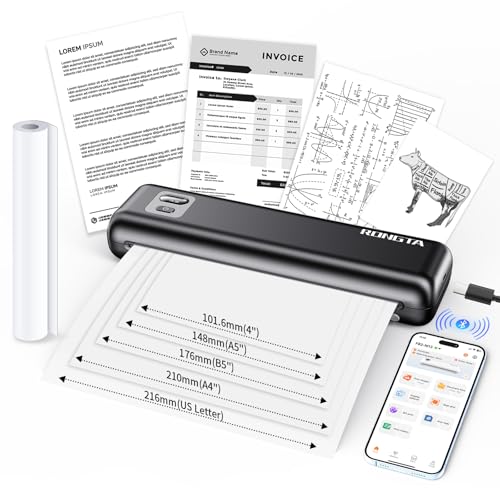
Rongta F82 Review Summary
If you want a portable thermal printer that is easy to carry, easy to connect, and built for quick monochrome output, the Rongta F82 Portable Thermal Printer makes a strong case.
It is especially appealing for travelers, remote workers, students, and small-business users who need a dependable print-only device for PDFs, forms, shipping-style documents, and simple text files.
What stands out most is the combination of inkless thermal printing, broad device support, and a travel-friendly body that weighs about 1 lb.
That makes the Rongta F82 feel less like a desk printer replacement and more like a flexible on-the-go document tool.
If that is your use case, it is easy to see the appeal.
At the same time, buyers should be realistic about the limits.
This is a monochrome, print-only machine that relies on thermal paper, so it is not for color graphics, photo work, scanning, or copying.
In other words, the Rongta F82 is best when convenience and portability matter more than versatility.
Scorecard
| Category | Score | What it means |
|---|---|---|
| Printing performance | 8.0 | Inkless thermal output is quick and crisp for black-and-white documents. |
| Portability | 9.0 | Compact, lightweight, and easy to toss into a bag or backpack. |
| Connectivity | 8.0 | Bluetooth and USB work across phones, tablets, PCs, and laptops. |
| Battery life | 8.0 | The 2550mAh battery and standby protection mode support mobile use. |
| Paper compatibility | 7.0 | Supports several paper formats, but still limited to thermal media. |
| Ease of use | 8.0 | The SoPrint app and LCD status screen simplify daily printing. |
| Noise and desk friendliness | 8.0 | Quiet operation makes it suitable for shared or calm workspaces. |
Overall, the Rongta F82 Portable Thermal Printer is a smart buy for people who value mobility, low-maintenance operation, and simple document output.
It is not a do-everything printer, but for the right buyer it can be a genuinely practical tool.
Key Features and Specifications of Rongta F82
The specifications show exactly where this printer fits in the market.
It is a portable printer with thermal printing technology, designed to reduce clutter and eliminate ink-related maintenance.
| Specification | Detail |
|---|---|
| Brand / Model | Rongta F82 Portable Thermal Printer |
| Printing technology | Thermal |
| Output type | Monochrome |
| Connectivity | Bluetooth, USB |
| Compatible devices | Laptops, PCs, smartphones, tablets |
| Supported systems | Android, iOS, Windows, Mac |
| Print media | Thermal paper |
| Supported paper formats | Thermal rolled paper, single-sheet paper, fan-fold paper |
| Maximum black-and-white speed | 70 ppm |
| Black-and-white resolution | 256 dpi |
| Duplex printing | No |
| Functions | Print only |
| Weight | 1 lb |
| Dimensions | 7.4 x 10.24 x 5.3 in |
| Battery | 2550mAh |
| Battery claim | Up to 150 pages per charge |
| Noise level | Under 60dB |
| Color | Black |
| App | SoPrint |
The most important spec for many buyers is the combination of Bluetooth and USB support.
That gives the Rongta F82 flexibility across mobile and desktop workflows, which matters if you print from both a phone and a laptop.
Another practical advantage is the 2550mAh battery.
The stated claim of up to 150 pages per charge suggests the printer is designed for intermittent use throughout the day rather than being chained to a wall outlet.
Pros and Cons of Rongta F82
Here is the straight answer on the Rongta F82 Portable Thermal Printer pros and cons from a buyer’s perspective.
Pros
- Inkless printing removes the need for cartridges, which keeps maintenance simple.
- Compact and lightweight enough for travel, commuting, or moving between workspaces.
- Bluetooth and USB connectivity make it usable with a wide range of devices.
- Works with Android, iOS, Windows, and Mac, which is a major convenience advantage.
- Quiet operation under 60dB is friendly for home offices and shared spaces.
- Multiple paper format support gives it more flexibility than some ultra-basic portable printers.
- The SoPrint app makes phone-based document printing more approachable.
Cons
- Monochrome only, so it is not suitable for color printing.
- Thermal paper dependency limits media choices compared with standard ink printers.
- No duplex printing, which is a drawback for users who print longer documents.
- Print-only design means no scanning or copying functions.
- Not ideal for photo-quality output or graphics-heavy work.
From a practical standpoint, the biggest drawback is not performance but format limitations.
If you can live within monochrome thermal printing, the benefits are compelling.
If you need color or high-detail output, this is the wrong category entirely.
Who Should Buy Rongta F82?
The Rongta F82 Portable Thermal Printer is a good fit for people who want an easy, portable way to print documents without dealing with ink or toner.
It is especially well suited to:
- Travelers who need a compact printer for occasional document output.
- Remote workers who move between home, office, and temporary workspaces.
- Students who want a small printer for study notes, forms, and PDFs.
- Small business owners who print shipping-style documents, invoices, or simple forms.
- Mobile-first users who want phone-to-printer convenience through the SoPrint app.
It is also a sensible choice if you are trying to reduce consumables and want to avoid the mess or cost of cartridge replacements.
The inkless design is one of its biggest strengths for low-maintenance use.
On the other hand, you should skip it if you need any of the following: color output, scanning, copying, duplex printing, or high-volume office production.
For those jobs, a traditional inkjet or compact laser printer will be a better long-term fit.
Design and Build Quality
The Rongta F82 follows a straightforward product design philosophy: keep it small, simple, and easy to move.
Its black finish and compact footprint make it look understated rather than flashy, which suits a work tool better than a lifestyle gadget.
At around 1 lb, it is light enough to carry without much thought.
That matters because portability is not just about dimensions; it is about whether you will actually bring the printer with you.
The F82 looks like the kind of device that can live in a backpack or laptop bag without becoming a burden.
The LCD status screen is another useful design choice.
Portable printers can be frustrating when status feedback is unclear, so having a visible screen helps reduce guesswork during setup and routine use.
Design-wise, the main trade-off is obvious: this printer prioritizes function over flexibility.
There is no scan lid, no color system, and no oversized control panel.
That keeps the product lean, but it also confirms the target audience: buyers who want a compact print-only device.
How the SoPrint App Works
The SoPrint app is central to the user experience, especially for people printing from smartphones or tablets.
App-based printing is often where portable printers either feel smooth or become annoying, and this is one of the areas that can make or break the buying decision.
According to the product details, the app supports PDFs, Word documents, images, and more.
That is important because it means the printer is not limited to one narrow workflow.
If you regularly receive files on your phone, the app-based setup should feel natural.
For mobile users, this is a major benefit.
A portable thermal printer is most valuable when you can print without booting up a full desktop system.
The SoPrint app helps the Rongta F82 stay true to that promise.
That said, app-based printing is only as good as compatibility and workflow reliability.
Buyers who plan to use multiple devices should verify that the app works well across their ecosystem.
The broad support for Android, iOS, Windows, and Mac is encouraging, but as with any mobile-connected printer, it is wise to set expectations realistically.
Paper Types and Print Size Compatibility
One of the stronger features of the Rongta F82 is its support for multiple paper formats.
It works with thermal rolled paper, single-sheet paper, and fan-fold paper, which gives it more versatility than some portable printers that only handle one style.
This matters because paper format affects everyday usability.
Roll paper can be practical for many mobile tasks, while single-sheet paper may feel more familiar to office users.
Fan-fold paper can be useful for batch-style workflows and certain document formats.
Still, the key limitation remains: the printer is tied to thermal media.
That means the buying decision should include not only the device itself, but also the ongoing availability and compatibility of the paper you plan to use.
If you already know you want standard office paper flexibility or you need output for long-term archival purposes, a conventional printer may be more appropriate.
But if your goal is convenience and portable document printing, the paper options here are a real advantage.
Battery Life and Travel Use
The built-in 2550mAh battery is one of the most important specifications for a printer like this.
Portable printers live or die by battery convenience, and the claim of up to 150 pages per charge suggests the Rongta F82 is intended for real-world mobile use rather than occasional novelty printing.
For travelers, that can be especially valuable.
If you need to print forms, confirmations, shipping documents, or work papers while away from your desk, battery-powered operation reduces friction.
You are not hunting for an outlet before every job.
The standby protection mode is also a smart inclusion because it helps preserve battery when the printer is not actively in use.
That kind of detail matters more than most people realize, especially if the device sits in a bag for days at a time.
My take: the battery setup looks solid for light to moderate portable use.
Heavy daily print users will still need to pay attention to charging habits, but for typical travel and home-office scenarios, it appears well thought out.
Noise Level and Office Friendliness
Portable printers can be surprisingly noisy, and that is a real issue in dorms, home offices, libraries, and shared work environments.
The Rongta F82 is rated at under 60dB, which points to a quieter-than-average user experience.
That is a meaningful advantage if you print around other people.
Quiet operation makes the printer feel less disruptive and more polished, especially when compared with louder desktop devices that can dominate a room.
For office friendliness, low noise and small size go hand in hand.
If you need a print tool that can sit unobtrusively on a desk, the F82 has the right profile.
It is not trying to be a bulky office machine; it is designed to stay out of the way until needed.
This matters in buyer terms because noise is often overlooked until the printer starts being used daily.
In this category, quiet, compact operation is a real quality-of-life feature.
Best Use Cases for a Portable Thermal Printer
The strongest use cases for the Rongta F82 are practical, not flashy.
This is a tool for straightforward monochrome jobs where speed and convenience matter more than visual richness.
- Document printing on the move
- PDFs, forms, and letters
- Basic business paperwork
- Shipping-style documents and labels
- Mobile office workflows
- Temporary work setups
If that sounds like your world, the F82 solves a real problem.
If you are hoping for a compact photo printer or an all-in-one home office machine, you should look elsewhere.
That is why the buying decision here is less about “best printer overall” and more about best portable printer for a specific workflow.
In that lane, the Rongta F82 performs well.
Alternative Portable Printers to Consider
If you are comparing options before buying, there are a few broad Amazon-friendly alternatives worth checking.
Phomemo portable thermal printers are popular if you want a similar inkless workflow with a wide range of compact models.
Brother pocket thermal printers are another route for buyers who want a trusted brand name in portable printing.
For shoppers who want more mainstream document handling, Canon portable document printers and HP compact wireless document printers may be better fits, especially if you care more about general office printing than thermal portability.
You can also compare it with Polono portable thermal printers if you are looking at the budget-friendly portable printer segment.
Compared with those options, the Rongta F82 stands out for its balance of Bluetooth, USB, app support, and travel-friendly construction.
That combination gives it a strong place in the portable thermal category.
Is Rongta F82 Worth It?
So, is Rongta F82 Portable Thermal Printer worth it?
For the right buyer, yes.
It is worth considering if you want a compact, inkless printer that is easy to carry, easy to connect, and suitable for everyday monochrome document printing.
The value proposition is strongest for people who prioritize portability, low maintenance, and phone-friendly printing.
The F82 is not trying to replace a full office printer; it is trying to make document printing simpler wherever you are.
The drawbacks are real, though.
You must accept thermal paper, monochrome output, no scanning or copying, and no duplex printing.
If those limitations are a problem, this is not the right purchase.
Bottom line: buy the Rongta F82 Portable Thermal Printer if you need a quiet, compact, practical document printer for mobile or mixed-device use. Skip it if you need color, photo quality, or all-in-one functionality.
For travelers, remote workers, and light-duty office users, it is a sensible and capable pick.