The NADAIIN N20 Label Maker review starts with one clear takeaway: this is a smart pick for buyers who want fast, portable, phone-based labeling without dealing with ink or toner.
It is small, flexible, and built for everyday organization.
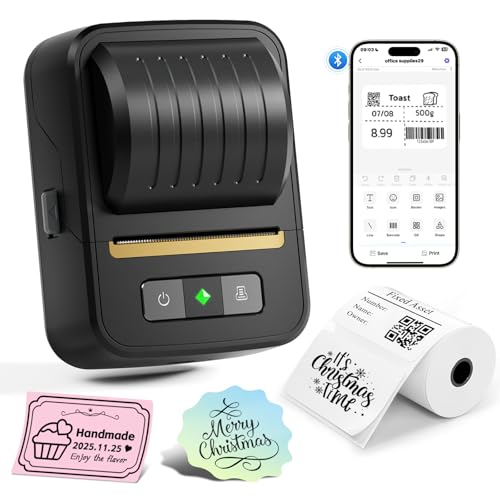
NADAIIN N20 Review Summary
If you want a compact thermal label printer for home organization, office filing, school supplies, or light retail labeling, the NADAIIN N20 Label Maker makes a strong case for itself.
It combines inkless printing, a rechargeable battery, and a surprisingly capable app, which is exactly what many buyers want in a modern portable label maker.
From a buyer’s perspective, the appeal is simple: it is easy to carry, quick to use, and versatile enough for address labels, folder tabs, cable labels, jars, and small business tags.
It is also a good fit for people who want to design labels from a phone instead of navigating a cramped built-in keypad.
Best for: home organizers, teachers, office workers, crafters, resellers, and small business owners who need a compact monochrome label printer.
Not best for: buyers who need shipping labels, color output, or a full desktop workflow.
Quick Scorecard
| Category | Score | Why it matters |
|---|---|---|
| Print quality | 8.0/10 | 203 x 203 dpi thermal output is sharp enough for text, barcodes, and simple logos. |
| App features | 9.0/10 | The Nada Print app offers fonts, borders, symbols, templates, and batch printing. |
| Portability | 9.0/10 | Very compact at 0.29 kg and easy to carry around a home, office, or workshop. |
| Connectivity and setup | 7.0/10 | Works through the app on iOS and Android, but the setup is less direct than simple Bluetooth pairing. |
| Label versatility | 8.0/10 | Supports 3/4 inch to 2 inch labels and multiple shapes for common organization jobs. |
| Battery life | 8.0/10 | The 2000mAh rechargeable battery is built for long cordless sessions. |
| Value for organizing work | 8.0/10 | A strong mix of portability, inkless operation, and practical labeling flexibility. |
Overall, the NADAIIN N20 Label Maker is a practical, modern label printer for people who value convenience and flexibility more than raw office-grade volume.
If that matches your workflow, it is easy to recommend.
Key Features and Specifications of NADAIIN N20
The NADAIIN N20 Label Maker is a Bluetooth thermal label printer designed to work from a phone or tablet.
Here are the specs and core features that matter most before buying.
| Specification | Details |
|---|---|
| Brand / Model | NADAIIN N20 |
| Printing technology | Direct thermal |
| Output | Monochrome, black only |
| Resolution | 203 x 203 dpi |
| Connectivity | Bluetooth |
| Compatible devices | iOS and Android phones, tablets |
| App | Free Nada Print app |
| Fonts / borders / symbols | 60+ fonts, 50+ borders, 1000+ symbols and icons |
| Label widths | 3/4 inch to 2 inch (20mm to 50mm) |
| Supported label shapes | Square, round, cable, file, and other common label forms |
| Battery | Built-in 2000mAh rechargeable battery |
| Weight | 0.29 kilograms |
| Dimensions | 4.93″ D x 3.24″ W x 2.58″ H |
| Functions | Print only, no duplex |
| Use case focus | Address, barcode, QR code, logo, file, cable, price, and container labels |
These specs tell a useful story.
The N20 is built for everyday labeling convenience, not heavy-duty warehouse printing.
The direct thermal system keeps operation simple because there is no ink, toner, or ribbon to replace.
For a buyer who wants low-maintenance labeling, that is a major advantage.
At the same time, the printer is intentionally limited to monochrome output.
That is normal in this category, but it is still a key buying factor.
If you need color labels or large shipping-format output, this is not the right model.
Pros and Cons of NADAIIN N20
Here is a practical breakdown of the NADAIIN N20 Label Maker pros and cons from a real buyer’s perspective.
Pros
- Very portable and lightweight for quick labeling anywhere.
- Inkless thermal printing keeps ownership simple and low-maintenance.
- Excellent app customization with many fonts, borders, and icons.
- Batch printing and templates are useful for repeat jobs.
- Works across multiple label shapes and common widths.
- Rechargeable battery supports cordless use for extended sessions.
Cons
- Monochrome only, so it will not suit buyers who want color labels.
- Not for shipping labels, which limits e-commerce use cases.
- App-based setup may confuse some users expecting instant direct pairing.
- Small handheld format is not ideal for high-volume desktop work.
The strengths are especially compelling if you care about ease of use and label variety.
The drawbacks are real too, but they mostly reflect the product’s intended category, not a flaw in execution.
Who Should Buy NADAIIN N20?
The NADAIIN N20 Label Maker is a good fit for buyers who need a flexible, phone-controlled label maker for personal or light business organization.
It is especially useful if you want to print labels for bins, pantry containers, folders, cables, price tags, or inventory-style tags without a messy setup.
- Home organizers who label storage boxes, jars, pantry containers, and household items.
- Office workers and admins who need file labels, name tags, and cable identification.
- Teachers and school staff who organize classroom supplies and student materials.
- Crafters and sellers who need barcode labels, logos, or small product tags.
- Small business owners who want a compact label maker for light-duty operations.
You should probably skip it if you need large shipping labels, color printing, or a printer that behaves like a traditional desktop machine.
This model is built for convenience and portability, not full shipping fulfillment.
How the N20 App Works
The app experience is one of the biggest reasons the NADAIIN N20 Label Maker review leans positive.
The free Nada Print app is where the printer becomes genuinely useful, because it gives you the tools to customize labels without feeling overly technical.
The app includes 60+ fonts, 50+ borders, and 1000+ symbols/icons, which is a strong feature set for a label maker in this class.
That matters because most buyers want labels that are not just readable, but visually organized and easy to scan at a glance.
In practical terms, you can create labels for spice jars, cable wraps, file tabs, storage bins, and product tags with very little friction.
The app also supports saved templates and batch printing, which is a major time saver when you are making a series of matching labels.
One important caution: setup is app-centric.
That is not unusual, but buyers who expect a simple direct Bluetooth connection may need a moment to adjust.
Once configured, though, the workflow is straightforward for repeat use.
If you like the idea of designing labels on your phone while standing in front of the shelf, drawer, or cabinet you are organizing, this software approach is a real strength.
Label Sizes and Compatibility
Label compatibility is one of the key decision-making factors for any label maker, and the NADAIIN N20 Label Maker performs well here for an everyday device.
It supports labels from 3/4 inch to 2 inch, or 20mm to 50mm, which covers many common organizing tasks.
That range is broad enough for address labels, barcode labels, folder labels, cable labels, bottle labels, and round or square containers.
It is also helpful for small retail workflows where you need a clean, easy-to-read tag rather than a shipping-format label.
The device is not intended for shipping labels, and that distinction matters.
If your workflow is built around postage printing or warehouse cartons, you will likely want a more specialized printer from a broader label or shipping line.
For most household and light-business uses, though, the supported width range is exactly where it should be.
It gives the N20 enough flexibility to handle multiple tasks without making the unit bigger or more complicated than it needs to be.
Print Quality for Text, Barcodes, and Logos
Thermal label printers live or die by legibility, and this is where the NADAIIN N20 Label Maker does enough to satisfy most buyers.
Its 203 x 203 dpi resolution delivers crisp monochrome output that is well suited to text, basic logos, and scannable codes.
For pure text labels, the output should be more than adequate in everyday use.
The same goes for barcodes and QR codes, provided the label size is chosen sensibly and the design is not overcrowded.
That is a key point: small thermal printers are only as effective as the layout you create on the app.
The printer’s monochrome nature is both a strength and a limitation.
On the plus side, black-on-white labels are fast to read and work well on containers, folders, and boxes.
On the downside, anyone expecting decorative, color-coded branding will need to look elsewhere.
Compared with broader alternatives like a Brother compact label maker, the N20 feels more app-driven and flexible for quick mobile use.
Compared with a Phomemo Bluetooth label printer, it lands in a similar category of portable thermal labeling with strong app support.
And if you are comparing it to a NIIMBOT label maker or DYMO portable label printer, the key question is whether you prefer app customization, portability, or a more traditional desktop-style workflow.
Bottom line: print quality is strong enough for the intended use cases, but this is a utility printer, not a premium graphic device.
Battery Life and Portability in Daily Use
Portability is one of the strongest selling points of the NADAIIN N20 Label Maker.
At just 0.29 kilograms and roughly 4.93 x 3.24 x 2.58 inches, it is easy to move from room to room or pack into a bag with minimal hassle.
The built-in 2000mAh rechargeable battery is designed for extended cordless sessions, with the product brief suggesting roughly a workday-style labeling experience.
That makes sense for a device designed to be used intermittently throughout the day rather than continuously like an office printer.
This portability changes how you work.
Instead of bringing items to a printer, you can bring the printer to the pantry, storage closet, classroom, or retail shelf.
That is exactly what many organization-focused buyers want.
Best use pattern: short bursts of labeling across multiple locations.
If you need to label a set of bins in one room, then tags in another, then folders at your desk, the N20’s small footprint and cordless design are a real advantage.
Best Uses for Home, Office, and Small Business
The NADAIIN N20 Label Maker is not a universal printer, but it is very good at the jobs it was designed to do.
The strongest use cases are everyday organization and light commercial labeling.
- Home: pantry jars, kitchen containers, storage bins, toy boxes, toiletries, and seasonal organization.
- Office: file folders, archive boxes, desk cables, shelf labels, and asset tags.
- School: student supplies, classroom bins, book labels, and activity materials.
- Small business: price tags, product identifiers, barcode stickers, jewelry tags, and homemade food or bakery labels.
The device is also useful for niche organizing jobs like labeling bottles, documentation, and cables.
That breadth matters because the value of a label maker often comes from how many small problems it can solve in one purchase.
For buyers who want one compact tool to reduce clutter and improve visibility, this model does a strong job of covering the common scenarios.
Comparisons and Alternatives to Consider
If you are deciding whether the NADAIIN N20 Label Maker is the right pick, it helps to compare it with other popular Amazon-friendly options.
- Brother compact label maker: Often a better fit for buyers who prefer a more traditional label maker experience and broad brand trust.
- Phomemo Bluetooth label printer: A close alternative if you want similar app-based thermal printing and portable convenience.
- NIIMBOT label maker: Worth considering if you want another compact app-driven label solution with wide consumer adoption.
- DYMO portable label printer: A practical option if you want a familiar name in labeling and a slightly different workflow.
What separates the N20 from many alternatives is the balance of app flexibility, label variety, and cordless portability.
It is not the only good portable label maker, but it is competitive in the exact areas that matter to home and small-business organizers.
If your priority is maximum simplicity, a traditional Brother model may feel easier.
If your priority is phone-based customization and a compact body, the N20 fits very well.
Is NADAIIN N20 Worth It?
So, is NADAIIN N20 Label Maker worth it?
For the right buyer, yes.
It offers a well-judged mix of portability, app features, thermal convenience, and label flexibility that makes everyday organization faster and cleaner.
The strongest reasons to buy it are the inkless printing, the strong app customization, and the compact cordless design.
The main drawbacks are equally clear: it is monochrome only, it is not a shipping-label printer, and the setup process is a little more app-dependent than some users may expect.
If you need a compact label maker for home, office, school, or light retail use, the NADAIIN N20 Label Maker is an easy recommendation.
If you need higher-volume output, color printing, or shipping support, you should look at a more specialized printer instead.
Final verdict: the NADAIIN N20 is a good-value portable label printer for practical organization tasks, and it is especially attractive if you want a modern, phone-controlled setup with minimal maintenance.