The MUNBYN Thermal Printer for Money Counter review starts with a simple question: do you need a printer that is made for cash-counting reports, not general office use?
If you run supported MUNBYN counters, this compact thermal unit can make recordkeeping much easier.
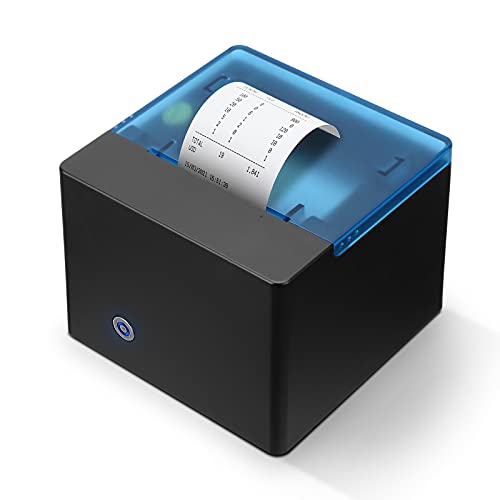
MUNBYN Printer Review Summary
The MUNBYN Thermal Printer for Money Counter is a niche but smart buy for cash-handling teams that need fast, printed proof of counted bills, denomination breakdowns, and serial-number records.
It is especially well suited to businesses using the MUNBYN Bill Counter IMC01 or IMC08, where a clean paper trail can save time during audits, cash drops, and end-of-day reconciliation.
What makes this printer compelling is not general versatility but purpose-built efficiency.
It uses direct thermal printing, connects by cable, supports 58mm receipt paper, and is designed to sit neatly on a counter or mount on a wall.
That combination makes it a practical companion for retail backrooms, small cash offices, and any workflow where money counts need to be documented quickly and consistently.
At the same time, buyers should understand the tradeoff: this is not a general-purpose printer, and it is not meant to work with random PCs or unrelated devices.
If you need a broad receipt printer for point-of-sale use, there are better alternatives.
But if you need a tightly integrated bill-counter printer, the MUNBYN model delivers exactly the kind of focused utility that matters.
Scorecard
| Category | Score | Why It Matters |
|---|---|---|
| Compatibility | 9.0 | Designed specifically for MUNBYN Bill Counter IMC01 and IMC08, making it a strong fit for the intended workflow. |
| Printing performance | 8.0 | Direct thermal printing and an 80 mm/sec output help receipts come out quickly during busy counting sessions. |
| Recordkeeping usefulness | 9.0 | Prints totals, denomination breakdowns, and bill serial numbers for better audit trails. |
| Ease of setup | 8.0 | Plug-and-play serial connection and straightforward paper loading keep setup friction low. |
| Space-saving design | 8.0 | Desktop or wall-mounted placement helps it fit into tight cash-handling spaces. |
| Build and maintenance | 7.0 | Useful touches like a one-button open cover and over-temperature protection support daily use, though it remains a specialized device. |
Bottom line: If your business already uses a compatible MUNBYN bill counter, this printer is a well-targeted productivity upgrade.
If you do not, the limited compatibility is the biggest reason to skip it.
Key Features and Specifications of MUNBYN Printer
The MUNBYN Thermal Printer for Money Counter is built around one job: turning counting results into a readable paper record.
That focus shows up in its hardware, print format, and installation options.
- Brand: MUNBYN
- Model: MU-IMC-ITPP
- Connectivity: Cable
- Printing technology: Thermal / direct thermal
- Output: Monochrome
- Max print speed: 80 mm/sec
- Paper width: 2 1/4 inch, 58mm only
- Color: Black
- Controller type: Push button
- Item weight: 0.6 kilograms
- Installation: Desktop or wall-mounted
A few of these details matter a lot from a buyer’s perspective.
First, the 58mm paper restriction is not a small footnote; it determines what consumables you need to keep on hand.
Second, the 80 mm/sec print speed is fast enough for routine cash operations, especially when you are printing multiple reports in a day.
Third, the direct thermal system means there are no ink cartridges or ribbons to replace, which is a real convenience in a utility device like this.
It also includes a large paper compartment, one-button open cover, and over-temperature protection for the print head.
These are not flashy features, but they are exactly the kind of design choices that reduce annoyance over time.
Pros and Cons of MUNBYN Printer
Here is the practical MUNBYN Thermal Printer for Money Counter pros and cons breakdown buyers should weigh before ordering.
Pros
- Purpose-built compatibility with MUNBYN IMC01 and IMC08 bill counters.
- Prints a useful paper record for totals, denomination counts, and bill serial numbers.
- Fast thermal output supports efficient daily workflow.
- Plug-and-play serial connection keeps setup simple.
- Desktop or wall-mounted installation helps with space management.
- Direct thermal printing means no ink, toner, or ribbon maintenance.
- Practical maintenance features like the one-button open cover and over-temperature protection.
Cons
- Limited compatibility; not meant for general PC or unrelated device use.
- Requires 58mm thermal receipt paper only.
- Monochrome output only, so no color printing capability.
- Narrow use case compared with a standard receipt printer.
The biggest strength is obvious: this printer is very good at its intended job.
The biggest weakness is also obvious: its specialized nature makes it less flexible than generic receipt printers.
That is not necessarily a flaw, but it is a buying constraint.
Who Should Buy MUNBYN Printer?
The right buyer is someone who already operates a compatible MUNBYN bill counter and wants a cleaner, more traceable workflow.
If that sounds like you, the MUNBYN Thermal Printer for Money Counter may be an easy yes.
- Buy it if you use the MUNBYN IMC01 or IMC08 and want printed money-count records.
- Buy it if you care about audit trails, denomination summaries, and serial-number documentation.
- Buy it if you have a small counter space and want either desktop or wall-mounted placement.
- Skip it if you need a general receipt printer for a PC or POS system.
- Skip it if you do not want to be tied to 58mm thermal paper.
- Skip it if your workflow does not benefit from printed bill-count logs.
From a buyer-fit perspective, this is best for cash-heavy operations, back-office counting stations, and small businesses that value documentation.
It is not for casual users, and it is not meant to be a universal office printer.
Will It Work With Your Bill Counter?
This is the most important decision factor in the entire review.
The printer is specifically designed for the MUNBYN Bill Counter IMC01 and IMC08, and the product data clearly says it is not for use with other PC devices.
That means compatibility is not broad and should not be assumed.
If you already own one of the supported MUNBYN counters, setup should be straightforward thanks to the cable connection and plug-and-play design.
If you are trying to connect it to a generic desktop, laptop, or unrelated money counter, you should expect problems or no support at all.
In other words, this printer is not a flexible accessory; it is a matched component in a specific cash-counting system.
That narrow focus may sound limiting, but it is also what helps the printer perform well.
When a device is built for one workflow, it usually does that job more cleanly than a general-use gadget pretending to cover everything.
What the Printed Records Include
For many buyers, this is where the MUNBYN Printer earns its keep.
It does more than print a simple total.
The printer can produce a record of the total value counted, the quantity breakdown by denomination, and bill serial numbers.
That trio of data points is highly valuable in environments where cash control matters.
A total alone tells you the end result, but denomination breakdowns help verify the mix of notes, and serial numbers create a stronger audit trail.
If you ever need to reconcile a drawer, document a cash count for a supervisor, or confirm a transfer, that printed record can save time and reduce disputes.
This is the main reason to buy the printer: it transforms a count into a document.
That is especially useful for businesses that need accountability rather than just speed.
Paper Size, Mounting, and Desk Setup
The physical setup is another area where the printer makes sensible design choices.
It supports 58mm thermal receipt paper only, which keeps the paper path compact and the device lightweight.
The 0.6-kilogram body is easy to place, move, or mount without turning your counter into a crowded workstation.
The option for desktop or wall-mounted installation is a nice touch for real-world spaces.
On a desktop, it stays close to the counter for quick access.
On a wall, it can free up space and keep receipts from ending up on the floor or under equipment.
For businesses with limited room, that flexibility matters more than it might seem at first glance.
The one-button open cover and large paper warehouse also make roll changes simple.
In a busy environment, the less time spent feeding paper and clearing jams, the better.
Printing Speed and Maintenance
With a maximum print speed of 80 mm/sec, the printer is built for quick output rather than premium graphics.
That is exactly what a bill-counter receipt printer should prioritize.
In a cash-handling workflow, you want receipts to appear promptly after a count, not after an awkward delay.
Because it uses direct thermal printing, ongoing maintenance is also simpler than with older receipt technologies.
There are no ribbons, and there is no ink to dry out.
That lowers the long-term hassle, especially if the printer is used intermittently across a workweek.
The receipt printer head over-temperature protection is a reassuring design feature.
It suggests MUNBYN is thinking about repeated use and print-head longevity, which matters in a utility device that may be used regularly in short bursts.
Still, this is not a heavy-duty industrial printer, so buyers should treat it as a compact specialized accessory rather than a rugged commercial workhorse.
Best Use Cases for Cash-Counting Workflows
The best use cases are very specific, and that is a good thing if they match your business.
- Retail cash rooms that need a printed record after every closeout.
- Small businesses that reconcile mixed-denomination bills regularly.
- Back-office counting stations where the bill counter and printer are used together.
- Cash-intensive operations that need serial-number documentation.
- Compact workspaces where a wall mount helps organize equipment.
Where it is less useful is just as important.
If your workflow already uses digital logs and never needs printed records, this may be unnecessary.
If you need broader POS receipt printing, you may be better served by a general-purpose thermal receipt printer from Epson, Star Micronics, or another mainstream brand.
For buyers comparing options, the real question is not whether thermal printing works.
It is whether you need a money-counter-specific receipt printer or a more flexible POS device.
That distinction determines whether this MUNBYN model feels perfectly tailored or too restrictive.
Comparable Alternatives to Consider
If you are still deciding, here are the main alternatives worth comparing.
- Other MUNBYN thermal printer options if you want to stay within the same ecosystem.
- Epson thermal receipt printers if you need a more widely used receipt-printing brand for POS or retail checkout.
- Star Micronics receipt printers for broader business compatibility and mainstream accessory support.
- Bill counter receipt printers if you want to compare similar cash-count reporting devices with different mounting or compatibility options.
These alternatives make sense if your priority is compatibility breadth rather than a tightly integrated MUNBYN setup.
But for owners of the supported bill counters, the specialized fit of this printer is hard to ignore.
Is MUNBYN Printer Worth It?
Yes, the MUNBYN Thermal Printer for Money Counter is worth it if you already use the supported IMC01 or IMC08 bill counters and need dependable printed records.
It is efficient, compact, easy to set up, and genuinely useful for cash audit trails.
It is not worth it for buyers who want a general-purpose receipt printer or who are unsure about compatibility.
The limited device support is the biggest buying risk, followed by the need for 58mm paper and monochrome-only output.
My advice is straightforward: buy it if the workflow matches.
If your business depends on printed money-count receipts and you want a neat, low-maintenance accessory, this MUNBYN printer makes a lot of sense.
If you need a broader office or POS printer, keep looking.
Final verdict: the MUNBYN Thermal Printer for Money Counter is a practical, well-designed niche accessory that delivers real value in the right environment, but it is only a strong purchase when paired with compatible MUNBYN cash-counting hardware.