A tilting monitor wall mount can free valuable desk space while making your screen easier to position for work, gaming, or entertainment. The right model depends on more than screen size: VESA compatibility, wall construction, weight capacity, and adjustment range all matter.
We compared 10 options spanning compact monitor brackets, slim TV-style mounts, full-motion designs, and ultrawide-compatible arms to help you choose a secure fit for your setup.
Best 10 Tilting Monitor Wall Mounts Picks for 2026
Best Slim Universal Pick
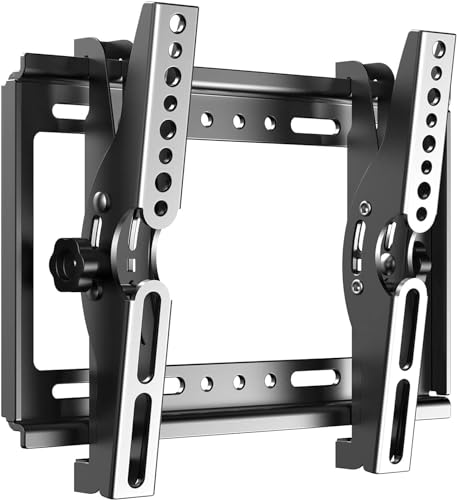
- Supports 14–42-inch screens up to 55 pounds
- Tilts up to 15 degrees
- Slim 1.9-inch wall profile
Best For: Small TVs and monitors needing a strong, low-profile mount
Best Ultrawide Option
VIVO Single Ultrawide Articulating Mount

- Handles screens up to 49 inches and 44 pounds
- Offers tilt, swivel, and leveling adjustments
- Extends 10.5 inches with integrated cable management
Best For: Ultrawide monitors needing flexible positioning
Best Small Adjustable Pick
USX MOUNT Compact Swivel-Tilt Bracket

- Fits 10–26-inch screens up to 22 pounds
- Offers ±30-degree tilt and ±45-degree swivel
- Designed for concrete walls or a single wood stud
Best For: Small displays requiring both tilt and swivel adjustment
Best Quick-Release Pick
Mount-It! Slim Tilting Wall Mount

- Slim 1.65-inch profile for 24–32-inch screens
- Tilts up to 15 degrees down or 5 degrees up
- Quick-release bracket and lifetime warranty
Best For: Small displays needing close mounting and easy removal
Flexible Space Saver
WALI Full-Motion Monitor Wall Mount

- Supports 13-32-inch screens up to 33 lb
- ±15° tilt, 180° swivel, 360° rotation
- Extends 15 inches; retracts to 2 inches
Best For: Adjustable home-office, bedroom, and gaming setups
Ergonomic Arm Choice
MOUNT PRO Single Monitor Wall Mount

- Supports 13-32-inch monitors up to 19.8 lb
- +90° to -45° tilt with 180° swivel
- Extends 21.6 inches and supports portrait mode
Best For: Single-monitor workstations needing frequent adjustment
Best Low-Profile Pick
Mount-It! Tilting TV Wall Mount

- 1.4-inch wall profile
- 44-pound capacity
- Lifetime warranty and bubble level
Best For: Tight spaces and small compatible screens
Best Articulating Monitor Pick
VIVO Single Monitor Wall Mount

- Tilt, swivel, and 360-degree rotation
- 16cm of height adjustment
- Supports up to 17.6 pounds
Best For: Adjustable home-office and standing-workstation setups
Best Rotation Value
VideoSecu Tilt Rotation Wall Mount
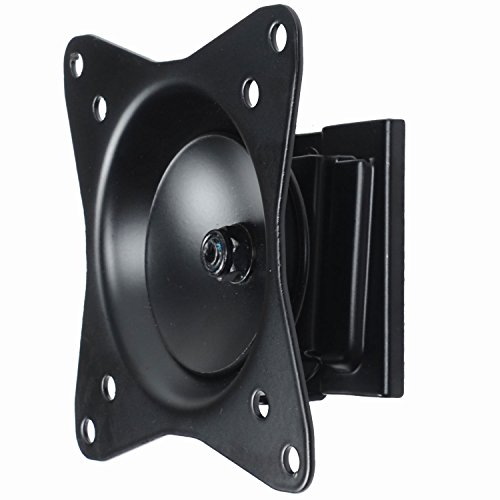
- 40-pound loading capacity
- Portrait or landscape rotation
- Includes mounting hardware
Best For: Simple small-screen installations needing rotation
Best Slim Universal Pick – Compact 14–42-Inch Tilt Mount
For shoppers comparing tilting monitor wall mounts, this JXMTSPW bracket is a practical choice for smaller TVs and monitors that need a simple, low-profile installation. It supports screens from 14 to 42 inches, up to 55 pounds, and tilts up to 15 degrees.
Best For: Small TVs and monitors where a slim, fixed wall position and broad VESA compatibility matter.
Pros:
- Supports 14–42-inch displays and up to 55 pounds.
- Offers up to 15 degrees of tilt for viewing-angle adjustment.
- Sits approximately 1.9 inches from the wall and includes multiple screw sizes.
Cons:
- It is a tilt-only mount without swivel or extension-arm movement.
- Buyers should verify the display’s VESA pattern and stud location before installation.
This mount emphasizes strength and a clean, close-to-wall appearance. Its broad screen-size range makes it flexible, but careful compatibility and wall-surface checks are important before buying.
Best Ultrawide Option – VIVO Single Ultrawide Articulating Mount
Among tilting monitor wall mounts, the VIVO MOUNT-VW01M stands out for ultrawide displays and users who want more positioning flexibility than a fixed bracket provides. It supports monitors up to 49 inches and 44 pounds, with tilt, swivel, leveling, and extension.
Best For: Ultrawide monitors that need adjustable viewing angles and up to 10.5 inches of wall clearance.
Pros:
- Supports most ultrawide monitors up to 49 inches and 44 pounds.
- Provides +5 to -12 degrees of tilt, ±45 degrees of swivel, and screen leveling.
- Includes cable management and collapses close to the wall when not extended.
Cons:
- Compatibility is limited to VESA 75×75 and 100x100mm patterns.
- Its articulating design extends farther from the wall than a fixed tilt mount.
The VIVO is the most flexible choice in this group for large, wide screens. Its combination of articulation and cable routing is useful for ergonomic positioning, provided the monitor matches the listed VESA patterns.
Best Small Adjustable Pick – USX MOUNT Compact Swivel-Tilt Bracket
This USX MOUNT bracket is a compact option for small displays when tilting monitor wall mounts with swivel movement are preferred. It fits 10- to 26-inch screens with supported VESA patterns up to 100x100mm and offers substantial angle adjustment.
Best For: Small monitors or TVs installed on a concrete wall or single wood stud where swivel and tilt are useful.
Pros:
- Supports 10–26-inch displays weighing up to 22 pounds.
- Provides ±30 degrees of tilt and ±45 degrees of swivel.
- Uses a three-step installation process and works with concrete walls or a single wood stud.
Cons:
- It should not be installed on drywall alone.
- Its 22-pound capacity and 26-inch screen limit exclude larger displays.
- Concrete anchors are not included in the package.
This mount makes sense for a small screen in a space where side-to-side positioning matters. Confirm the wall structure and arrange suitable concrete anchors if needed before installation.
Best Quick-Release Pick – Mount-It! Slim Tilting Wall Mount
For buyers seeking tilting monitor wall mounts with a slim profile and easy display removal, the Mount-It! MI-6524 is designed for 24- to 32-inch screens. It supports up to 30 pounds, tilts to reduce glare, and allows the display to lift off without removing the wall plate.
Best For: Small TVs or monitors in homes, offices, RVs, or travel trailers where close mounting and quick removal are valuable.
Pros:
- Maintains a slim 1.65-inch profile and supports up to 30 pounds.
- Tilts up to 15 degrees down or 5 degrees up to help reduce glare.
- Quick-release design allows the display to come off without removing the wall plate.
- Includes a lifetime manufacturer warranty and US-based support.
Cons:
- It tilts only and does not swivel side to side.
- It is limited to 24–32-inch displays with 75×75 or 100x100mm VESA patterns.
- Its close profile requires checking cable clearance before final installation.
The MI-6524 is a focused solution rather than a full-motion mount. Its quick-release bracket, slim depth, and wall-type flexibility make it especially practical where maintenance, cleaning, or travel use is part of the setup.
Flexible Space Saver – WALI Full-Motion Monitor Wall Mount
For shoppers comparing tilting monitor wall mounts, the WALI 1330LM offers broad movement for small monitors and flat-panel displays. It supports 13- to 32-inch screens up to 33 pounds, with tilt, swivel, and rotation adjustments for flexible positioning.
Best For: Home offices, bedrooms, and gaming rooms that need a versatile, space-saving mount.
Pros:
- Supports 13- to 32-inch screens up to 33 pounds.
- Offers ±15° tilt, 180° swivel, and 360° rotation.
- Extends 15 inches and retracts to 2 inches from the wall.
- Works with wood studs, brick, or concrete walls.
Cons:
- Drywall alone is not supported.
- Compatibility is limited to VESA 75x75mm and 100x100mm patterns.
This is a strong choice when adjustability matters more than a low-profile installation. Confirm the screen size, weight, VESA pattern, and wall construction before ordering.
Compact Low-Profile Pick – Mount-It! Small TV Wall Mount
The Mount-It! MI-2829 is a practical option among tilting monitor wall mounts for smaller screens. It fits 19- to 32-inch TVs and monitors up to 44 pounds, while keeping the display just 2.6 inches from the wall.
Best For: Small-screen installations in bedrooms, kitchens, offices, dorms, and RVs.
Pros:
- Supports screens up to 44 pounds.
- Tilts up to 12° downward to help reduce glare.
- Swivels up to 30° left or right.
- Mounts to wood or metal studs, concrete, brick, or block.
Cons:
- Swivel range may be reduced with larger or wider screens.
- Drywall alone is not suitable without a stud or masonry anchor.
- Compatibility is limited to VESA 75x75mm and 100x100mm patterns.
Choose this mount if you want a close-to-wall profile and substantial capacity without a pull-out arm. Measure the screen’s VESA hole spacing and verify the wall structure before installation.
Ergonomic Arm Choice – MOUNT PRO Single Monitor Wall Mount
The MOUNT PRO single-monitor arm stands out among tilting monitor wall mounts for its wide adjustment range and height flexibility. It supports 13- to 32-inch monitors weighing 4.4 to 19.8 pounds and can extend up to 21.6 inches from the wall.
Best For: Remote workers, gamers, creators, developers, and other users who frequently reposition one monitor.
Pros:
- Provides +90° to -45° tilt, 180° swivel, and 360° rotation.
- Supports portrait and landscape monitor orientation.
- Includes height adjustment and cable management.
- Fits wood studs and solid concrete walls.
Cons:
- Supports up to 19.8 pounds, less than some competing mounts.
- Not compatible with 1000R, 1500R, or 1800R curved screens.
- Requires weight adjustment before use.
This mount is best suited to a single compatible monitor where ergonomic repositioning is a priority. Check the monitor’s weight, VESA pattern, curvature, and the wall surface before buying.
Best Low-Profile Pick – Mount-It! Tilting TV Wall Mount
For shoppers comparing tilting monitor wall mounts for smaller screens, the Mount-It! MI-203T emphasizes a close-to-the-wall installation and straightforward compatibility checks. It supports 19- to 32-inch screens up to 44 pounds, provided they use a 75x75mm or 100x100mm VESA pattern.
Best For: Tight spaces, RVs, boats, and users who want a low-profile tilting mount with a lifetime warranty.
Pros:
- Only 1.4 inches from the wall for a clean, space-saving setup.
- Tilts 15 degrees down or 10 degrees up to help reduce glare.
- Supports wood or metal studs, concrete, brick, and block, with a built-in bubble level.
- Quick-release design, included hardware, and lifetime manufacturer warranty.
Cons:
- Tilts only; it does not swivel side to side.
- Not intended for drywall alone without a stud or masonry anchor.
- Monitor or TV bolt-hole spacing must match the listed VESA patterns.
This is a practical choice when clearance matters more than articulation. Verify the VESA pattern, screen size, weight, and wall structure before ordering.
Best Articulating Monitor Pick – VIVO Single Monitor Wall Mount
The VIVO MOUNT-VW01A is a flexible option among tilting monitor wall mounts for 17- to 32-inch monitors. Along with +10 to -10 degrees of tilt, it adds swivel, rotation, and height adjustment for a more adaptable workstation setup.
Best For: Home offices and standing workstations that need portrait or landscape positioning and adjustable monitor height.
Pros:
- Fits 17- to 32-inch screens weighing up to 17.6 pounds with 75x75mm or 100x100mm VESA patterns.
- Offers +10 to -10 degrees of tilt, 20-degree swivel, and 360-degree rotation.
- Provides 16cm of height adjustment and sits 5.1cm from the wall.
- Steel construction includes a three-year manufacturer warranty and tech support.
Cons:
- Hardware for monitors with curved or recessed backs is not included.
- Its 17.6-pound capacity is lower than some small TV-focused mounts.
- Compatibility is limited to the listed VESA patterns and screen range.
Choose this model when ergonomic positioning is more important than the thinnest possible profile. Its articulation and rotation make it more versatile than a tilt-only bracket.
Best Rotation Value – VideoSecu Tilt Rotation Wall Mount
The VideoSecu ML32B is a simple tilting monitor wall mount for compatible 19- to 32-inch TVs and monitors, with some 39-inch screens supported when the VESA pattern and weight are suitable. Its rotation adjustment also allows portrait or landscape orientation.
Best For: Budget-conscious buyers who want basic tilt capability plus screen rotation for small displays.
Pros:
- Supports 75x75mm and 100x100mm VESA patterns.
- Holds up to 40 pounds and fits many 19- to 32-inch screens.
- Rotation adjustment supports portrait or landscape orientation.
- Steel construction, a 2-inch wall profile, and included mounting hardware.
Cons:
- Compatibility with some screens up to 39 inches depends on the VESA pattern and weight.
- The supplied notes do not specify a warranty or tilt-angle range.
- Requires careful compatibility checking before installation.
This mount is worth considering for a straightforward installation when rotation is useful and advanced articulation is unnecessary. Confirm the display’s VESA spacing and weight before relying on the larger stated screen-size range.
How We Picked the Best Tilting Monitor Wall Mounts
We focused on mounts that support common monitor and small-TV sizes, with particular attention to tilt adjustment, VESA compatibility, rated load capacity, installation profile, and ease of positioning. The selection includes fixed-tilt brackets for a low-profile installation as well as swivel or height-adjustable designs for users who need more flexibility.
Because product specifications can vary by screen size and configuration, verify the manufacturer’s current weight and VESA limits before ordering. A mount rated for a larger diagonal may still be unsuitable if your display’s mounting pattern or weight falls outside its supported range.
Quick Comparison
| Best For | Look For | Typical Advantage |
|---|---|---|
| Basic desk-space savings | Simple tilt bracket | Low profile and straightforward installation |
| Ultrawide monitors | Wide screen-size support and strong load rating | Accommodates larger displays |
| Corner or RV installations | Swivel and tilt adjustment | Better viewing from changing positions |
| Ergonomic computer setups | Height adjustment or monitor arm design | More precise screen positioning |
Key Buying Factors for Tilting Monitor Wall Mounts
Screen Size, Weight, and VESA Pattern
Check all three specifications instead of relying on screen size alone. Common VESA patterns include 75×75 mm and 100×100 mm for monitors, while larger displays may use wider patterns. The mount’s weight rating should exceed your display’s actual weight, excluding or including the stand as specified by the manufacturer.
Tilt Range and Viewing Height
Tilt is most useful when a screen is mounted above eye level, positioned in a bedroom or RV, or affected by glare. Confirm the stated upward and downward tilt range, and mount the display so your normal viewing angle does not require excessive neck movement.
Wall Type and Installation
Stud-mounted hardware is generally preferred for heavier displays. Drywall-only installation may require appropriate anchors and must stay within the mount’s limits. Before drilling, locate studs, check for wiring and plumbing, and ensure the mounting surface is level.
Profile, Swivel, and Cable Access
A slim bracket keeps the setup close to the wall, but it can make cable routing and rear-panel access harder. Swivel and full-motion models provide easier access and more viewing options, although they usually extend farther from the wall.
Who Should Buy Which Tilting Monitor Wall Mounts?
Choose a simple tilting bracket if you want the cleanest, closest-to-wall installation for a standard monitor or small TV. Pick a swivel-and-tilt model for an RV, bedroom, corner location, or any setup viewed from multiple positions. Ultrawide owners should prioritize explicit support for their screen size and a sufficient weight rating rather than choosing by diagonal measurement alone. For a desk-based workstation, a height-adjustable monitor wall arm is usually the better choice when you need to fine-tune screen height, distance, or posture.
Before purchasing, compare the mount’s VESA pattern, supported weight, tilt range, wall clearance, included hardware, and installation instructions with your specific display and wall. Those checks provide a more reliable fit than brand name or advertised screen-size range alone.