Accurate color starts before you press the shutter and continues through editing. The right portable calibration tool can help you set dependable white balance, control exposure, match cameras, and verify that your monitor displays color correctly.
We selected 10 options spanning camera charts, video targets, monitor colorimeters, and bundled capture-to-edit kits, so you can choose equipment that fits your workflow, budget, and portability needs.
Best 10 Portable Color Calibration Tools Picks for 2026
Best Portable Photo Workflow Kit

- Four targets for exposure, white balance, and profiling
- DNG and ICC profile support via PROFILER software
- Folding case with lanyard for location work
Best For: Photographers needing a compact, complete camera color workflow
Best Expanded Color Reference
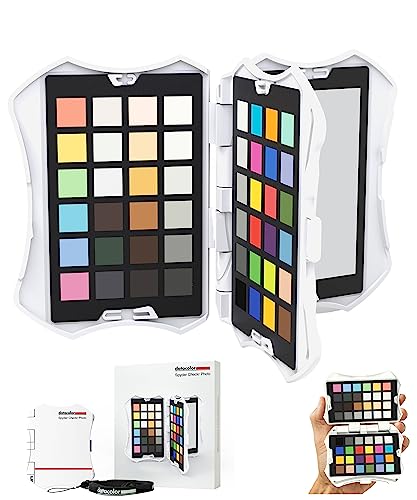
- 62 targets across four interchangeable cards
- Includes skin tones, gray scales, and white-balance targets
- Creates HSL presets for supported photo editors
Best For: Photographers wanting broad reference coverage and editing presets
Best Portable Video Color Kit

- Includes two video targets and a Classic 24 target
- Supports white balance and multi-camera matching
- Protective folding case with lanyard
Best For: Videographers working across mixed lighting and multiple cameras
Passport Duo

- 24-patch target, white-balance target, and two video targets
- Creates DNG or ICC camera profiles with included software
- Protective adjustable case with lanyard for location work
Best For: Photographers and videographers working across varied lighting
Spyder Checkr

- Includes 48 color targets plus a grey card
- Creates HSL presets for several photo editors
- Tripod mount and self-casing design support location use
Best For: Photographers seeking detailed camera color adjustments
Display Pro
Monitor and Projector Calibration

- Profiles monitors and projectors with included software support
- Optical design emphasizes repeatable calibration results
- Diffuser arm and tripod mount add measurement flexibility
Best For: Creators and teams calibrating displays or projectors
Professional Color Targets
DKC-Pro White Balance Chart Set

- Two cards with 12% and 18% gray references
- 18 coated color patches for digital correction
- Includes stand and user guide
Best For: Photographers needing portable physical color references
Easy Monitor Calibration

- Guided Easy 1 2 3 calibration workflow
- Supports up to two displays
- USB-C connection with before-and-after check
Best For: Creators seeking simple dual-monitor calibration
Complete Capture-to-Edit Workflow

- Includes Display Pro HL and Passport Photo 2
- Creates custom camera profiles for RAW workflows
- Supports modern high-luminance displays
Best For: Photographers wanting camera and monitor color control
Best Portable Photo Workflow Kit – ColorChecker Passport Photo 2
The ColorChecker Passport Photo 2 is a versatile choice among portable color calibration tools for photographers and hybrid photo-video creators. Its four targets support exposure control, custom white balance, camera profiling, and color enhancement, while the folding case makes it practical for location shoots.
Best For: Photographers who need repeatable white balance, exposure references, and custom camera profiles while traveling or working on location.
Pros:
- Four targets cover exposure, white balance, profiling, and enhancement needs.
- Supports DNG and ICC workflows through Calibrite PROFILER software.
- Folding protective case and included lanyard keep the kit accessible and protected.
Cons:
- Its benefits depend on incorporating reference captures into the shooting and editing workflow.
- Designed primarily for camera-based calibration rather than monitor calibration.
The Passport Photo 2 is a strong all-around option when portability and a complete capture-to-edit color workflow matter more than carrying a larger chart.
Best Expanded Color Reference – SpyderCheckr Photo
The datacolor SpyderCheckr Photo is a pocket-sized option among portable color calibration tools, offering 62 targets across four interchangeable cards. It combines color, skin-tone, gray-scale, white-balance, and black-level references with software that can create HSL presets for supported editing applications.
Best For: Photographers who want extensive color and gray-scale references, especially for portraits, exposure checks, and Lightroom Classic, Adobe Camera RAW, or Hasselblad Phocus workflows.
Pros:
- Provides 62 targets, including hues, skin tones, gray scales, and adjustment patches.
- Interchangeable cards support portrait work, white balance, exposure, and dynamic-range checks.
- Spyder Checkr software can create HSL presets for several popular photo editors.
- Compact case and attachable lanyard support portable use.
Cons:
- The larger target selection may add complexity compared with a basic color chart.
- Software support is described for specific editing applications rather than every photo editor.
Choose the SpyderCheckr Photo when detailed reference coverage and preset creation are priorities, particularly for photographers managing varied subjects and lighting.
Best Portable Video Color Kit – ColorChecker Passport Video 2
The ColorChecker Passport Video 2 is one of the more video-focused portable color calibration tools. It includes a Classic 24 patch target, a white-balance target, and two video targets for in-camera or post-production use, helping creators manage mixed lighting and match multiple cameras.
Best For: Videographers and photo-video teams that need consistent color across cameras, lighting conditions, and post-production workflows.
Pros:
- Includes dedicated video targets plus Classic 24 and white-balance targets.
- Supports camera matching in different or mixed lighting conditions.
- Portable protective case adjusts to multiple positions for scene placement.
- Includes a lanyard and camera calibration software for DNG or ICC profiles.
Cons:
- Its video-oriented targets may be more specialized than needed for photographers seeking only basic still-image references.
- The supplied notes do not specify detailed compatibility for every video editing application.
For moving-image work, the Passport Video 2 offers a focused combination of white balance, camera matching, and video reference targets in a compact format.
Best High-Brightness Monitor Calibrator – Calibrite Display Pro HL
The Calibrite Display Pro HL takes a different approach to portable color calibration tools by calibrating displays rather than cameras. Its high-luminance sensor measures up to 3000 nits and works with LCD, mini-LED, OLED, Apple XDR displays, and compatible projectors through Calibrite PROFILER software.
Best For: Photographers, designers, editors, and studios that need calibrated high-brightness or HDR-capable displays and matched multi-monitor setups.
Pros:
- Measures displays up to 3000 nits, supporting modern high-brightness panels.
- Offers Basic and Advanced PROFILER modes with white point, luminance, gamma, and contrast controls.
- Includes validation, uniformity, flare-correction, and Quick Check tools.
- Supports multiple monitors, custom patch sets, Mac and Windows, and USB-C with a USB-A adapter.
Cons:
- It calibrates monitors and projectors, not camera capture color.
- Advanced controls and custom patch sets may be more than casual users need.
The Display Pro HL is the right fit when screen accuracy is the bottleneck, especially with bright modern displays, HDR workflows, or several monitors that need consistent profiling.
Passport Duo – Portable Camera Color Control
The Calibrite ColorChecker Passport Duo is one of the more compact portable color calibration tools for photographers and video creators who need repeatable color in changing or mixed lighting. Its targets support custom camera profiles, white-balance reference, and multi-camera matching.
Best For: Photographers and videographers who need a travel-friendly target set for stills, video, and mixed-light scenes.
Pros:
- Combines a 24-patch ColorChecker Classic, white-balance target, and two video targets.
- Supports DNG or ICC custom camera profiles through the included camera-calibration software.
- Protective case adjusts for different positions and includes a lanyard for portability.
- Useful for matching color across multiple cameras.
Cons:
- Designed for camera color control rather than direct monitor or projector calibration.
- Warranty registration is required within 30 days, with purchase restrictions noted by the manufacturer.
This is a versatile choice when your workflow spans photography and video. The integrated targets and protective passport-style case make it especially practical for location work, while the software adds a more controlled raw-image profiling workflow.
Spyder Checkr – 48-Target Camera Calibration
The Datacolor Spyder Checkr is a practical option among portable color calibration tools for photographers who want more color references in a test shot. It combines 48 spectrally engineered targets with a grey card and software that creates HSL presets for supported editing workflows.
Best For: Photographers who need detailed camera color adjustment, white-balance control, and repeatability between studio and location shoots.
Pros:
- Provides 48 targets, including expanded references for skin tones, near-white tints, and black tones.
- Software analyzes test shots and creates HSL presets for Lightroom Classic, Adobe Camera Raw, and Hasselblad Phocus.
- Grey chart supports in-camera white balance and provides scene-light color and intensity data.
- Self-casing construction and tripod mount suit studio or on-location use.
Cons:
- The listed battery requirement may add a maintenance consideration.
- The fade-indicator patch means target cards eventually need replacement after substantial light exposure.
Choose the Spyder Checkr when detailed color references and editing presets matter more than the smallest possible footprint. Its larger targets, tripod support, and fade warning make it well suited to repeatable workflows in varied shooting environments.
Display Pro – Monitor and Projector Calibration
The Calibrite ColorChecker Display Pro takes a different approach to portable color calibration tools: it is a colorimeter for profiling displays and projectors rather than a camera chart. Used with ccProfiler or i1Profiler software, it is designed to improve consistency across display types.
Best For: Photographers, video professionals, and presentation teams calibrating monitors or projectors.
Pros:
- Supports monitor and projector calibration with ccProfiler or i1Profiler software.
- Optical design is intended to provide repeatable results on the same display and across different display types.
- Rotatable diffuser arm supports ambient-light measurement, tabletop projector profiling, and optical protection.
- Integrated tripod mount helps with projector profiling in larger venues.
Cons:
- It does not provide camera targets for in-camera white balance or camera profiling.
- USB connectivity is listed, so setup may require a wired connection to the computer.
This is the right category of tool when the problem is an inconsistent monitor or projector rather than inconsistent camera color. Its diffuser arm and tripod mount add flexibility for desktop and larger-venue calibration, while the compact colorimeter remains practical to carry.
Professional Color Targets – DKC-Pro White Balance Chart Set
For photographers who need portable color calibration tools in the field or studio, this two-card set provides physical references for white balance and digital color correction. Its 12% and 18% gray targets and 18 color patches are designed to support workflows in software such as Adobe Photoshop and Lightroom.
Best For: Photographers who want compact, tabletop color and white-balance references for capture and editing.
Pros:
- Includes both 12% and 18% gray references for white balance.
- Provides 18 color patches for digital color correction.
- n-Chrome-coated targets are designed for improved saturation, luminance, and accuracy.
- Includes two 5-by-7-inch cards, a frame stand, and a user guide.
Cons:
- Requires compatible editing software for the correction workflow.
- Provides physical capture references rather than monitor calibration.
This is a practical choice when your priority is repeatable color reference during shooting and post-processing. The included stand also makes the cards convenient to position on a tabletop.
Easy Monitor Calibration – Calibrite Display 123
The Calibrite Display 123 is one of the portable color calibration tools aimed at creators who want a straightforward way to improve monitor accuracy. Its guided software workflow, USB-C connection, and compact colorimeter make calibration approachable for photo and video work.
Best For: Creators who want simple calibration for one- or two-monitor editing setups.
Pros:
- Uses a guided Easy 1 2 3 software workflow.
- Supports calibration of up to two displays.
- Offers brightness target choices, including Native and Photo.
- Includes a before-and-after comparison check.
Cons:
- Its focus is monitor calibration, not camera profiling or physical white-balance capture.
- USB-C connectivity may require an adapter for systems without a compatible port.
Choose this model if you want a compact, approachable monitor-calibration solution without a complicated setup. Dual-display support is particularly useful for multi-screen editing workspaces.
Complete Capture-to-Edit Workflow – Calibrite Photo Kit
This Calibrite kit combines portable color calibration tools for both camera capture and monitor editing. It pairs the Display Pro HL colorimeter with ColorChecker Passport Photo 2, helping photographers build a more consistent RAW workflow from custom camera profiles and white balance through display calibration.
Best For: Photographers who need an integrated camera-profiling and high-luminance monitor-calibration workflow.
Pros:
- Combines Display Pro HL monitor calibration with ColorChecker Passport Photo 2.
- Supports custom camera profiles for RAW still workflows.
- Designed for modern displays including mini LED, OLED, and Apple XDR panels.
- Includes Calibrite PROFILER software with adjustable targets such as white point and gamma.
Cons:
- More specialized and comprehensive than needed for basic monitor calibration.
- Its capture-to-edit workflow is focused on photography rather than general display use.
This is the strongest fit for photographers who want to address color consistency at both ends of the workflow. The included Passport Photo 2 and Display Pro HL reduce the need to assemble separate camera and monitor tools.
How We Picked These Portable Color Calibration Tools
We focused on tools that support practical color-control tasks in the field or studio, including white-balance measurement, exposure reference, camera profiling, display calibration, and multi-camera consistency. The selection includes compact passport-style charts, larger reference targets, monitor colorimeters, and kits that combine camera and display calibration.
We also considered target variety, software workflow, display compatibility, brightness handling, connection requirements, physical durability, and how easily each product can fit into a camera bag. Because camera charts and monitor calibrators solve different problems, they should be compared within their intended category rather than judged by the same specifications.
Quick Comparison
- Camera color and white balance: Choose a ColorChecker Passport, SpyderCheckr, or gray-card set.
- Video production: Look for video-specific targets with skin-tone, saturation, and exposure references.
- Monitor calibration: Choose a colorimeter such as the Display Pro HL, Display Pro, or Display 123.
- Complete workflow: A combined photo-and-display kit can simplify capture-to-edit color management.
- Maximum portability: Passport-style folding charts are generally easier to carry than larger standalone boards.
Key Buying Factors for Portable Color Calibration Tools
Camera or Display Calibration
First identify where the color problem occurs. Camera charts establish a reference during capture, while colorimeters measure and adjust a monitor. If you need accurate results from shooting through editing, you may benefit from both types.
Target Layout and Intended Use
More color patches can provide more profiling information, but a compact chart may be more convenient on location. Photographers often prioritize white balance, exposure, and skin-tone references; video users may need targets designed for matching cameras and evaluating tonal or saturation consistency.
Monitor Compatibility and Brightness
For display tools, check support for LCD, mini-LED, OLED, HDR, and high-brightness screens. A colorimeter rated for brighter displays is a better fit for modern HDR workflows, while simpler models may be sufficient for standard photo-editing monitors.
Software and Connectivity
Review the included software, operating-system support, USB connector, and calibration controls. A straightforward workflow can matter as much as measurement capability, particularly if several users or computers will use the device.
Portability and Durability
Folding cases, protective covers, stands, and washable or replaceable surfaces can improve field use. Avoid storing charts in direct sunlight, and replace targets when they become faded, scratched, or visibly contaminated.
Who Should Buy Which Portable Color Calibration Tools?
Traveling photographers should choose a compact passport-style chart for fast white balance and exposure references. Studio and portrait photographers may prefer a chart with a broader patch set for repeatable camera profiles and skin-tone control. Video teams should select a video-oriented target when matching multiple cameras or lighting setups.
Photo editors and digital artists should prioritize a monitor colorimeter, choosing a higher-end model for HDR or very bright displays. Beginners may prefer a simpler monitor calibrator with guided software. Professionals building an end-to-end workflow should consider a bundle that combines a camera reference chart with display calibration hardware.