Choosing among the best laptops for small businesses means balancing price, performance, portability, and long-term usability. The right model should handle daily productivity without paying for features your team does not need.
This roundup compares 10 business-ready laptops across several budgets and configurations, including larger desktop-replacement models, compact office notebooks, and refurbished Dell Latitude systems.
Best 10 Laptops for Small Businesses Picks for 2026
Best Big-Screen Workhorse
HP 17.3-inch Ryzen 5 Business Laptop

- 17.3-inch anti-glare display for multitasking
- 16GB RAM and 512GB SSD
- Full-size keyboard with numeric keypad
Best For: Home offices and spreadsheet-heavy work
Best Budget Portable
Lenovo 15.6-inch Everyday Business Laptop

- Lightweight 3.42-pound design
- Full HD anti-glare display
- Wi-Fi 6, USB-C, HDMI, and SD reader
Best For: Basic office work and remote productivity
Best Refurbished Business Value

- 16GB RAM and 256GB SSD
- Windows 11 Pro included
- Thunderbolt 3, HDMI, and Mini DisplayPort
Best For: Budget-conscious users needing business features
Best for Mobile Basics
Lenovo 15.6-inch 2026 Business Laptop
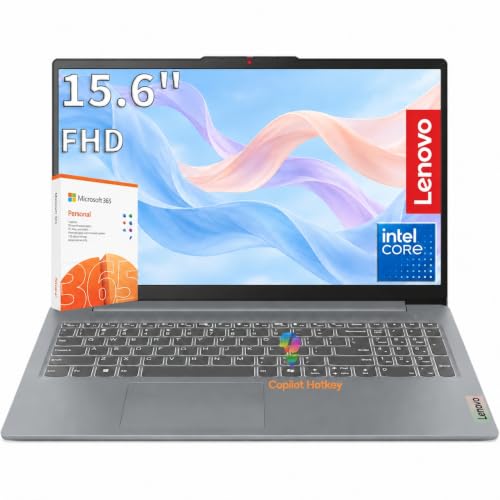
- 1920x1200 anti-glare display
- Lightweight, durable 3.42-pound chassis
- Wi-Fi 6 and versatile expansion ports
Best For: Cloud-based office work and mobile productivity
Best for Easy Setup

- 16GB RAM and 256GB SSD
- Windows 11 Pro with Full HD display
- Compact design with extensive ports
Best For: Small-business multitasking and office productivity
Best Budget Chromebook

- Lightweight 14-inch Chromebook
- Wi-Fi 6 and useful expansion ports
- 720p webcam for video calls
Best For: Cloud-based work and basic online productivity
Best Large-Screen Portable Option
Lenovo 15.6-inch Business Laptop

- 15.6-inch Full HD anti-glare display
- 8GB LPDDR5 RAM with Intel N150
- Camera privacy shutter and broad connectivity
Best For: Mobile professionals who prefer a larger workspace
Best Overall Value
15.6-inch Windows 11 Pro Business Laptop

- 16GB RAM and 256GB SSD for responsive everyday work
- 15.6-inch Full HD IPS display with numeric keypad
- Fingerprint reader, 1080p webcam, and two-year warranty
Best For: Small-business multitasking and office work
Budget-Friendly Pick
HP 14-inch N150 Business Laptop

- Quad-core Intel N150 processor for everyday productivity
- USB-C, USB-A, HDMI, and SD card connectivity
- 14-inch anti-glare display with Windows 11 Home
Best For: Light office work and budget-conscious users
Best Bundle
HP 14-inch Windows 11 Pro Office Laptop

- Windows 11 Pro with Microsoft Office included
- 500GB external drive and practical accessories bundled
- 3.2-pound design with Wi-Fi 6 and video-call features
Best For: Ready-to-deploy home offices and small businesses
Best Big-Screen Workhorse – HP 17.3-inch Ryzen 5 Business Laptop
For small businesses that value screen space and built-in number entry, this HP is a practical choice among laptops for small businesses. Its Ryzen 5 processor, 16GB of RAM, 512GB SSD, and full-size keyboard suit everyday office work, multitasking, spreadsheets, and video calls.
Best For: Home offices, spreadsheet-heavy work, and users who prefer a large display with a numeric keypad.
Pros:
- Large 17.3-inch anti-glare display supports comfortable multitasking.
- 16GB RAM and a 512GB SSD provide capable everyday productivity performance.
- Full-size keyboard includes a dedicated 10-key numeric keypad.
- Windows 11, web-based Office 365, Copilot, and a 720p camera support common business tasks.
Cons:
- The larger chassis is less convenient for frequent travel than a compact business notebook.
- The supplied display details list a 1600×900 native resolution, despite a stated maximum of 1920×1080.
This HP emphasizes workspace and usability over ultraportability. It is a sensible fit for a stationary desk setup, particularly when numeric data entry and a roomy screen matter more than carrying weight.
Best Budget Portable – Lenovo 15.6-inch Everyday Business Laptop
This Lenovo offers a lightweight, affordable approach to laptops for small businesses, with an Intel N150 processor, 8GB LPDDR5 memory, and 128GB UFS storage. It is aimed at email, documents, web work, video calls, and other routine office tasks rather than demanding workloads.
Best For: Remote workers, students, and small-business users who need a light Windows laptop for basic productivity.
Pros:
- Light 3.42-pound, 0.70-inch-thin design is easy to carry.
- 15.6-inch Full HD anti-glare screen provides a comfortable work area.
- Useful connectivity includes Wi-Fi 6, USB-C with DisplayPort, HDMI, USB-A, and an SD card reader.
- Includes a 1-year Microsoft 365 Personal subscription and a webcam privacy shutter.
Cons:
- 128GB storage is relatively limited for large local files and applications.
- 8GB memory and the entry-level Intel N150 are best suited to routine productivity.
- Windows 11 Home is less business-focused than Windows 11 Pro.
Choose this Lenovo when portability, connectivity, and basic office capability are priorities. Businesses with heavier multitasking or extensive local storage needs should consider a higher-spec alternative.
Best Refurbished Business Value – Dell Latitude 5410 Core i5
The renewed Dell Latitude 5410 is a strong value-oriented option among laptops for small businesses, pairing a 10th-generation Intel Core i5 processor with 16GB of RAM, a 256GB SSD, and Windows 11 Pro. Its business-oriented connectivity also suits desk setups with external displays and peripherals.
Best For: Small-business users who want Windows 11 Pro, solid multitasking, and extensive ports in a compact renewed notebook.
Pros:
- 16GB DDR4 RAM and a 256GB SSD support multitasking and business applications.
- 14-inch Full HD display delivers sharp 1920×1080 visuals.
- Windows 11 Pro is suited to more business-focused workflows.
- Ports include Thunderbolt 3, HDMI, Mini DisplayPort, USB, and a microSD reader.
Cons:
- As a renewed 2021 model, it uses an older 10th-generation processor.
- The supplied warranty description is limited to 90 days.
- Battery specifications are not clearly provided in the supplied details.
This Latitude balances portability, memory, storage, and professional connectivity well. Its renewed status and older platform are the main trade-offs, but the configuration remains practical for many office workloads.
Best for Mobile Basics – Lenovo 15.6-inch 2026 Business Laptop
For everyday business fundamentals, this Lenovo combines an Intel N150 processor, 8GB LPDDR5 memory, and 128GB UFS storage in a portable chassis. It fits small-business routines such as email, document editing, browser work, online meetings, and presentations.
Best For: Mobile office users, education-focused work, and small teams handling routine cloud-based productivity.
Pros:
- 15.6-inch anti-glare display provides a spacious 1920×1200 work area.
- 3.42-pound design and MIL-STD-810H testing support everyday portability and durability.
- Wi-Fi 6, USB-C with DisplayPort, HDMI, USB-A, and an SD reader offer flexible connectivity.
- Physical camera privacy shutter, Copilot key, and Microsoft 365 Personal add useful productivity features.
Cons:
- 128GB storage may fill quickly with locally stored business files.
- 8GB RAM and the Intel N150 are intended for everyday rather than demanding workloads.
- Windows 11 Home is not the Pro edition.
This Lenovo is a sensible lightweight choice when the business workload is mostly browser-based and document-focused. Its screen, ports, and privacy features make it more versatile than its entry-level specifications might suggest.
Best for Easy Setup – Dell Latitude 5420
For small businesses seeking capable laptops for small businesses without overspending, the renewed Dell Latitude 5420 offers a practical combination of business-ready Windows 11 Pro, 16GB of RAM, and a 256GB SSD. Its 14-inch matte Full HD display and compact 3-pound design suit everyday office work and mobile use.
Best For: Small-business users who need strong multitasking, Windows 11 Pro, and dependable connectivity for office productivity.
Pros:
- 16GB DDR4 RAM supports smooth multitasking.
- 256GB SSD provides fast storage and boot times.
- 14-inch 1920×1080 matte display helps reduce glare.
- Includes HDMI, Ethernet, USB, Wi-Fi, and Bluetooth connectivity.
Cons:
- Renewed condition may offer less assurance than a new laptop.
- 30-day warranty is relatively limited.
- Integrated graphics are intended for everyday tasks rather than demanding visual workloads.
The Latitude 5420 is the strongest productivity-focused option in this group, especially for employees who regularly work across multiple applications. Verify the renewed condition and warranty terms before purchase.
Best Budget Chromebook – HP Essential 14
The HP Essential 14 is a lightweight Chromebook aimed at straightforward online work, making it one of the more accessible laptops for small businesses with web-based workflows. Its 14-inch anti-glare display, Wi-Fi 6, webcam, and portable 3.35-pound design support browsing, video calls, and everyday cloud productivity.
Best For: Small teams or individual users who primarily use browser-based tools, email, video conferencing, and online documents.
Pros:
- Lightweight design is convenient for commuting and travel.
- Wi-Fi 6 and Bluetooth 5.3 provide modern wireless connectivity.
- Includes USB-C, two USB-A ports, HDMI, and a 720p webcam.
- 47Wh battery is designed for extended everyday use.
Cons:
- 4GB of RAM limits heavier multitasking.
- 1366×768 display resolution is less sharp than Full HD.
- Chrome OS may not support Windows-only business applications.
This HP is a sensible low-cost choice when a business relies mainly on cloud applications. Its modest memory and Chrome OS make it less suitable for specialized desktop software or demanding workloads.
Best Large-Screen Portable Option – Lenovo 15.6-inch Business Laptop
For buyers who prefer a larger workspace, this Lenovo combines a 15.6-inch Full HD anti-glare display with a lightweight 3.42-pound chassis. It is a practical candidate among laptops for small businesses that need Windows 11, video-call privacy features, and enough performance for documents, browsing, and light productivity.
Best For: Professionals who want a spacious display, portable design, and straightforward Windows-based office capabilities.
Pros:
- 15.6-inch 1920×1080 anti-glare display offers a comfortable work area.
- 8GB LPDDR5 RAM and Intel N150 processor suit everyday productivity.
- Camera privacy shutter adds convenience for video calls.
- Includes USB-C with DisplayPort, HDMI, Wi-Fi 6, Bluetooth, and an SD card reader.
Cons:
- 128GB UFS storage is limited for large local file libraries.
- Windows 11 Home is less business-oriented than Windows 11 Pro.
- Integrated graphics are not designed for demanding creative work.
The Lenovo strikes a useful balance between screen size and portability for general office use. Businesses storing substantial files locally may want to pair it with external storage or cloud storage.
Best Overall Value – 15.6-inch Windows 11 Pro Business Laptop
For small businesses seeking practical performance without excessive weight, this Windows 11 Pro laptop combines 16GB of RAM, a 256GB SSD, and a roomy 15.6-inch Full HD IPS display. Its fingerprint reader, numeric keypad, and included two-year warranty add useful workplace convenience.
Best For: Small-business owners and professionals who need smooth everyday multitasking, a larger display, and portable Windows 11 Pro computing.
Pros:
- 16GB RAM supports multiple programs and browser tabs.
- 256GB SSD enables quick boot-ups and file access.
- Includes a 1080p webcam, fingerprint recognition, numeric keypad, and two-year limited warranty.
- 3.5-pound design and up to four hours of stated battery life support mobile work.
Cons:
- Four-hour battery rating is modest for extended travel days.
- Integrated graphics and the 4425Y processor are aimed at everyday computing rather than demanding workloads.
This is a strong all-around choice for laptops for small businesses when multitasking and display space matter more than advanced graphics performance or all-day battery life.
Budget-Friendly Pick – HP 14-inch N150 Business Laptop
This HP notebook is a straightforward option for small businesses that mainly use web apps, documents, video meetings, and email. Its quad-core Intel N150 processor, 14-inch anti-glare display, and useful port selection cover basic office needs in a compact business laptop.
Best For: Budget-conscious teams and individual professionals handling light productivity, browsing, remote meetings, and document work.
Pros:
- Quad-core Intel N150 processor reaches speeds up to 3.6GHz.
- 14-inch anti-glare LED display is designed for comfortable viewing.
- Ports include USB-C, two USB-A ports, HDMI, a headphone/microphone jack, and an SD card reader.
- Includes Windows 11 Home and a one-year Microsoft 365 subscription according to the product title.
Cons:
- 4GB of RAM is limited for heavy multitasking.
- 1366-by-768 resolution is less detailed than Full HD displays.
- At 4.6 pounds, it is heavier than the other listed 14-inch option.
Consider this HP when keeping upfront costs low is the priority and workloads are light. Businesses expecting frequent multitasking or more demanding applications may prefer a configuration with more memory.
Best Bundle – HP 14-inch Windows 11 Pro Office Laptop
This HP package is designed for small businesses that want a ready-to-use productivity setup. Along with Windows 11 Pro, it includes Microsoft Office, a 500GB external drive, wireless mouse, earbuds, HDMI cable, and other accessories, while its 3.2-pound chassis remains easy to carry.
Best For: New home offices, mobile professionals, and small-business users who value bundled accessories, Windows 11 Pro, and extra storage.
Pros:
- Windows 11 Pro includes business-oriented security features described in the listing.
- Intel N150 quad-core processor supports everyday web apps and productivity tasks.
- Bundle adds a 500GB portable drive, wireless mouse, earbuds, HDMI cable, and USB extension cord.
- Wi-Fi 6 compatibility, a 720p camera, and dual-array microphones support remote work.
Cons:
- 4GB RAM may constrain heavier multitasking.
- 14-inch display is limited to 1366-by-768 resolution.
- The internal 128GB UFS storage is supplemented by an external drive rather than built-in capacity.
The included accessories and Office software make this a convenient starter package among laptops for small businesses. It is best suited to everyday productivity rather than memory-intensive professional applications.
How We Picked the Best Laptops for Small Businesses
We focused on the specifications that matter most in everyday business work: processor generation, memory, storage, screen quality, operating system, portability, and practical extras such as webcams, HDMI ports, and numeric keypads. We also considered configuration value, since RAM and storage can have a greater effect on a small-business computer’s useful life than cosmetic features.
The selection includes newer entry-level laptops alongside Dell Latitude business systems with more established enterprise-oriented designs. Because listed configurations can vary by seller, verify the exact processor, storage type, warranty, and operating system before ordering.
Quick Comparison
| Best For | Recommended Configuration | What to Look For |
|---|---|---|
| General office work | 8GB RAM, SSD storage | Comfortable keyboard, webcam, Windows 11 |
| Heavy multitasking | 16GB RAM, Core i5 or Ryzen 5 | Faster processor and at least 256GB SSD |
| Budget purchasing | 4GB to 8GB RAM | Confirm upgrade options and storage type |
| Desk-based productivity | 15.6-inch or 17.3-inch display | Full HD resolution and numeric keypad |
| Mobile work | 14-inch lightweight laptop | Battery life, durable build, and useful ports |
Key Buying Factors for Laptops for Small Businesses
Performance and Memory
For email, documents, browser-based software, invoicing, and video meetings, an entry-level Intel or AMD processor can be sufficient. Choose 16GB of RAM if employees regularly keep many browser tabs and applications open. Systems with only 4GB may be suitable for basic tasks, but they offer less room for future software updates and multitasking.
Storage and Reliability
An SSD generally provides faster startup and application loading than older hard drives. A 128GB drive can fill quickly after Windows updates and business files are added, while 256GB is a more flexible minimum for many users. Cloud storage can reduce local capacity requirements, but it should not replace a dependable backup plan.
Screen Size, Ports, and Ergonomics
Choose a 14-inch model for frequent travel, a 15.6-inch laptop for a balanced office setup, or a 17.3-inch model when a larger workspace and numeric keypad matter more than portability. Check for HDMI, USB connectivity, a usable webcam, and a comfortable keyboard if the laptop will be used all day.
Operating System and Support
Windows 11 Pro may offer useful business administration and security features, while Windows 11 Home can be adequate for solo operators and small teams. Review the seller’s warranty, return policy, Microsoft Office inclusions, and whether the product is new, refurbished, or a third-party configuration.
Who Should Buy Which Laptops for Small Businesses?
Choose a 16GB Core i5 or Ryzen 5 laptop for managers, analysts, bookkeepers, and employees who frequently multitask. Choose a 14-inch business notebook for consultants, sales staff, and anyone who works between home, office, and client locations. Choose a 15.6-inch model for general office use when screen space and value are priorities. Choose a 17.3-inch laptop for spreadsheet-heavy work or users who prefer a desktop-style setup. Finally, choose a 4GB or 128GB configuration only for light workloads and confirm that its limitations fit the employee’s software needs.