The best laptops for programming combine dependable performance, a comfortable keyboard, a sharp display, and enough memory and storage for modern development tools. The right choice depends on whether you prioritize portability, battery life, multitasking, or graphics power.
This roundup compares 10 laptops across a range of budgets and use cases, including web development, business software, computer science coursework, virtual machines, and GPU-accelerated projects.
Best 10 Laptops for Programming Picks for 2026
Performance Powerhouse

- Core i7 processor with 16GB DDR5 RAM
- 1TB PCIe Gen 4 SSD
- 165Hz 16-inch FHD+ display
Best For: High-performance development and GPU-intensive workloads
Professional Developer Pick

- Core Ultra 7 255H with 16 cores
- 32GB DDR5 RAM and 1TB NVMe SSD
- Thunderbolt 4 and Windows 11 Pro
Best For: Professional coding, business applications, and multitasking
GPU-Accelerated Workstation

- Ryzen 9 processor with RTX 5070 graphics
- 32GB DDR5 RAM and 1TB SSD
- 16-inch QHD+ 240Hz display
Best For: Game development, 3D tools, and GPU-accelerated programming
Portable Efficiency Choice

- Eight-core Snapdragon X platform
- 16GB RAM with 512GB PCIe 4.0 SSD
- 16-inch WUXGA IPS display
Best For: Student coding, web development, and everyday programming
Large-Screen Performance Pick
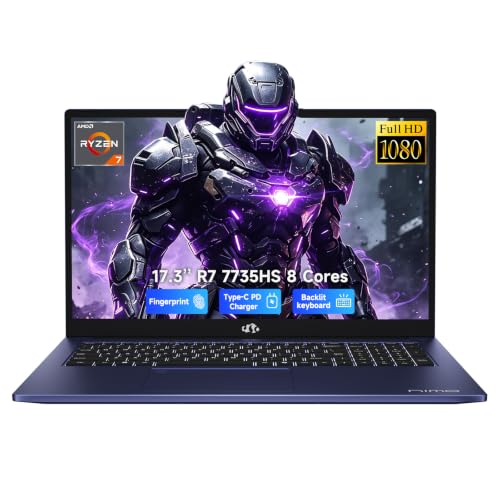
- Ryzen 7 7735HS for demanding multitasking
- 16GB DDR5 and 1TB PCIe 4.0 SSD
- 17.3-inch Full HD workspace
Best For: Programmers who prioritize screen space and sustained multitasking
Budget-Friendly Big Display

- 17.3-inch Full HD IPS display
- 512GB NVMe SSD for responsive storage
- Wi-Fi 6 and broad port selection
Best For: Beginners and students handling lighter coding workloads
Flexible Business Choice

- Ryzen 7 8845HS with eight cores and 16 threads
- 16GB RAM and 1TB SSD
- 16-inch 1920 x 1200 touchscreen
Best For: Developers needing performance, touch flexibility, and business features
Balanced Everyday Pick

- Ryzen 7 7730U with 16GB RAM
- 512GB PCIe Gen4 SSD
- 15.6-inch 1080p IPS display
Best For: Students and general-purpose developers
High-Memory Workhorse

- 32GB RAM for heavy multitasking
- 1TB PCIe SSD
- Windows 11 Pro and Ryzen 7 CPU
Best For: Developers handling large projects and many applications
Large-Screen Office Option

- 17.3-inch anti-glare display
- 16GB RAM and 512GB SSD
- Full-size keyboard with number pad
Best For: Desk-based coding and office productivity
Performance Powerhouse – ASUS ROG Strix G16
For demanding programming workloads, the ASUS ROG Strix G16 combines a high-performance Core i7 processor, 16GB of DDR5 memory, and a 1TB PCIe Gen 4 SSD. Its 16-inch 16:10 display and strong cooling system also make it suitable for development alongside gaming and creative work.
Best For: Developers who want substantial CPU and GPU performance for coding, multitasking, and graphics-intensive work.
Pros:
- Core i7-14650HX processor and 16GB DDR5 memory support demanding multitasking.
- 1TB PCIe Gen 4 SSD provides fast storage and useful project capacity.
- 16-inch FHD+ 165Hz display offers a spacious, smooth workspace.
- Advanced vapor-chamber, tri-fan, and liquid-metal cooling are designed for sustained performance.
Cons:
- At 2.65 kg, it is relatively heavy for frequent commuting.
- Listed battery life is approximately 2 hours.
- Gaming-focused styling and RGB lighting may feel less understated in office settings.
This is a strong choice among laptops for programming when compilation, virtualization, GPU work, or demanding multitasking matter more than portability and battery endurance.
Professional Developer Pick – Lenovo ThinkPad E16
The Lenovo ThinkPad E16 is a practical option for programming, business applications, and everyday development. Its Core Ultra 7 processor, 32GB of RAM, 1TB SSD, Windows 11 Pro, and broad port selection are well suited to code-heavy multitasking.
Best For: Professional developers who need generous memory, business features, and flexible external-display connectivity.
Pros:
- Core Ultra 7 255H processor has 16 cores and boost speeds up to 5.1GHz.
- 32GB DDR5 RAM is useful for large projects, containers, and multitasking.
- 1TB NVMe SSD includes Opal 2.0 encryption for fast, protected storage.
- Thunderbolt 4, HDMI 2.1, USB ports, and Ethernet support versatile desk setups.
Cons:
- Integrated graphics are intended for productivity and light creative work rather than demanding GPU workloads.
- The display is limited to a 60Hz refresh rate.
- The supplied notes do not specify battery capacity or runtime.
For most software engineering workflows, the ThinkPad E16 offers a balanced configuration with especially useful memory capacity, business-oriented security, and connectivity.
GPU-Accelerated Workstation – MSI Crosshair A16 HX
The MSI Crosshair A16 HX is an overpowered choice for programming when development also includes game engines, 3D tools, AI applications, or other graphics-heavy workloads. It pairs a Ryzen 9 processor with an RTX 5070, 32GB of DDR5 memory, and a high-resolution 240Hz display.
Best For: Developers building games, working with 3D or GPU-accelerated tools, and running demanding multitasking setups.
Pros:
- Ryzen 9 8940HX processor supports demanding workloads and multitasking.
- RTX 5070 graphics provides dedicated GPU capability with ray tracing and DLSS 4 support.
- 32GB DDR5 memory and a 1TB NVMe SSD offer a strong development configuration.
- 16-inch QHD+ 240Hz matte display delivers high resolution and fast refresh.
Cons:
- At 5.5 pounds, it is not especially portable.
- The 1.1-inch thickness reflects its performance-oriented design.
- Its gaming-focused hardware may be more than needed for basic web or scripting work.
This laptop makes the most sense when programming overlaps with graphics, game development, or other workloads that can benefit from dedicated RTX hardware.
Portable Efficiency Choice – ASUS Vivobook 16
The ASUS Vivobook 16 is a lightweight-feeling, efficiency-focused option for programming fundamentals, web development, studying, and everyday coding. Its Snapdragon X platform, 16GB of memory, 512GB SSD, and 16-inch WUXGA display favor quiet general productivity and power efficiency over workstation-class performance.
Best For: Students and developers handling web, scripting, and everyday programming tasks who value an efficient 16-inch workspace.
Pros:
- Snapdragon X eight-core processor includes a Qualcomm Hexagon NPU for AI-oriented tasks.
- 16GB RAM and a 512GB PCIe 4.0 SSD cover common development and study needs.
- 16-inch 1920×1200 IPS display provides a spacious 16:10 workspace.
- Integrated Adreno graphics and the Snapdragon platform are designed with power efficiency in mind.
Cons:
- Integrated Adreno graphics are not intended for demanding GPU development.
- 512GB of storage provides less project capacity than the 1TB alternatives.
- Its 60Hz display is less suited to high-refresh gaming or motion-focused work.
The Vivobook 16 is a sensible entry-level choice for laptops for programming when portability, efficiency, and everyday coding matter more than compiling large projects or running heavyweight local environments.
Large-Screen Performance Pick – NIMO 17.3 Ryzen 7 Laptop
For shoppers comparing laptops for programming, the NIMO stands out with an eight-core Ryzen 7 7735HS, 16GB of DDR5 memory, and a 1TB PCIe 4.0 SSD. Its 17.3-inch Full HD screen also provides extra room for code editors, documentation, terminals, and split-screen workflows.
Best For: Programmers, students, and remote workers who want strong multitasking performance and a spacious display.
Pros:
- Ryzen 7 7735HS supports heavier multitasking across coding tools, browser tabs, meetings, and creative apps.
- 16GB DDR5 RAM and a 1TB PCIe 4.0 SSD provide capable memory and storage for development workflows.
- 17.3-inch Full HD display offers a wider work area for code, documents, and split-screen use.
- Useful connectivity includes two full-function USB-C ports, HDMI, an SD card reader, and three USB-A ports.
Cons:
- Integrated Radeon 680M graphics are aimed at everyday visual work rather than dedicated-GPU workloads.
- The large 17.3-inch form factor may be less convenient for frequent travel.
- Confirmed notes do not provide a specific real-world battery-runtime estimate.
Overall, this is a practical choice when programming involves multiple applications and a larger workspace. The backlit keyboard, 180-degree hinge, 100W PD charging, and two-year warranty add useful everyday flexibility.
Budget-Friendly Big Display – HP OmniBook 3 17.3 Laptop
The HP OmniBook 3 is a straightforward option among laptops for programming, pairing a 17.3-inch Full HD IPS display with a 512GB NVMe SSD and Windows 11 Home. Its Ryzen 3 processor and 8GB of onboard RAM are better suited to entry-level coding, web development, and general productivity than especially demanding development workloads.
Best For: Beginners, students, and casual programmers who want a large screen for basic development and everyday tasks.
Pros:
- 17.3-inch anti-glare Full HD IPS display provides a spacious coding and document-viewing area.
- 512GB PCIe NVMe SSD offers responsive storage for applications, files, and development projects.
- Wi-Fi 6, Bluetooth 5.4, two USB-C ports, HDMI 2.1, and two USB-A ports support common accessories.
- FHD camera with HDR auto-switch and advanced AI noise reduction helps with remote meetings.
Cons:
- 8GB LPDDR5 RAM is more limiting for virtual machines, containers, and large multitasking sessions.
- Ryzen 3 30 and Radeon 610M graphics are intended for everyday performance rather than demanding workloads.
- Memory is onboard, so the supplied specifications do not indicate a user-upgrade path.
The OmniBook 3 makes the most sense as an accessible starting point for programming education and lighter projects. Its stated battery rating of up to 14 hours and 15 minutes, plus HP Fast Charge, can also help with mobile study and work.
Flexible Business Choice – Lenovo IdeaPad Ryzen 7 2-in-1
For programming buyers who value flexibility, the Lenovo IdeaPad combines an eight-core Ryzen 7 8845HS with 16GB of LPDDR5 memory and a 1TB SSD. Its 16-inch 1920 x 1200 touchscreen provides added vertical space for code and documentation, while the 2-in-1 design supports a more adaptable work setup.
Best For: Business users, students, and developers who want strong multitasking with touch, security, and productivity features.
Pros:
- Ryzen 7 8845HS with eight cores and 16 threads is designed for demanding multitasking and content creation.
- 16GB RAM and a 1TB SSD provide a strong configuration for coding tools, files, and everyday workflows.
- 16-inch 1920 x 1200 touchscreen offers additional vertical workspace for editors and web pages.
- Fingerprint reader, backlit keyboard, numeric keypad, camera privacy shutter, and Windows 11 Pro support business use.
Cons:
- LPDDR5 memory is listed as onboard with a 16GB maximum, limiting future memory expansion.
- At 6 pounds, it may be less portable than lighter programming laptops.
- Integrated Radeon 780M graphics are capable for everyday visual work but are not a substitute for a dedicated GPU.
This Lenovo is a well-rounded option when programming is part of a broader business or school workflow. The touchscreen, convertible design, extensive ports, and Windows 11 Pro make it more versatile than a basic clamshell laptop.
Balanced Everyday Pick – Acer Aspire Go 15
For shoppers comparing laptops for programming, the Acer Aspire Go 15 offers a practical balance of processing power, memory, storage, and portability. Its Ryzen 7 processor, 16GB of RAM, and 512GB SSD are well suited to coding, web development, coursework, and everyday multitasking.
Best For: Students and developers seeking a capable general-purpose programming laptop with a clear 15.6-inch display.
Pros:
- AMD Ryzen 7 7730U processor with 8 cores and up to 4.5GHz boost speed
- 16GB memory and a 512GB PCIe Gen4 SSD for responsive multitasking and storage
- 15.6-inch 1080p IPS display, Wi-Fi 6, USB-C, and HDMI 2.1 connectivity
- Windows 11 Home includes a dedicated Copilot key and AcerSense device controls
Cons:
- Integrated AMD Radeon graphics are better suited to development and general use than demanding graphics workloads
- The 300-nit display may be less suitable for very bright environments
The Aspire Go 15 is a well-rounded choice for programming tasks that benefit from solid CPU performance and modern connectivity without requiring a dedicated graphics processor. Its 3.9-pound weight also keeps it reasonably portable for campus or office use.
High-Memory Workhorse – HP 255 G10
The HP 255 G10 stands out among laptops for programming because it combines the Ryzen 7 7730U with 32GB of RAM and a 1TB PCIe SSD. That configuration gives developers extra room for virtual machines, large projects, multiple browser tabs, and demanding development tools.
Best For: Developers who prioritize memory and storage for multitasking, business software, and larger programming projects.
Pros:
- 32GB of DDR4 RAM supports extensive multitasking and development workflows
- 1TB PCIe M.2 SSD provides substantial space and fast boot and transfer performance
- Ryzen 7 7730U offers 8 cores, 16 threads, and up to 4.5GHz turbo speed
- Windows 11 Pro adds enterprise-oriented security and management features
Cons:
- Integrated AMD Radeon graphics are not intended for graphics-intensive workloads
- The 250-nit display is functional but less bright than some competing panels
- Its 15.6-inch display has a 60Hz refresh rate
With twice the memory and storage of many mainstream configurations, this HP is the strongest productivity-focused option in the group. The numeric keypad, HDMI output, Wi-Fi 6, and 3.4-pound weight add practicality for office and home programming setups.
Large-Screen Office Option – HP 17 Business Laptop
If screen size matters when choosing laptops for programming, this HP business laptop provides a spacious 17.3-inch display, a full-size keyboard, and a numeric keypad. Its Ryzen 5 processor, 16GB of RAM, and 512GB SSD cover everyday coding, study, office work, and web development.
Best For: Home users, students, and office workers who prefer a large screen and full-size keyboard for coding and multitasking.
Pros:
- Large 17.3-inch anti-glare display is useful for viewing code and multiple windows
- 16GB of DDR4 RAM and a 512GB SSD support everyday development and productivity
- Full-size keyboard includes a numeric keypad and spill-resistant design
- Windows 11 includes Copilot, while the listed battery life is up to 12 hours
Cons:
- The supplied specifications list a 1600×900 native resolution, which is lower than the 1080p resolution advertised elsewhere
- Ryzen 5 performance is less powerful than the Ryzen 7 processors in the other two options
- The larger chassis is less convenient for frequent travel
This HP favors workspace over maximum portability. It makes sense for programmers who work primarily at a desk and value a large anti-glare panel, comfortable full-size keyboard, and long stated battery life more than top-tier processing power.
How We Picked These Laptops for Programming
We focused on the components that most affect real-world development: processor performance, memory capacity, SSD storage, keyboard usability, display size, connectivity, operating system compatibility, and upgrade potential. We also included a broad mix of systems, from efficient everyday laptops to high-performance gaming models that can handle demanding compilers, containers, virtual machines, and creative workloads.
Every selected model offers a practical starting point for coding, but specifications can vary by configuration. Confirm the exact RAM, storage, processor, operating system, and display listed by the seller before purchasing.
Quick Comparison
| Best For | Recommended Starting Point | Why It Stands Out |
|---|---|---|
| demanding development and GPU work | Gaming laptop with a dedicated RTX GPU | Strong multicore performance and graphics acceleration |
| Business programming | ThinkPad or business-class Windows laptop | Practical keyboards, connectivity, and productivity features |
| Students and general coding | Ryzen 7 laptop with 16GB RAM | Balanced performance for IDEs, browsers, and coursework |
| Budget programming | Ryzen 5 or Ryzen 7 model with an SSD | Good everyday speed without premium pricing |
| Portability and battery efficiency | Snapdragon-based thin-and-light laptop | Quiet operation and potentially strong battery life |
Key Buying Factors for Laptops for Programming
Processor
A modern Core Ultra, Core i7, Ryzen 7, or comparable processor is a strong choice for compiling projects, running IDEs, and multitasking. Higher-core-count chips are especially useful for Android Studio, Docker, local databases, and virtual machines. Entry-level processors can handle web development and basic scripting, but may feel slower with large projects.
RAM and Storage
Choose at least 16GB of RAM for a comfortable development experience. Heavy multitaskers should consider 32GB, particularly when using virtual machines or containers. A 512GB SSD is a reasonable minimum; a 1TB SSD gives more room for SDKs, source trees, test environments, and media files.
Keyboard, Display, and Size
A precise, comfortable keyboard matters during long coding sessions. A 15- or 16-inch display generally provides more room for code and side-by-side documentation, while a 17-inch model offers maximum workspace but is less portable. Higher-resolution screens improve text clarity, although they may use more power.
Operating System and Compatibility
Windows laptops support most mainstream development tools, while Linux compatibility should be checked for specific hardware, especially newer wireless adapters and ARM-based systems. Snapdragon Windows laptops can be efficient, but verify that your IDEs, drivers, emulators, and required developer tools support the processor architecture.
Graphics and Connectivity
Integrated graphics are sufficient for most web, software, and data development. A dedicated GPU is worthwhile for game development, 3D work, machine learning, video production, or GPU computing. USB-C, HDMI, Wi-Fi 6 or newer, and multiple USB ports make it easier to connect monitors, drives, and development peripherals.
Who Should Buy Which Laptops for Programming?
- Students and first-time programmers: Choose an affordable 15- or 16-inch Ryzen 7 or equivalent laptop with 16GB of RAM and a 512GB SSD.
- Professional developers: Prioritize a reliable business laptop with a comfortable keyboard, strong multicore processor, 16GB or 32GB of RAM, and upgrade-friendly storage.
- Developers using containers or virtual machines: Select 32GB of RAM when possible, along with a high-performance Core i7, Core Ultra, or Ryzen 7/9 processor.
- Game and graphics developers: Pick a gaming laptop with a dedicated RTX GPU, strong cooling, and a high-refresh display.
- Traveling programmers: Look for a lighter laptop with efficient hardware, dependable battery life, and enough RAM for your normal tools.
- Buyers on a tight budget: Favor memory and SSD capacity over a premium display or dedicated graphics card; 16GB RAM and solid-state storage will usually improve daily usability most.