The Liene PixCut S1 Sticker Printer review for 2026 is straightforward: this is a smart pick for crafters who want an easy print-and-cut workflow.
It is especially appealing if you make stickers, labels, phone skins, or personalized gifts at home.
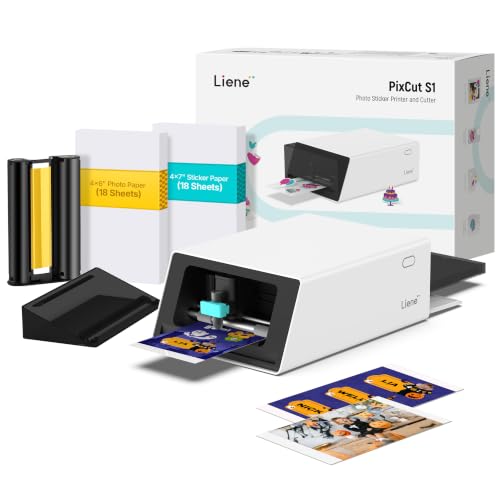
PixCut S1 Review Summary
If you want an all-in-one machine that prints and cuts in a single workflow, the Liene PixCut S1 Sticker Printer stands out as a practical, creator-friendly option.
It is best for buyers who value convenience, clean sticker edges, and durable outputs more than raw print speed or office-style versatility.
What makes it compelling is the combination of AI-assisted image extraction, app-based control, and thermal dye-sublimation printing.
That means you can design on a phone or tablet, print in color, and get precisely cut stickers without juggling a separate printer and cutting machine.
For DIY sellers, journaling fans, parents making name tags, or anyone who enjoys custom crafts, the PixCut S1 reduces friction in the creative process.
It is not a general-purpose printer, but within its niche it solves a real problem very well.
Scorecard
| Category | Score | What it means |
|---|---|---|
| print-and-cut convenience | 9.0 | Combines photo printing and precise cutting in one device, reducing the need for separate tools and simplifying the sticker-making workflow. |
| cutting precision | 9.0 | Uses AI image extraction and guided edge cutting to follow subject outlines closely for cleaner sticker edges. |
| print quality | 8.0 | Thermal dye-sublimation output with 300 dpi resolution and full-color printing is aimed at vivid, true-to-life results. |
| app experience | 8.0 | Bluetooth app control supports editing, printing, and cutting from mobile devices, with templates and creative tools included. |
| sticker durability | 8.0 | Four-layer thermal dye-sublimation output is described as laminated, waterproof, and scratch-resistant for longer-lasting stickers and labels. |
| creative versatility | 9.0 | Built for stickers, labels, name tags, phone skins, ID photos, journaling, and custom gifts, making it useful for many DIY projects. |
| setup and compatibility | 7.0 | Works with smartphones, tablets, and laptops, but the core workflow depends on app-based control and Bluetooth connectivity. |
Overall, the Liene PixCut S1 Sticker Printer is a strong fit if you want a creator-focused device that prioritizes output quality, ease of use, and durable results.
Buy it for crafts and labels; skip it if you want speed, large-format printing, or a desktop-style office device.
Key Features and Specifications of PixCut S1
The hardware and software mix explains why this machine is different from a typical color printer.
The PixCut S1 is built around a compact, all-in-one craft workflow that handles both printing and cutting, which is the main reason buyers consider it.
| Spec | Detail |
|---|---|
| Brand | Liene |
| Model | DHP700 |
| Printer type | Thermal dye sublimation |
| Output type | Color |
| Resolution | 300 x 300 |
| Color depth | 24 bpp |
| Ink color | CMY |
| Connectivity | Bluetooth |
| Control method | App |
| Compatible devices | Laptops, smartphones, tablets |
| Print media | Labels |
| Additional functions | All in one |
| Item weight | 6.2 pounds |
| Dimensions | 11″ D x 7.7″ W x 4.1″ H |
| Trays | 1 |
| Controller type | Android, iOS |
| Warranty | Limited warranty |
- All-in-one print-and-cut design for stickers, labels, and crafts
- AI image extraction to detect subjects and simplify outline cutting
- 4-layer thermal dye-sublimation process with automatic lamination
- Waterproof and scratch-resistant output for everyday handling
- Bluetooth app control for design, editing, printing, and cutting
- 40,000+ free images, fonts, and elements
- 2,000+ ready-to-use templates
- No subscription required
From a buyer’s perspective, these specs point to a device designed to eliminate extra steps.
The 300 dpi resolution is adequate for detailed craft work, while the app library helps reduce the learning curve for users who do not want to build every project from scratch.
Pros and Cons of PixCut S1
Here is the practical side of the Liene PixCut S1 Sticker Printer pros and cons breakdown.
This is the section that matters most if you are deciding whether it matches your workflow.
| Pros | Cons |
|---|---|
| Combines printing and cutting in one machine | Print speed is described as slow |
| AI helps extract subjects and improve cut accuracy | Depends on the app and Bluetooth workflow |
| Produces vivid full-color prints | Best suited to labels and stickers rather than general-purpose printing |
| Useful for many DIY and labeling projects | Requires learning the app and creative workflow for best results |
| Durable, waterproof, scratch-resistant sticker output | Not ideal for bulk production |
| Large template and asset library included | Limited appeal if you rarely make custom stickers |
| No subscription fees |
The biggest win is convenience. The biggest trade-off is that this machine is optimized for a specific creative niche, so it is not the most flexible printer for every household or office.
Who Should Buy PixCut S1?
The PixCut S1 is a smart choice for anyone who wants to make custom stickers, labels, and small personalized projects at home without dealing with a complicated multi-device setup.
It is especially useful if you like working from a phone or tablet and want access to ready-made templates and creative assets.
- DIY crafters who make stickers, journaling pages, scrapbooking accents, and gift labels
- Parents and families who need name tags, school labels, or custom organization stickers
- Small sellers making product labels or branded decorative stickers in modest quantities
- Content creators who want custom visual assets for packaging, reels, and mailers
- Users who want simple setup and do not want to buy a separate cutter
Who should skip it?
If you need a fast office printer, a large-format device, or a hardware-first machine with minimal app dependence, this is probably not the right fit.
The PixCut S1 is a creator tool first and a printer second.
How the AI Cut Workflow Works
The standout feature of the PixCut S1 is its AI-guided cutting workflow.
Instead of manually tracing outlines or sending a design to a separate cutter, the app helps extract the subject and create a cut path around it.
That makes it much easier to turn a photo or graphic into a finished sticker.
This matters because sticker making often fails at the edges.
A sloppy border can make a nice design look homemade in the wrong way.
The PixCut S1 aims to solve that with better outline recognition, and the result is a cleaner, more polished final product.
For users who are new to crafting machines, this is a meaningful advantage.
It lowers the barrier to entry and reduces the trial-and-error that usually comes with separate print-and-cut setups.
For experienced makers, it still saves time by collapsing multiple steps into one process.
That said, AI cut assistance is only as good as the source image. High-contrast subjects, clear outlines, and simple backgrounds usually work best.
Messy photos or extremely intricate shapes may still need some adjustment.
Print Quality and Color Accuracy
The PixCut S1 uses thermal dye-sublimation printing with a 300 x 300 resolution and 16.7 million color capability.
In plain terms, that means it is built to produce vivid, smooth color output that works well for craft graphics, stickers, and labels.
Because this is not a standard office inkjet or laser printer, the expectations should be different.
It is tuned for visual appeal and durable sticker output, not for churning out documents.
That makes sense for the product category: buyers do not usually want this machine because they need spreadsheets; they want it because they need colorful, clean-looking projects that hold up over time.
In practical use, the important question is whether it preserves detail in small artwork, text, and icons.
The answer is generally yes for craft-level applications.
Small labels and decorative stickers are where the machine should shine most, while super-fine photographic output is less of a priority than reliability and finish.
If your top concern is rich color and a polished sticker finish, the PixCut S1 makes a strong case. If you want maximum speed or studio-grade print precision, you should compare it against more specialized photo printers or production-oriented cutters.
Best Uses for Stickers, Labels, and Crafts
This is where the PixCut S1 becomes easy to evaluate as a buying decision.
The product is clearly designed for everyday creative and organizational tasks rather than broad printing chores.
- Custom stickers for planners, laptops, water bottles, and packaging
- Labels for pantry bins, storage boxes, office supplies, and school items
- Name tags and ID-style custom pieces for events or family use
- Phone skins, lens stickers, and small decorative accessories
- Journaling and scrapbooking elements
- Personalized gifts and small-batch branded pieces
The compact footprint also helps.
At roughly 11 inches deep and 7.7 inches wide, it is not oversized for a desk or craft room.
At 6.2 pounds, it is still portable enough to move around if needed, though it is not meant to be a carry-anywhere gadget.
For families or hobbyists, the biggest practical value is consistency.
You can create one-off stickers or repeat label projects without setting up a large workstation.
That convenience is a major reason this printer makes sense for home crafting.
App Templates and Creative Tools
The app experience is a major part of the PixCut S1 value proposition.
Instead of relying on a complicated desktop workflow, the machine works through Bluetooth and a mobile-friendly app that supports Android and iOS devices.
That app includes 2,000+ templates and 40,000+ free images, fonts, and elements, which is a serious advantage for beginners.
You do not have to be a graphic designer to get started.
The included assets can save time, inspire ideas, and make the machine more useful right away.
The templates cover use cases such as:
- phone skins
- lens stickers
- ID cards
- labels
- name tags
- journaling layouts
There is also an AI Lab feature for stylized creations, which broadens the machine’s appeal for users who want more playful or personalized output.
That said, app-driven creativity is a double-edged sword.
Buyers who love guided design will appreciate it, while users who prefer direct hardware controls may find it limiting.
My take: the app is a strength if you want speed and inspiration, not if you want full manual control.
Durability: Waterproof and Scratch-Resistant Output
One of the most practical benefits of the PixCut S1 is that the output is designed to be waterproof and scratch-resistant.
That matters because stickers and labels are often handled, stored, peeled, stuck, moved, and exposed to moisture.
The four-layer thermal dye-sublimation process with automatic lamination is the feature that supports this durability claim.
In day-to-day use, that means your stickers should be more resilient than basic paper labels or unprotected prints.
For pantry labels, school items, water bottles, and notebook stickers, that extra toughness is a real advantage.
Durability is also part of the value equation.
A sticker that fades, smears, or scratches easily may seem cheaper at first but costs more in replacement time and frustration.
The PixCut S1’s durable output makes it a better long-term fit for projects that will be touched often or used in mildly demanding environments.
This is one of the reasons the machine feels more premium than a basic label maker.
Alternatives to Consider Before You Buy
Before deciding on the PixCut S1, it is smart to compare it with other product types that may better match your needs.
The right choice depends on whether you want printing, cutting, labeling, or all three.
- Cricut Joy Xtra — A strong alternative if you want a cutting-focused craft machine and already plan to build a more modular creative setup.
- Portable photo printer — Better if you mainly want quick photo prints rather than cuttable stickers.
- Bluetooth label maker — A simpler pick if your main job is organization labels and you do not need color graphics.
- DIY sticker printer — Worth comparing if you want a broader set of sticker-printing options and are okay with more setup.
- all-in-one craft printer — A useful search if you want to compare similar creative machines from other brands.
Compared with those options, the PixCut S1 is strongest when you want integrated printing and cutting with low friction.
It is less attractive if your workflow is mostly labels, mostly photos, or mostly cutting.
Is PixCut S1 Worth It?
So, is Liene PixCut S1 Sticker Printer worth it?
For the right buyer, yes.
The machine delivers a well-thought-out creative workflow, strong cutting precision, durable sticker output, and enough templates to get beginners making useful projects quickly.
The strongest value comes from how it simplifies the whole process.
Instead of buying one machine for printing and another for cutting, you get an integrated solution that reduces setup time and makes repeat projects easier.
That is a big deal for home crafters, hobby sellers, and anyone who wants polished results without turning their desk into a production line.
Still, it is important to be honest about the trade-offs.
The PixCut S1 is not fast, it depends on app-based control, and it is more specialized than a general printer.
If your projects are sticker-heavy and creativity-focused, those drawbacks are easy to accept. If not, the machine may be more niche than you need.
Final verdict: the Liene PixCut S1 Sticker Printer is worth buying for DIY creators who want an easy, durable, and smart print-and-cut system. If that sounds like your workflow, it is one of the more compelling craft printers to consider in 2026.