The Nelko P21 Label Maker review starts with a simple idea: make everyday organization faster, cleaner, and less annoying.
It does that well for the right buyer.
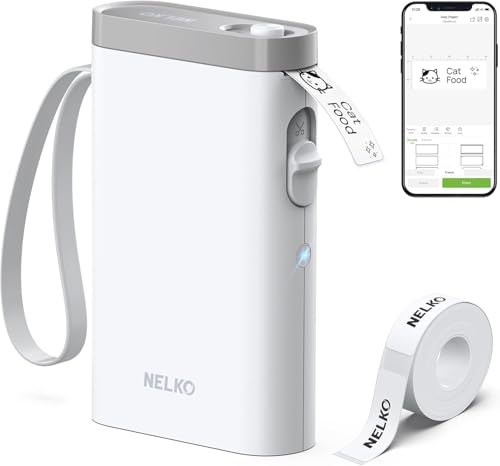
Nelko P21 Review Summary
The Nelko P21 Label Maker is a compact Bluetooth thermal label printer that favors convenience over complexity.
If you want a small, inkless label maker that pairs with your phone and helps you create storage labels, name tags, notebook tags, or QR labels in minutes, this is a strong fit.
What makes it appealing is the combination of portability, app-based design tools, and low-maintenance thermal printing.
It is especially attractive for home organizers, teachers, students, and office users who want fast label creation without dealing with ink cartridges or a bulky desktop machine.
That said, this is not a universal solution.
The monochrome-only output, the app dependency, and the compatibility note for some Android 14 phones are important buying considerations.
For buyers who can live within those limits, the Nelko P21 offers a very practical and surprisingly flexible labeling experience.
Scorecard
| Category | Score | Buyer Takeaway |
|---|---|---|
| Portability | 9.0 | Compact, lightweight, and easy to carry between rooms, school, or the office. |
| Print Quality | 8.0 | 203 DPI thermal output is sharp enough for text, QR codes, and barcodes. |
| App Features | 9.0 | Loaded with templates, icons, borders, materials, and custom layouts. |
| Ease of Use | 8.0 | Bluetooth setup is straightforward, though correct app and paper setup matter. |
| Battery and Convenience | 8.0 | Rechargeable and inkless for low-fuss everyday labeling. |
| Versatility | 8.0 | Works well for home, school, and office organization tasks. |
| Compatibility and Limits | 6.0 | Good broad support, but the Android 14 limitation and app update note reduce flexibility. |
Bottom line: the Nelko P21 is best for buyers who want a portable, phone-connected label maker for quick, repetitive labeling jobs and are comfortable using a companion app.
Key Features and Specifications of Nelko P21
The Nelko P21 Label Maker is designed around convenience and mobile printing rather than a traditional keypad-and-screen layout.
Here are the core specifications and features that matter most when deciding whether it belongs on your desk or in your organization kit.
| Spec | Details |
|---|---|
| Brand / Model | Nelko P21 |
| Printing Technology | Direct thermal, inkless, toner-free |
| Output | Monochrome |
| Print Resolution | 203 DPI |
| Connectivity | Bluetooth |
| Supported Platforms | iOS and Android |
| App | Nelko app |
| Languages Supported | 29 languages |
| Weight | 11.52 ounces |
| Dimensions | 6.65 x 4.5 x 1.9 inches |
| Color | White |
| Battery | Built-in rechargeable battery |
| Speed | Up to 30 monochrome labels per minute |
| Label Sizes Mentioned | 14×40mm, 14×50mm, 14×75mm, and more |
- 3600+ icons for visual customization
- 700+ borders for framed label designs
- 5500+ materials for templates and label styling
- 750+ templates for fast creation
- Supports text, QR codes, barcodes, images, time, and borders
- Recommended use with NELKO thermal label paper
These specs place the P21 in the portable label printer category rather than the heavy-duty office label maker category.
In practice, that means it is optimized for fast smartphone labeling, not high-volume industrial use.
Pros and Cons of Nelko P21
Every label maker makes trade-offs, and the Nelko P21 Label Maker pros and cons are pretty clear.
If you understand them before buying, you are much less likely to be disappointed.
| Pros | Cons |
|---|---|
| Very portable and lightweight | Prints only in monochrome |
| Bluetooth printing from iOS and Android | Requires the companion app |
| Inkless thermal operation | Not compatible with Google phones running Android 14 |
| Rich app with templates and design tools | Some iOS users need an app update |
| Useful for home, office, and school | Fixed label size options limit flexibility |
| Rechargeable battery adds convenience | Best performance depends on recommended label paper |
| Clear enough for everyday text and codes | Not a color label solution |
Strongest advantage: the P21 makes everyday labeling quick and easy without ink, toner, or a desktop workflow.
Main drawback: if your phone compatibility is questionable, or you need color output, this may not be the right purchase.
Who Should Buy Nelko P21?
The Nelko P21 Label Maker is a smart buy for people who label things often but do not need a full-size machine.
It is especially well suited to buyers who want a phone-first workflow and value convenience over advanced hardware controls.
- Home organizers who label pantry bins, storage boxes, cosmetic containers, and mail
- Parents and teachers who need name tags, classroom labels, and student organization labels
- Office users who want notebook tags, reminder labels, supply labels, and price tags
- Students who like quick labels for folders, notebooks, cables, and dorm storage
- Buyers who prefer inkless printing and low-maintenance devices
You should probably skip it if you want color labels, a standalone keypad printer, or maximum phone compatibility without caveats.
It is also less ideal if your labeling work involves a lot of repeated special formats across multiple devices.
How the Nelko P21 App Works
The app is the center of the whole experience, and that is both the strength and the limitation of the Nelko P21.
After Bluetooth pairing, you design labels from your phone using templates, icons, borders, and text tools.
That keeps the hardware small and simple, while the software handles the creativity.
From a buyer’s perspective, this is a good design choice because it makes label creation feel modern and flexible.
You can build labels for storage bins, classroom materials, office assets, and personal items without learning a complicated on-device menu system.
The app’s content library is one of the P21’s biggest selling points.
With thousands of icons and hundreds of templates and borders, it gives casual users enough variety to create clean, useful labels quickly.
The support for QR codes and barcodes also adds practical value for inventory-style labeling.
The trade-off is that the app is not optional.
If you dislike app-based peripherals, this may feel less elegant than a traditional handheld label maker.
And if your phone is not fully compatible, the convenience benefit drops sharply.
Best Uses for Home, School, and Office
The Nelko P21 Label Maker is most useful when the job is repetitive, small-scale, and organization-focused.
It is not trying to be the most advanced label printer on the market.
Instead, it is trying to be the one you will actually use because it is so easy to grab and print.
For home use, it is good for kitchen containers, freezer items, clothes bins, cosmetic organizers, cable tags, and mail sorting.
The inkless design is especially handy in the kitchen and closet because you can print labels without worrying about smudges or drying time.
For school use, the P21 works well for name tags, classroom storage, notebook labels, and equipment identification.
Teachers and parents who need a lot of labels quickly will appreciate the template-driven workflow.
For office use, it is useful for notebook tags, supply labels, reminders, and simple asset labeling.
It is also a decent fit for small business packaging tasks where a clean black-and-white label is enough.
The category weakness is obvious: because it prints monochrome only and uses fixed label lengths, it is not the best choice for branding-heavy work or more customized visual labeling.
Label Quality, Tape Types, and Print Size Limits
The P21 uses 203 DPI direct thermal printing, which is a reasonable resolution for a compact label maker in this class.
Text looks crisp enough for everyday reading, and QR codes or barcodes should be clear in normal use if the label is installed correctly and the app settings are configured well.
Its biggest limitation is that it is designed around specific label paper formats, including fixed lengths such as 14×40mm, 14×50mm, and 14×75mm.
That is fine for standard organization jobs, but it is not as flexible as systems that support a wider range of tape widths and roll sizes.
This is why buying the right consumables matters.
The product data specifically recommends NELKO thermal label paper, and that is usually the safest path for consistent print quality.
If you try to improvise with unsupported paper, the print results may not be as clean.
Also worth noting: thermal printing is attractive because it eliminates ink and toner, but it does not remove the need to manage the label stock carefully.
The handling note about the green sticker on the back of the label strip sounds minor, but in practice it matters.
Damage there can create feeding or printing issues.
Battery Life and Everyday Portability
One of the biggest reasons to choose the Nelko P21 Label Maker over a traditional desktop unit is portability.
At 11.52 ounces and just 6.65 x 4.5 x 1.9 inches, it is small enough to move around the house, toss into a bag, or bring from classroom to classroom.
The built-in rechargeable battery reinforces that mobility.
You are not tied to a constant wall connection, which makes short labeling sessions much easier.
For buyers who label in bursts rather than in long production runs, that is a practical advantage.
In real-world terms, the battery and wireless setup make the P21 feel like an everyday utility rather than a special-purpose machine.
You can label a stack of storage bins, recharge it, then use it again later for school supplies or office folders without much friction.
That said, portability is most valuable when compatibility is smooth. If your device setup is problematic, the convenience of the hardware will not fully offset the software friction.
Compatibility Notes and Setup Pitfalls
This is the section to read carefully if you are deciding whether is Nelko P21 Label Maker worth it for your phone and operating system.
The product is designed to work with iOS and Android through Bluetooth, but the notes included in the product data matter a lot.
- iOS users may need to update the Nelko app to the latest version.
- Google phones running Android 14 are listed as not compatible.
- Correct paper installation is important for reliable printing.
- Do not tear or damage the green sticker on the back of the label strip.
These are not dealbreakers for every buyer, but they are absolutely decision-making factors.
A label maker is supposed to save time, not create troubleshooting chores.
If you want the safest experience, verify your phone model and OS before you buy.
Compared with some handheld label makers from Brother P-touch handheld label makers, the Nelko P21 leans more toward app-driven convenience and template variety.
Compared with DYMO Bluetooth label printers, it is similarly phone-centric but often more focused on compact, casual organization.
Buyers who want very small thermal labelers may also compare it with Phomemo mini label makers or other compact thermal label printer options.
Nelko P21 Label Maker Pros and Cons in Real Buying Terms
If you are weighing the purchase, focus on how the P21 fits your actual labeling habits.
The Nelko P21 Label Maker pros and cons are not abstract; they determine whether this becomes an everyday tool or a drawer item.
Buy it if you want a lightweight, inkless, app-powered label maker with plenty of design templates and you mostly print standard black labels for organization.
Skip it if you need color, broad device compatibility, or a more independent device that does not rely so heavily on a smartphone app.
Is Nelko P21 Worth It?
So, is Nelko P21 Label Maker worth it?
For the right buyer, yes.
It is a well-designed portable thermal label printer that makes everyday organizing faster, easier, and less expensive to maintain over time because it does not need ink or toner.
Its biggest strengths are the compact size, strong app feature set, wireless convenience, and flexible use across home, school, and office tasks.
The biggest drawbacks are equally clear: monochrome output, app dependence, and compatibility limitations that some buyers cannot ignore.
If you are shopping for a straightforward Nelko P21 Label Maker review verdict, here it is: this is a strong pick for practical label printing, especially if you value portability and quick phone-based creation.
If your setup is compatible, and your expectations are realistic, the Nelko P21 can be a very useful everyday organizer.
Final advice: choose the Nelko P21 if you want a simple, low-maintenance label maker that is easy to carry and easy to use.
If you need more platform flexibility or color printing, keep shopping.