The MUNBYN ITPP047 Receipt Printer review starts with one simple question: does this compact thermal printer fit the way real checkout counters work?
For the right POS setup, it can be a strong business-first choice.
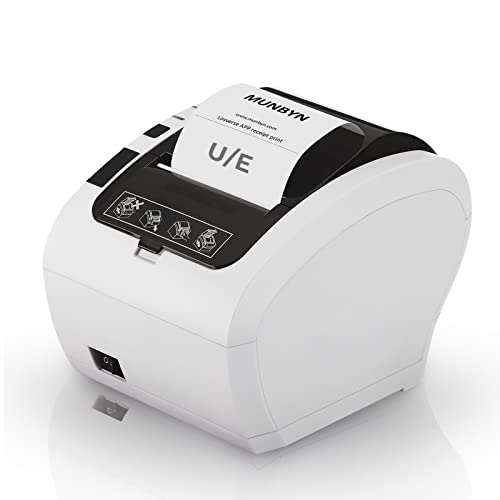
MUNBYN ITPP047 Review Summary
If you need a dedicated receipt printer that prioritizes speed, simple wired connectivity, and space-saving design, the MUNBYN ITPP047 Receipt Printer makes a compelling case.
It is especially attractive for small retail shops, cafes, restaurants, ticketing counters, and back-office stations that rely on fast, monochrome thermal output rather than extra features.
What stands out most is the balance of high-throughput printing, automatic cutting, and flexible USB/Ethernet setup.
That combination makes the MUNBYN ITPP047 Receipt Printer a practical fit for buyers who want a straightforward receipt workflow, not a complicated all-in-one device.
That said, compatibility is the main buying concern.
The printer supports Windows, Mac, Linux, and Chromebook environments through ESC/POS commands, but buyers using certain payment and delivery platforms should verify support first.
In other words, it is a smart purchase only when your POS stack is confirmed.
Scorecard
| Category | Score | Why It Matters |
|---|---|---|
| Printing speed | 9.0/10 | High-speed thermal output is well suited to busy register lines. |
| Compatibility | 7.0/10 | Good broad OS support, but some platform limits require caution. |
| Setup and documentation | 8.0/10 | USB drive tools, drivers, manual, SDK, and videos help simplify installation. |
| Space-saving design | 8.0/10 | Compact footprint and wall-mount support work well in tight counters. |
| Print handling | 8.0/10 | Automatic paper cutting improves receipt presentation and workflow. |
| Business value | 8.0/10 | Print-only thermal design keeps it focused and efficient for daily use. |
| Support and reliability | 7.0/10 | Support looks helpful, but compatibility checks remain essential before buying. |
Bottom line: the MUNBYN ITPP047 Receipt Printer is best for businesses that want a fast, compact, wired receipt printer and are willing to verify software support before checkout.
Key Features and Specifications of MUNBYN ITPP047
The MUNBYN ITPP047 Receipt Printer is a monochrome thermal receipt printer built for point-of-sale environments.
It is not trying to be a multifunction printer; instead, it focuses on one job and aims to do it well.
- Brand: MUNBYN
- Model: ITPP047
- Printer type: Thermal
- Output: Monochrome
- Connectivity: USB, Ethernet
- Compatible devices: Laptops, PCs
- Supported systems: Windows, Mac, Linux, Chromebook via ESC/POS commands
- Paper size: 80mm thermal receipt paper
- Print function: Print only
- Automatic paper cutter: Yes
- Mounting: Wall-mount design with two hanging holes
- Weight: 7 ounces
- Dimensions: 5.51″ D x 7.48″ W x 5.51″ H
- Maximum monochrome print speed: 230 ppm
- Maximum copy speed black and white: 40 ppm
- Color: White
- Special feature: Energy Star
- Media: Standard plain paper
- Number of trays: 1
- Controller type: Android
- Warranty: Limited warranty or full warranty
Those specifications tell an important story.
The MUNBYN ITPP047 Receipt Printer is built for receipt throughput, desk efficiency, and simple deployment.
The compact chassis and light weight matter in real-world use because POS counters are often crowded with cash drawers, card readers, tablets, and scanners.
The wired USB and Ethernet options also matter.
A receipt printer is often more reliable when it is tethered to a fixed register or back-office terminal, and that setup can be easier to maintain than wireless-only alternatives in busy environments.
The included USB drive is another practical plus.
It contains the printer driver, user manual, SDK, tools, and how-to videos, which should help owners or installers get the unit running without hunting around for separate resources.
Pros and Cons of MUNBYN ITPP047
Every buyer should weigh the MUNBYN ITPP047 Receipt Printer pros and cons before deciding if it belongs in their checkout workflow.
Here is the honest breakdown.
Pros
- Fast thermal printing for busy registers and ticket lines
- Automatic cutter improves receipt handling and presentation
- USB and Ethernet connectivity give you flexible deployment options
- Compact and wall-mountable to save counter space
- Energy Star certification may help keep operation efficient
- Helpful setup media included for installation and troubleshooting
- Strong fit for retail and food service workflows that need reliable receipt output
Cons
- Not compatible with Square, which is a major limitation for some small businesses
- No iOS support, so iPhone and iPad setups are out
- Does not support DoorDash, limiting some delivery-related workflows
- Compatibility must be verified with your POS before buying
- Print-only design means no label printing, copying, or multifunction convenience
From a buyer’s perspective, the drawbacks are not dealbreakers for everyone, but they are significant enough to make pre-purchase checks essential.
If you are shopping for a flexible app-driven printer for mobile devices, this is not the safest choice.
Compatibility With POS Systems and Devices
Compatibility is the area where the MUNBYN ITPP047 Receipt Printer deserves the most attention.
The product listing highlights support for Windows, Mac, Linux, and Chromebook systems using ESC/POS commands, which gives it broad appeal for traditional desktop-based POS setups.
That said, broad OS support does not automatically equal universal app support.
The model is explicitly not compatible with Square, and it does not support iPhone or iPad.
It also does not support DoorDash, which matters for restaurants and food businesses that depend on third-party delivery integrations.
So how should a buyer think about it?
If you run a stable register setup on a laptop or PC, this printer could be a very good fit.
If your business runs on a mobile-first checkout flow, tablets, or tightly integrated delivery platforms, you should be cautious.
Compatibility is the deciding factor, not just print speed.
In the receipt printer category, this is common.
Many printers look similar on paper but differ in driver behavior, command support, and app integration.
That is why verifying the exact POS software, operating system, and connection method before purchase is the smartest move.
Print Speed, Cutter, and Checkout Workflow
For a receipt printer, speed and paper handling are often more important than fancy features.
The MUNBYN ITPP047 Receipt Printer is clearly designed around that reality.
The listed monochrome speed is strong enough to support busy checkout lines, quick order tickets, and steady-volume transactions.
In practical terms, that means less waiting at the register and fewer bottlenecks when staff are processing multiple purchases in a row.
The automatic cutter is another meaningful workflow advantage.
Manual tear points can slow staff down slightly and leave uneven edges, while an auto cutter helps receipts look cleaner and feel more professional.
That is especially useful in retail, hospitality, and ticketing environments where customer handoff needs to be quick.
The print-only design also works in its favor.
A printer that focuses only on receipts is usually easier to deploy, easier to understand, and less prone to feature overload.
For buyers who want reliable receipt output instead of extra gadgetry, that restraint is a real design benefit.
Wall-Mount Setup and Counter Space Savings
Counter space is precious in many businesses, and the MUNBYN ITPP047 Receipt Printer reflects that.
Its compact dimensions and wall-mount support make it a sensible choice when every inch of workspace matters.
The unit measures 5.51 inches deep, 7.48 inches wide, and 5.51 inches high, and it weighs only 7 ounces.
Those are favorable numbers for a receipt printer because they suggest easy placement near a register, under a shelf, or mounted out of the way.
Wall-mounting can be especially helpful in food service or small retail shops where the counter is already occupied by payment hardware.
By lifting the printer off the work surface, you can reduce clutter and improve staff flow.
That matters when one employee has to grab receipts, ring up orders, and handle customer questions quickly.
For tight POS environments, this space-saving layout is one of the MUNBYN ITPP047 Receipt Printer’s best-selling points.
What Comes in the Box and Driver Tools
Setup support can make or break the early experience with a business printer.
MUNBYN appears to have understood that by including a USB drive with useful installation assets.
- Printer driver
- User manual
- SDK
- Tools
- How-to videos
This is a practical bundle because it gives business owners and IT helpers multiple ways to get started.
The manual covers the basics, the driver handles connectivity, the SDK helps developers or integrators, and the videos are especially useful for visual setup guidance.
For buyers who dislike searching online for fragmented setup files, that is a genuine convenience.
It also suggests the printer is aimed at real business deployment rather than casual consumer use.
Best Use Cases for Retail and Food Service
The MUNBYN ITPP047 Receipt Printer is best matched to businesses that print receipts all day and want a dependable wired device.
Its strongest use cases include:
- Retail stores that need fast customer receipts at the register
- Restaurants and cafes that want order tickets or checkout receipts
- Grocery and supermarket counters with consistent transaction volume
- Clothing stores where compact POS hardware matters
- Ticketing counters and admission desks that print frequent transactions
- Banks and service desks that need simple receipt output
- Food trucks and small mobile operations using a compatible wired setup
In each of those scenarios, the printer’s strengths are similar: speed, simplicity, and a compact footprint.
If your business needs color output, labels, or mobile-app-heavy integration, look elsewhere.
But if you need a dedicated receipt workhorse, this is squarely in the right category.
Alternatives to Consider Before You Buy
If you are comparing the MUNBYN ITPP047 Receipt Printer with other options, it helps to think in terms of workflow rather than brand alone.
Here are some sensible Amazon-searchable alternatives to review:
- MUNBYN WiFi receipt printer if you need wireless convenience
- MUNBYN Bluetooth receipt printer for mobile-friendly setups
- USB/LAN receipt printer for POS if you want similar wired flexibility from multiple brands
- 80mm thermal receipt printer with broader app compatibility if app support is your top priority
- Star Micronics receipt printer for more established POS ecosystem options
- Epson receipt printer if you want a widely recognized POS brand
Among these, the best alternative depends on your software stack.
If you are already committed to a specific POS platform, compatibility can be more important than raw speed.
If you simply need a dependable wired printer, the MUNBYN model remains competitive.
Buying Advice and Decision Factors
Before you choose the MUNBYN ITPP047 Receipt Printer, check five things: your POS software, your operating system, your connection preference, your paper size, and whether you need iOS or delivery-platform support.
Those are the details that determine whether this printer will be easy or frustrating to live with.
Here is the simplest way to judge it:
- Buy it if you need a fast, compact, wired receipt printer for a desktop-based business setup.
- Buy it if you want wall-mount flexibility and automatic cutting for cleaner workflows.
- Skip it if your business depends on Square, iPhone/iPad, or DoorDash integration.
- Skip it if you need a multifunction printer or color output.
The MUNBYN ITPP047 Receipt Printer is a good fit for practical buyers, not experimental ones. That means it is most appealing when you already know your software environment and just want a dependable thermal output device that can keep up with everyday transactions.
Is MUNBYN ITPP047 Worth It?
So, is MUNBYN ITPP047 Receipt Printer worth it?
For the right business, yes.
It offers a strong mix of speed, compact design, automatic cutting, and wired connectivity that fits the needs of many retail and food-service counters.
The biggest reason to buy is clear: it is a focused receipt printer that does its core job well.
The biggest reason to hesitate is also clear: compatibility limitations can rule it out for some modern POS ecosystems.
If your software and device setup are confirmed, the MUNBYN ITPP047 Receipt Printer is an efficient and sensible choice.
Final verdict: choose it if you value fast, reliable, space-saving receipt printing and want a business printer built around straightforward operations.
If your workflow depends on unsupported apps or mobile devices, keep shopping.