Choosing a receipt printer for a Mac-based point-of-sale system involves more than checking print speed. Connection type, macOS compatibility, paper size, cutter reliability, and setup support all affect daily performance.
We selected 10 thermal POS printers suited to cafés, retail counters, restaurants, and mobile businesses, with options ranging from straightforward USB models to Ethernet and Bluetooth printers.
Best 10 Receipt Printers for Mac Picks for 2026
Best Plug-and-Print Pick

- Fast 250mm/s thermal printing
- Simple USB setup for mixed devices
- Compact body with internal power supply
Best For: Small USB-connected POS counters and Apple-device setups
Best Wall-Mount Value
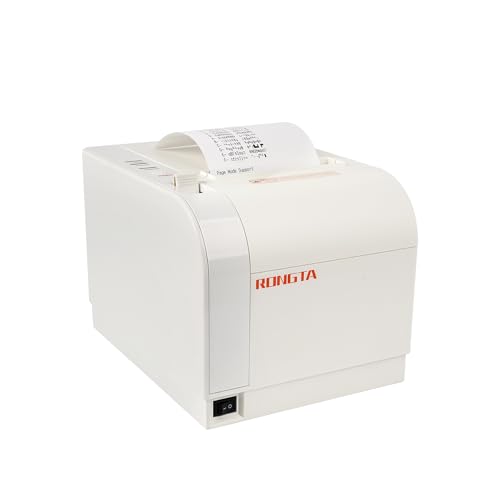
- USB, Ethernet, and serial interfaces
- 300mm/s printing with auto cutter
- Wall-mountable 80mm design
Best For: Commercial counters and kitchens needing wired flexibility
Best Multi-Interface Option

- 310mm/s high-speed printing
- USB, serial, and Ethernet ports
- Epson ePOS support for iOS and Android
Best For: Busy retail and restaurant POS environments
Best Budget Wired Alternative

- Mac and Windows operating-system support
- USB, serial, and Ethernet ports
- 250mm/s printing with auto cutter
Best For: Basic wired POS setups in retail and food service
Feature-Rich but Compatibility-Limited
Volcora 80mm Thermal Receipt Printer

- Up to 220mm/s printing with automatic cutter
- USB, Bluetooth, and cash-drawer connectivity
- Not compatible with Mac OS according to supplied notes
Best For: Windows or Linux POS setups needing Bluetooth and wall mounting
Efficient Ethernet Workhorse
MUNBYN ITPP047 80mm POS Printer
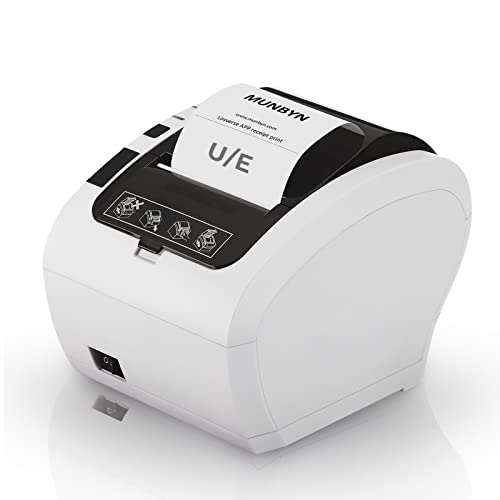
- Up to 230mm/s and over 40 receipts per minute
- USB and Ethernet connectivity
- Mac compatibility should be verified before purchase
Best For: Wired retail or food-service counters with compatible POS software
Fast USB-Only Pick
NetumScan 8360 80mm Receipt Printer

- Up to 300mm/s printing with automatic cutter
- Advertised support for Windows, Mac, and Linux
- USB-only with no LAN, Wi-Fi, or Bluetooth
Best For: Mac workstations needing fast, direct USB receipt printing
Best Wired Versatility
Rongta RP332 80mm Thermal Receipt Printer

- Mac, Windows, and Linux support
- USB, serial, and Ethernet connectivity
- Auto cutter with cash-drawer and wall-mount support
Best For: Wired Mac checkout setups using compatible ESC/POS software
Best for Speed
NetumScan NS8360L 80mm POS Receipt Printer

- Prints at up to 300mm/s
- USB and Ethernet connectivity
- Auto cutter with overheating protection
Best For: Fast wired Mac receipt printing in retail and restaurant environments
Best for Kitchen Counters
Rongta RP850 80mm Thermal Receipt Printer

- Mac, Windows, and Linux support
- USB, Ethernet, and serial interfaces
- Order reminder, auto cutter, and wall-mount design
Best For: Fixed restaurant or retail counters using compatible wired POS software
Best Plug-and-Print Pick – Star Micronics TSP143IIIU
For shoppers comparing receipt printers for Mac, the Star Micronics TSP143IIIU is a compact USB thermal model designed for straightforward point-of-sale setups. Its direct USB connection, automatic cutter, and support for iOS, Android, and Windows make it a practical choice where simple wired printing matters.
Best For: Small counters and POS systems using direct USB connections with computers, iPads, or iPhones.
Pros:
- Prints up to 250mm per second, with a stated capacity of up to 43 receipts per minute.
- Plug-and-print USB setup with support for iOS, Android, and Windows.
- Compact design with an internal power supply helps conserve counter space.
- Drop-in paper loading and a patented De-Curl function produce flat receipts.
Cons:
- USB connectivity is the primary focus, so it may be less suitable for Ethernet-based installations.
- It is a monochrome thermal printer and requires compatible thermal paper.
The TSP143IIIU stands out for buyers who want a dependable, space-conscious receipt printer for Mac-adjacent or mixed-device setups, especially when a wired USB workflow is preferred.
Best Wall-Mount Value – Rongta RP820
The Rongta RP820 is a versatile 80mm thermal printer for buyers seeking receipt printers for Mac with multiple wired connection options. It supports USB, Ethernet, and serial interfaces, while its wall-hanging design can help free up valuable counter space.
Best For: Retail, restaurant, kitchen, and commercial environments that need wired connectivity or wall-mounted installation.
Pros:
- Offers USB, LAN, and serial ports for flexible POS integration.
- Prints at up to 300mm per second and includes an automatic cutter.
- Supports Mac, Linux, and several Windows versions according to the supplied specifications.
- Supports cash-drawer driving and standard ESC/POS print commands.
Cons:
- It does not include Wi-Fi or Bluetooth connectivity.
- The supplied notes state that it is not compatible with Grubhub, DoorDash, Square, or Chromebook.
- Its 80mm paper format may be larger than needed for compact receipt workflows.
Choose the RP820 when wired networking, speed, and installation flexibility are more important than wireless connectivity or compatibility with the listed delivery and POS platforms.
Best Multi-Interface Option – Epson TM-T20IV
The Epson TM-T20IV is a high-speed thermal model for businesses comparing receipt printers for Mac and other modern POS platforms. Its USB, serial, and Ethernet interfaces support flexible installations, while Epson ePOS technology is specified for Windows, iOS, and Android devices.
Best For: Retailers, restaurants, and service businesses that need fast printing, network connectivity, and broad device support.
Pros:
- Prints at up to 310mm per second for faster customer transactions.
- Includes USB, RS-232 serial, and Ethernet connectivity.
- Supports Epson ePOS mobile printing with Windows, iOS, and Android devices.
- Offers paper-saving controls, ENERGY STAR certification, and a rated 2 million auto-cuts.
Cons:
- It is a wired printer with no wireless connection listed.
- Its feature set may be more than necessary for a basic single-computer USB setup.
- The supplied listing information gives conflicting warranty details, so buyers should verify coverage.
The TM-T20IV is a strong fit for busy POS environments where speed, Ethernet integration, and multi-platform support justify choosing a more fully featured printer.
Best Budget Wired Alternative – Rongta RP326-USE
The Rongta RP326-USE is a straightforward 80mm thermal printer for shoppers seeking receipt printers for Mac without wireless features. It combines USB, serial, and Ethernet ports with an automatic cutter and wall-mounting holes for flexible placement in retail or food-service spaces.
Best For: Office, retail, food-truck, kitchen, and restaurant setups using wired POS equipment.
Pros:
- Supports Mac, Linux, and multiple Windows operating systems.
- Provides USB, serial, and Ethernet connectivity for wired POS integration.
- Prints at up to 250mm per second and includes an automatic cutter.
- Uses direct thermal printing without ribbon or ink cartridges.
Cons:
- No Wi-Fi or Bluetooth connectivity is provided.
- The supplied notes state that it does not work with DoorDash, Uber Eats, Square, or Grubhub.
- Its stated paper capacity and speed specifications are less detailed than those of some alternatives.
The RP326-USE makes sense for buyers who need basic wired connectivity and Mac operating-system support, provided their POS application is compatible with the printer’s ESC/POS workflow.
Feature-Rich but Compatibility-Limited – Volcora 80mm Thermal Receipt Printer
The Volcora is a fast 80mm thermal printer with USB and Bluetooth connectivity, making it an appealing option for some receipt printers for Mac setups. However, its supplied compatibility information says it is not compatible with Mac OS, so verify your operating system and POS software carefully before buying.
Best For: Windows or Linux businesses needing a fast, wall-mountable thermal printer with Bluetooth and cash-drawer support.
Pros:
- Prints at speeds up to 220mm/s and includes an automatic cutter rated for up to 1.5 million cuts.
- Offers USB, Bluetooth, and RJ11 cash-drawer connectivity.
- Supports wall mounting and uses ink-free direct thermal printing.
- Includes U.S.-based customer service and a limited lifetime warranty.
Cons:
- Supplied notes state that it is not compatible with Mac OS or iOS.
- Does not support several popular POS platforms, including Square, Clover, Shopify, and delivery services listed by the manufacturer.
The Volcora has useful hardware features, but the Mac OS limitation is decisive for this roundup. Consider it only if your setup is Windows- or Linux-based despite the product title’s broader compatibility wording.
Efficient Ethernet Workhorse – MUNBYN ITPP047 80mm POS Printer
The MUNBYN ITPP047 is a straightforward 80mm thermal POS printer with USB and Ethernet connections. It can suit businesses comparing receipt printers for Mac, but the supplied notes do not confirm Mac compatibility, so check the operating system, driver, and POS platform before ordering.
Best For: Retail and food-service counters that need fast Ethernet or USB receipt printing and a space-saving wall-mount design.
Pros:
- Prints more than 40 receipts per minute at up to 230mm/s.
- Includes both USB and Ethernet connectivity.
- Supports wall hanging to help conserve counter space.
- ENERGY STAR certified, with the manufacturer claiming lower electricity use than non-certified models.
Cons:
- Supplied compatibility information does not confirm support for Mac.
- Incompatible with Shopify, iZettle, Grubhub, and DoorDash according to the product notes.
This MUNBYN model emphasizes speed, wired networking, and efficient operation rather than broad platform support. It is worth considering for a compatible wired POS environment, but Mac users should confirm support directly before purchase.
Fast USB-Only Pick – NetumScan 8360 80mm Receipt Printer
The NetumScan 8360 is a USB-only 80mm thermal printer advertised for Windows, Mac, and Linux. For shoppers seeking receipt printers for Mac, its listed Mac support is promising, but the lack of wireless or network connectivity means it is best suited to a directly connected computer and a compatible ESC/POS workflow.
Best For: Mac, Windows, or Linux users who need high-speed USB receipt printing at a single workstation.
Pros:
- Prints at speeds up to 300mm/s and includes an automatic cutter.
- Advertised support for Windows, Mac, and Linux.
- Uses ink-free thermal printing and includes overheating protection.
- Offers a wall-mount option and a large paper compartment.
Cons:
- USB-only; it does not support LAN, Wi-Fi, or Bluetooth.
- Not compatible with Square POS, Clover, Shopify, Lightspeed, and several mobile devices or services listed in the notes.
- Compatibility with a specific Mac POS application should be confirmed before purchase.
With the fastest stated print speed in this group and explicit Mac support, the 8360 is the most natural fit for a wired Mac workstation. Its limited interface and POS exclusions make software and connection checks essential.
Best Wired Versatility – Rongta RP332 80mm Thermal Receipt Printer
If you need receipt printers for Mac with flexible wired connectivity, the Rongta RP332 is a practical option for a laptop- or desktop-based checkout setup. It supports Mac, Windows, and Linux through USB, serial, or Ethernet connections, uses ESC/POS and OPOS commands, and includes an auto cutter.
Best For: Mac users who need a wired 80mm receipt printer with Ethernet installation, cash-drawer support, and wall-mounting options.
Pros:
- Supports Mac, Windows, and Linux computers.
- USB, serial, and Ethernet connectivity, including TCP/IP installation.
- Auto cutter, cash-drawer support, and wall-mount design.
- Prints at up to 250mm/s and supports 80mm or 58mm paper.
Cons:
- No Wi-Fi or Bluetooth.
- Not designed for iPhone, iPad, Android devices, Chromebooks, or several named POS platforms, including Square and PayPal.
- Requires choosing the correct Mac driver for the paper width.
The RP332 makes the most sense when your Mac checkout system can use a wired ESC/POS printer. Its connection choices and mounting flexibility are useful, but confirm software compatibility before buying.
Best for Speed – NetumScan NS8360L 80mm POS Receipt Printer
Among receipt printers for Mac, the NetumScan NS8360L stands out for its listed 300mm/s printing speed. It connects by USB or Ethernet, supports Windows, Mac, and Linux systems using ESC/POS commands, and includes an auto cutter for busy receipt-printing environments.
Best For: Restaurants, retail counters, and other Mac-based setups that prioritize fast wired receipt printing.
Pros:
- Listed printing speed of up to 300mm/s.
- Supports Windows, Mac, and Linux with ESC/POS compatibility.
- USB and Ethernet ports provide two wired connection options.
- Includes an auto cutter, overheating protection, and wall-mount holes.
Cons:
- No wireless connectivity is listed.
- Not compatible with iPhone, iPad, Android devices, Square POS, Clover, Shopify, Lightspeed, or several delivery platforms.
- Limited to 80mm receipt paper.
The NS8360L is a strong candidate when speed and wired reliability matter more than mobile or cloud-POS compatibility. Check that your Mac software supports its ESC/POS workflow before ordering.
Best for Kitchen Counters – Rongta RP850 80mm Thermal Receipt Printer
The Rongta RP850 is a straightforward choice for receipt printers for Mac in commercial settings. It supports Mac, Windows, and Linux computers, connects through USB, Ethernet, or serial interfaces, and adds a sound-and-light order reminder that can be disabled through the printer tool.
Best For: Restaurants and retail businesses using a Mac or desktop computer with a compatible wired POS system.
Pros:
- Supports Mac, Windows, and Linux computers.
- USB, Ethernet, and serial interfaces support different wired installations.
- Auto cutter, cash-drawer support, and wall-mounting holes.
- Sound-and-light order reminder can be adjusted or turned off.
Cons:
- No Wi-Fi or Bluetooth.
- Not compatible with iPhone, iPad, Android devices, Chromebooks, Square, Clover, Shopify, and other listed platforms.
- Requires following the included Mac driver installation guidance.
With its order reminder and mounting options, the RP850 is particularly suited to a fixed restaurant or retail counter. It is best paired with a Mac application that supports ESC/POS commands and wired printers.
How We Picked the Best Receipt Printers for Mac
We focused on the features that matter most in a Mac-based checkout setup: dependable macOS connectivity, standard 80mm paper support, thermal printing without ink, useful print speeds, and practical POS features such as auto-cutters and cash-drawer ports. We also considered interface flexibility, since USB is simple for a single workstation while Ethernet is often better for shared systems.
Compatibility can depend on the POS application and driver support, so check your software’s supported printer list before buying. Models advertising ESC/POS support are generally easier to integrate with compatible retail and restaurant systems, but they are not automatically compatible with every Mac app.
Quick Comparison
- Best for simple Mac setups: Star Micronics TSP143IIIU, with a well-established POS design and USB connectivity.
- Best for established retail use: Epson TM-T20IV, offering USB, Ethernet, and serial connectivity.
- Best for flexible interfaces: Volcora, with USB and Bluetooth support for Windows, Mac, and Linux.
- Best for fast printing: NetumScan models rated at up to 300mm/s.
- Best for budget-focused buyers: Rongta and MUNBYN models with core thermal POS features.
Key Buying Factors for Receipt Printers for Mac
Connection and MacOS Support
USB is usually the easiest option for one Mac at the counter, but confirm that the included cable and driver or setup instructions support your macOS version. Ethernet is preferable when several terminals need access to one printer. Bluetooth can be convenient, though wireless pairing may depend more heavily on the POS software.
Paper Width and Print Speed
Most models here use 80mm thermal rolls, the common format for full-size retail receipts. Check the printer’s maximum roll diameter and your supplier’s paper availability. Speeds around 200 to 300mm/s are suitable for busy counters, but real-world output also depends on receipt layout, graphics, and connection quality.
Auto-Cutter, Cash Drawer, and Durability
An auto-cutter saves time during busy service, while a cash-drawer port can simplify a traditional till setup. For restaurants, look for a design suited to frequent printing and consider whether the printer will sit near heat, grease, or moisture. Thermal printers do not use ink, but their print heads and cutters still benefit from routine cleaning.
Power, Space, and Maintenance
Measure the counter area and check whether the power supply is internal or external. Keep spare thermal rolls available, clean paper dust from the mechanism, and use compatible paper to reduce jams and faded output.
Who Should Buy Which Receipt Printers for Mac?
Choose the Star or Epson if dependable brand support and straightforward business deployment matter most. Pick a Rongta or MUNBYN model when you need basic 80mm printing at a lower upfront cost. Volcora is a practical choice when Bluetooth or cross-platform connectivity is important. NetumScan is worth considering for high-volume counters that benefit from faster rated output.
Before ordering, verify your POS application, macOS version, interface requirements, paper width, and return support. The best receipt printer for your Mac is the one that integrates cleanly with your checkout workflow rather than simply offering the highest advertised speed.