Accurate color depends on more than a good monitor. Room lighting, screen brightness, color temperature, and display age can all affect how your photos, video, and design work appear.
These 10 color calibration tools with ambient light sensor capabilities cover monitor colorimeters, handheld light meters, and combination kits. Use this roundup to match the right measurement approach to your workflow, display type, and budget.
Best 10 Color Calibration Tools with Ambient Light Sensor Picks for 2026
Best Dedicated Light Reader

- Measures lux, CCT, chromaticity, and DUV
- Works with ambient and flash lighting
- Syncs readings to a mobile app by Bluetooth
Best For: Portable lighting checks on photo and video sets
Best Capture-to-Display Kit

- Calibrates displays up to 10,000 nits
- Includes Passport Video 2 reference targets
- Supports white balance, exposure, and camera matching
Best For: Photo and video creators managing the full color workflow
Best for Lighting Uniformity
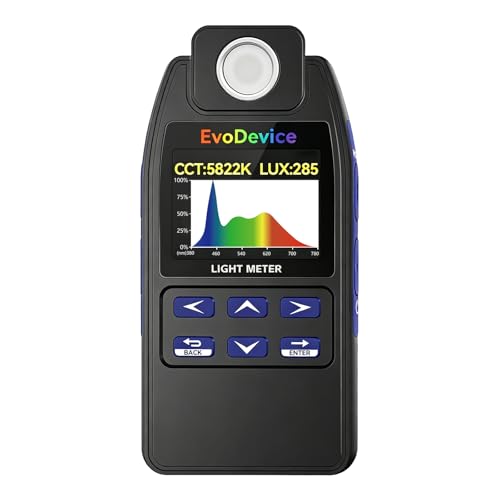
- Measures lux and color temperature
- Maps up to 99 lighting points
- Useful for comparing ambient-light distribution
Best For: Workspace and room lighting consistency checks
Editor's Pick

- Repeatable profiling across display types
- Ambient-light measurement via diffuser arm
- Supports monitor and projector calibration
Best For: Photographers and designers calibrating displays and projectors
Most Advanced

- Supports newer OLED and Mini LED displays
- Automatically adapts profiles to room lighting
- Adds display analysis and 3D LUT export
Best For: Color-critical professionals with multiple or modern displays
Best Standalone Light Meter

- Measures illuminance, CCT, and uniformity
- Adds EML and mEDI circadian metrics
- Bluetooth app support with portable power options
Best For: Professionals assessing room lighting around displays
Reliable Legacy Calibration

- Automated color and brightness calibration
- Supports multiple displays
- Includes quick ReCAL assistance
Best For: Multi-display users seeking repeatable calibration
Beginner-Friendly Room-Light Calibration
Spyder X Pro Monitor Calibrator

- Monitors room lighting
- Uses a guided single-click workflow
- Supports multiple monitors
Best For: First-time photographers and creative users
Simple USB-C Calibration

- Easy 1 2 3 software workflow
- Supports up to two displays
- Includes before-and-after checking
Best For: Creators with a compact two-monitor setup
Best High-Brightness Monitor Calibrator – Display Pro HL
The Calibrite Display Pro HL is one of the more capable color calibration tools with ambient light sensor applications for photographers and designers working with bright LCD, mini-LED, OLED, or Apple XDR displays. Its high-luminance sensor measures up to 3,000 nits, while PROFILER software provides control over white point, luminance, contrast ratio, gamma, and custom presets.
Best For: Photo and design professionals calibrating modern high-brightness displays or matching multiple monitors.
Pros:
- Measures displays up to 3,000 nits, including LCD, mini-LED, OLED, and compatible projectors.
- Includes Basic and Advanced PROFILER modes with custom profiling options.
- Offers profile validation, uniformity checks, flare correction, and multi-display workflows.
- Includes USB-C connectivity, a USB-A adapter, travel pouch, and 1/4-inch mount thread.
Cons:
- Designed primarily for display calibration rather than standalone room-light measurement.
- Advanced controls may be more than casual users need.
Choose this model when dependable calibration on bright modern panels matters more than a basic, streamlined setup. Its validation and uniformity tools add useful confidence for client-facing work.
Best Dedicated Light Reader – Datacolor LightColor Meter
The Datacolor LightColor Meter is a practical choice when color calibration tools with ambient light sensor capabilities need to measure the lighting around a set or workspace. It records lux, chromaticity, color temperature from 1,600K to 20,000K, and green-magenta balance, then sends results to its mobile app over Bluetooth.
Best For: Photographers, videographers, and production teams checking ambient or flash lighting wirelessly.
Pros:
- Measures ambient and flash lighting, lux, chromaticity, CCT, and DUV.
- Bluetooth 4.0 LE provides real-time app integration.
- Supports LED, tungsten, HMI, fluorescent, strobe, and outdoor light.
- Compact, drop-resistant design offers up to 40 hours of use on two included AAA batteries.
Cons:
- It measures the lighting environment rather than directly calibrating a monitor.
- Some wireless and multi-meter features depend on the companion app.
This is the better fit for users who need a portable ambient-light and color-temperature reference. Its wireless workflow is especially useful when checking several lighting positions or coordinating larger productions.
Best Capture-to-Display Kit – Calibrite Video Photo Kit
The Calibrite Video Photo Kit combines a high-luminance monitor colorimeter with a ColorChecker Passport Video 2, making it a comprehensive option among color calibration tools with ambient light sensor workflows. The kit supports monitor profiling up to 10,000 nits while also helping with white balance, exposure, camera matching, and reference-based color control on set.
Best For: Photographers and videographers who want one kit for capture references and high-brightness monitor calibration.
Pros:
- Includes a Display Plus HL colorimeter rated for displays up to 10,000 nits.
- Passport Video 2 provides video color, grayscale, white-balance, and classic 24-color targets.
- Supports a consistent workflow from camera setup through editing and delivery.
- Includes a protective case, lanyard, USB-C to USB-A adapter, and PROFILER software access.
Cons:
- Its broader kit format may be unnecessary for users who only need monitor calibration.
- PROFILER software requires a download.
This kit is compelling when color consistency must span both the camera and the display. It offers more workflow coverage than a standalone colorimeter, particularly for mixed-light shooting and professional post-production.
Best for Lighting Uniformity – E130 Light Meter
The E130 Light Meter is useful when color calibration tools with ambient light sensor features need to account for uneven illumination. It measures lux and color temperature across common light sources and can record up to 99 points, helping you compare lighting distribution across a workspace, room, shelf, bench, or tank.
Best For: Users mapping ambient-light consistency and comparing lighting changes across multiple locations.
Pros:
- Measures illuminance and color temperature across LED, fluorescent, HID, sunlight, and other sources.
- 99-point mapping reveals lighting distribution instead of relying on a single reading.
- Includes hold/freeze functionality and a spectrum mode.
- Handheld design uses simple controls and includes two AAA batteries.
Cons:
- Its spectrum function is not intended for analysis of sunlight, sodium, metal-halide, or CFL sources.
- It is a lighting meter, not a direct monitor-calibration device.
Consider the E130 when ambient-light uniformity is the main concern. Its multi-point mapping can make before-and-after lighting checks more informative than a single spot measurement, while its stated spectrum limitations should guide how you use that mode.
Editor's Pick – ColorChecker Display Pro
The Calibrite ColorChecker Display Pro is a practical choice among color calibration tools with ambient light sensor support. Its optical design is built for repeatable profiling across different display types, while the rotatable diffuser supports ambient-light measurement and projector profiling.
Best For: Photographers, designers, and users calibrating monitors or projectors who want repeatable results and flexible setup options.
Pros:
- Works with ccProfiler or i1Profiler software.
- Designed for high repeatability across display types.
- Rotatable diffuser supports ambient-light measurement and tabletop projector profiling.
- Includes a tripod mount for projector profiling in larger venues.
Cons:
- Requires software and a USB connection for operation.
- Its listed warranty is 12 months and requires registration within 30 days.
The Display Pro stands out for its versatile diffuser arm and projector-focused features. It is a strong fit when consistent monitor calibration and ambient-light measurement matter in the same workflow.
Most Advanced – SpyderPro Monitor Calibrator
The datacolor SpyderPro is one of the more feature-rich color calibration tools with ambient light sensor functionality. It combines room-light reading with broad display support, detailed screen analysis, multi-monitor matching, and calibration profiles for demanding photo, design, and video workflows.
Best For: Professionals managing multiple modern displays, high-brightness screens, projectors, or color-critical video workflows.
Pros:
- Supports Wide LED, OLED, QD-OLED, Mini LED, and Apple Liquid Retina XDR displays.
- Ambient light readings can automatically adapt display profiles to room lighting.
- Offers display analysis for uniformity, brightness, contrast, gamut, tone response, and white point.
- Includes USB-C connectivity, a USB-A adapter, projector calibration, and 3D LUT export.
Cons:
- Its extensive feature set may be more than casual users need.
- Some advanced functions depend on compatible video monitors or other supported equipment.
SpyderPro is the strongest all-around option here for advanced display management. Its automatic room-light switching and wide compatibility make it especially useful in changing studio environments and multi-screen setups.
Best Standalone Light Meter – In.Licht Pro Light Meter
The In.Licht Pro is a handheld light meter rather than a monitor colorimeter, but it can complement color calibration tools with ambient light sensor workflows. It measures illuminance, color temperature, uniformity, and circadian-light metrics, with Bluetooth analysis through its mobile app.
Best For: Lighting designers, architects, photographers, and workspace planners who need to evaluate the surrounding light before calibrating or arranging displays.
Pros:
- Measures illuminance, CCT, EML, mEDI, visual contrast, and uniformity.
- Connects to iOS and Android devices through Bluetooth.
- Compact 40g design includes a magnetic body and lanyard hole.
- Runs on three AAA batteries or a Micro-USB cable.
Cons:
- It does not perform monitor calibration itself.
- Using its analysis features requires the companion mobile app.
- Its specialized circadian metrics may be unnecessary for basic display setup.
Choose the In.Licht Pro when the priority is understanding the room’s lighting conditions rather than profiling a screen. It is a useful companion measurement device for creating consistent lighting around a color-managed workspace.
Reliable Legacy Calibration – Spyder4Pro S4P100
The Datacolor Spyder4Pro is a practical option among color calibration tools with ambient light sensor capabilities, combining automated color and brightness calibration with a full-spectrum sensor. Its single sensor can calibrate multiple displays, while the ReCAL feature helps simplify repeat calibration.
Best For: Users calibrating multiple displays who want automated adjustment and straightforward recalibration.
Pros:
- Automates color and brightness calibration.
- One sensor can calibrate multiple displays.
- Double-shielded filters are designed for improved accuracy and long-term stability.
- ReCAL makes recurring calibration faster.
Cons:
- Older Spyder4-generation hardware may have a less modern workflow than newer calibrators.
- The supplied notes do not specify current operating-system compatibility.
The Spyder4Pro remains a capable choice if its compatibility meets your setup, especially when repeatable multi-display calibration and a quick recalibration process matter most.
Beginner-Friendly Room-Light Calibration – Spyder X Pro Monitor Calibrator
The Datacolor Spyder X Pro is one of the more approachable color calibration tools with ambient light sensor functionality, offering room-light monitoring, automatic profile changing, and a lens-based color engine. Its guided software and single-click workflow make it well suited to first-time users.
Best For: Photographers and creators who want quick monitor calibration with room-light monitoring and support for multiple displays.
Pros:
- Room-light monitoring can support automatic profile changes.
- Single-click calibration and a wizard workflow simplify setup.
- Offers 12 predefined calibration targets.
- Can calibrate multiple laptop and desktop monitors.
Cons:
- The supplied notes do not specify support for phones.
- Advanced users may want more manual control than the guided workflow provides.
With fast calibration, before-and-after checking through SpyderProof, and room-light monitoring, the Spyder X Pro is a strong fit for users who prioritize ease of use without giving up multi-monitor capability.
Simple USB-C Calibration – Calibrite Display 123
The Calibrite Display 123 is a compact choice among color calibration tools with ambient light sensor considerations, using an Easy 1 2 3 software workflow and USB-C connection. It supports up to two displays and includes brightness target selection plus a before-and-after comparison.
Best For: Photographers and creators who want approachable calibration for a two-monitor workspace.
Pros:
- Guided workflow makes setup approachable.
- USB-C connection and compact body suit modern workspaces.
- Calibrates up to two displays.
- Before-and-after checking helps confirm the result.
Cons:
- Supports fewer displays than a larger multi-monitor setup may require.
- The supplied notes do not describe a dedicated ambient-light monitoring feature.
The Display 123 emphasizes simplicity and portability over extensive configuration. Its two-display support, adjustable counterweight, and comparison view make it a convenient fit for straightforward photo-editing workflows.
How We Picked the Best Color Calibration Tools with Ambient Light Sensor
We selected tools that measure at least one critical part of a color-managed workflow: display color, screen luminance, ambient illuminance, or correlated color temperature (CCT). The list includes dedicated monitor colorimeters, handheld meters for evaluating room and studio lighting, and kits that combine display calibration with camera-color references.
We also considered compatibility with modern LCD, Mini LED, and OLED displays; high-brightness HDR capability; software simplicity; connectivity; portability; and whether the tool suits photography, video, design, or general color-accurate viewing. Because “ambient light sensor” can describe different capabilities, check each product’s specifications carefully: some tools read the room directly, while others use ambient-light information to help determine display settings.
Quick Comparison
- Best for modern HDR displays: Choose a current Calibrite or Datacolor colorimeter rated for high luminance.
- Best for measuring the room: Consider a dedicated light meter such as the Datacolor LightColor Meter, E130, or In.Licht Pro.
- Best for photography: Pair a monitor calibrator with a color reference target for consistent capture and editing.
- Best for straightforward setup: Look for guided software and USB-C compatibility, such as the Display 123.
- Best for older or budget systems: Verify operating-system support before choosing a legacy Spyder4Pro or older colorimeter.
Key Buying Factors for Color Calibration Tools with Ambient Light Sensor
Display and Brightness Support
Match the instrument to your monitor. Standard SDR displays have different requirements from HDR, Mini LED, and OLED screens. If your display reaches very high brightness, select a model explicitly rated for that range rather than assuming any colorimeter will perform equally well.
Ambient-Light Measurement
Decide whether you need room readings or only display calibration. A handheld lux and CCT meter helps identify uneven lighting, daylight shifts, and overly warm or cool sources. This is useful when editing in a studio, office, or mixed-light room. A monitor calibrator with an ambient sensor may instead use the reading to recommend a suitable luminance target.
Software and Workflow
Check whether the included software supports your operating system, multiple monitors, profiling presets, and scheduled recalibration. Simpler guided apps are convenient for occasional users, while advanced controls benefit photographers, colorists, and designers who need repeatable targets.
Connectivity and Portability
USB-C can simplify connection to newer computers, but adapters may be needed for older systems. Bluetooth is useful for handheld meters and mobile workflows. If you measure multiple locations, prioritize a compact meter, clear display, data logging, and reliable battery life.
Who Should Buy Which Color Calibration Tools with Ambient Light Sensor?
Photographers and designers should start with a monitor colorimeter and choose a model that supports their display’s brightness and operating system. Video professionals should prioritize high-nit HDR support and consider a camera-color kit when capture consistency matters. Studio managers and lighting technicians will benefit more from a dedicated lux and CCT meter that can map or compare several light sources. Home users and occasional editors should favor an easy guided workflow over advanced controls. Finally, buyers considering older Datacolor or Calibrite models should confirm software availability and compatibility before purchasing.