A compact desk does not have to mean cramped typing space. The right keyboard tray can move your keyboard and mouse below the desktop, freeing room for notebooks, monitors, and everyday work.
We selected 10 space-conscious keyboard trays with different mounting styles, platform sizes, adjustment options, and weight capacities so you can match the tray to your desk and setup.
Best 10 Keyboard Trays for Small Desks Picks for 2026
Best Adjustable Pick
HUANUO 360-Degree Keyboard Tray

- 6.3 inches of height adjustment
- Swivels and tilts for ergonomic positioning
- Includes wrist rest and mouse space
Best For: Adjustable sit-stand workstations with generous clearance
Best Traditional Drawer
Fellowes Office Suites Keyboard Drawer

- Three height-adjustable mounting positions
- Supports keyboards up to 20 inches wide
- Retractable mouse tray stores neatly
Best For: Standard keyboards on desks suitable for screw mounting
Best No-Drill Large Platform

- Installs with padded C-clamps
- 11-pound load capacity
- Large keyboard-and-mouse platform
Best For: Renters with flat desks and enough underside width
Best Compact Clamp-On
VIVO MOUNT-KB05ES Keyboard Tray
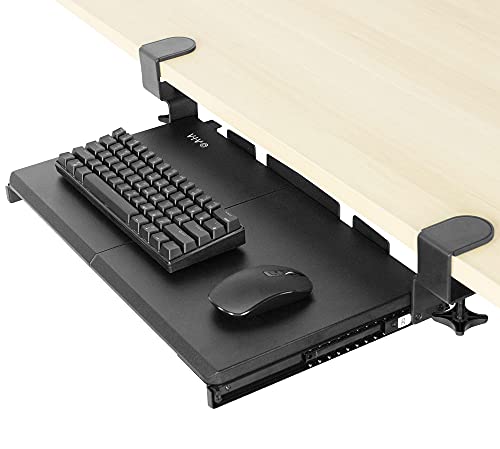
- Compact 20-by-11-inch tray
- No-drill adjustable C-clamps
- Supports up to 11 pounds
Best For: Small desks needing a removable clamp-on keyboard tray
Best Swivel Organizer
Klearlook Rotating Keyboard Tray

- 360° swivel clears the desktop
- Includes drawer, phone slot, and headphone hanger
- Tilt adjusts, but height does not
Best For: Small desks needing built-in organization and flexible storage
Best for Thin Desktops

- Holds up to 11 pounds
- Slides out up to 8.5 inches
- Requires a flat desktop up to 1.25 inches thick
Best For: Flat-edged desks with limited desktop depth and modest thickness
Best Large Slide-Out
XINLEI Large Under-Desk Keyboard Tray

- 25.6-by-11.8-inch keyboard and mouse platform
- Quiet metal rails slide up to 12.24 inches
- Offers C-clamp and screw-mount installation
Best For: Users wanting a roomy tray with flexible mounting options
Extra-Large Workspace Pick
VIVO 34-Inch Clamp-On Keyboard Tray

- 33.9-inch tray for keyboard, mouse, and accessories
- 11-pound capacity with adjustable C-clamps
- Requires 1.25-inch desk thickness and 39.4-inch width
Best For: Small desks with ample width that need a spacious slide-out tray
Compact Desk-Saving Pick
suptek 20-Inch Pull-Out Keyboard Tray

- Compact 20-inch platform for small keyboards
- No-drill C-clamp installation with 11-pound capacity
- Non-slip pads and an edge stopper add stability
Best For: Small desks needing a compact, stowable keyboard tray
Adjustable Mounting Pick
AX WABER 27-Inch Keyboard Tray

- 27.3-inch slide-out platform for keyboard and mouse
- C-clamps fit desks up to 1.9 inches thick
- 11-pound capacity with a 5.7-inch extension
Best For: Small desks needing a mid-size tray and flexible clamp fit
Best Adjustable Pick – HUANUO 360-Degree Keyboard Tray
For shoppers comparing keyboard trays for small desks, the HUANUO stands out when adjustability matters more than a minimal footprint. Its full-size 25-by-9.84-inch platform includes room for a keyboard and mouse, while the tray swivels, tilts, slides, and adjusts vertically for seated or standing use.
Best For: Users who want a highly adjustable tray and have adequate clearance beneath and beside the desk.
Pros:
- 6.3 inches of height adjustment supports sit-stand setups.
- Swivels left and right and tilts 6 degrees up or 22 degrees down.
- Includes a wrist rest and space for a keyboard plus mouse.
- Slides under the desk to free desktop space.
Cons:
- Requires careful clearance checks, including desk thickness over 0.6 inch.
- The 25-inch width and 10-pound tray may be substantial for very compact desks.
- Adjustment and sliding require loosening and tightening the knob correctly.
This is a strong ergonomic option if your desk has an unobstructed underside and enough side clearance. Measure carefully before buying, especially if you need the tray to rotate or slide fully underneath.
Best Traditional Drawer – Fellowes Office Suites Keyboard Drawer
The Fellowes Office Suites is a practical choice among keyboard trays for small desks when you want a straightforward under-desk drawer. Its platform supports keyboards up to 20 inches wide, and the built-in mouse tray tucks away when not needed to help reclaim desktop space.
Best For: Standard keyboard users who want a simple, height-adjustable drawer with an integrated mouse platform.
Pros:
- Three mounting height choices allow some setup customization.
- Accommodates keyboards up to 20 inches wide and 7 5/8 inches deep.
- Retractable 7.25-by-7.5-inch mouse tray saves space when stored.
- Lightweight 3.9-pound construction is easier to handle during installation.
Cons:
- Requires drilling into the underside of the desk with screws.
- Needs at least 23.5 inches of width and 14.5 inches of depth underneath.
- Installation area must be free of crossbars and other obstructions.
Choose this model if your desk can accept a permanently mounted tray and your keyboard fits within its stated limits. It offers less motion than some alternatives, but its compact mouse-storage design is useful for keeping a small workstation organized.
Best No-Drill Large Platform – BONTEC Pull-Out Keyboard Tray
The BONTEC is a useful pick for keyboard trays for small desks when you want a broad pull-out surface without drilling. Its 25.6-by-11.8-inch platform mounts with padded C-clamps, supports up to 11 pounds, and slides beneath the desk when you need more room on top.
Best For: Renters and home-office users with a flat, unobstructed desk underside and a desktop up to 1.97 inches thick.
Pros:
- No-drill C-clamp installation avoids permanent desk modification.
- Padded clamps help protect the desktop and improve grip.
- Spacious platform provides room for a standard keyboard and mouse.
- Supports up to 11 pounds and pulls out for convenient access.
Cons:
- Will not fit curved, beveled, or rounded desk edges.
- Requires at least 31.3 inches of width and 11.8 inches of underside depth.
- Vertical mice, oversized keyboards, and split ergonomic keyboards require extra compatibility checks.
The BONTEC combines a roomy work surface with renter-friendly installation, but its clamp clearance is demanding for a genuinely small desk. Confirm the desk shape and measurements before ordering.
Best Compact Clamp-On – VIVO MOUNT-KB05ES Keyboard Tray
The VIVO MOUNT-KB05ES is one of the more compact keyboard trays for small desks, using adjustable C-clamps instead of screws. Its 20-by-11-inch tray supports up to 11 pounds, slides in and out, and keeps the keyboard below the desktop to reduce clutter.
Best For: Smaller workstations that need a clamp-on tray for a standard keyboard and mouse.
Pros:
- Compact 20-by-11-inch tray suits space-limited desks.
- C-clamps attach without drilling or permanently damaging the desk.
- Slides out up to 9.5 inches for access and stores beneath the desktop.
- Supports up to 11 pounds.
Cons:
- The clamps extend the overall width to about 27 inches.
- Clamp installation is limited to desks up to about 2 inches thick.
- Less suitable for oversized keyboards or unusually deep mouse setups.
For a genuinely tight workstation, this VIVO tray offers a smaller platform and simple clamp installation. Account for the clamp width and verify your desktop thickness before choosing it.
Best Swivel Organizer – Klearlook Rotating Keyboard Tray
For shoppers comparing keyboard trays for small desks, the Klearlook combines an under-desk keyboard and mouse platform with storage features. Its 360° rotation lets you move the tray out of the way when it is not in use.
Best For: Small workspaces that need a rotating tray with organization for accessories, a phone, and headphones.
Pros:
- 360° swivel design supports convenient under-desk storage.
- Adjustable tilt angle helps create a more comfortable typing position.
- Includes a drawer, phone slot, headphone hanger, and integrated mouse pad.
- Supports desktops up to 2.68 inches thick and accommodates keyboard-and-mouse setups.
Cons:
- Keyboard tray height is not adjustable.
- Double-sided rotation requires at least 35 inches of table width; single-sided rotation requires 27.5 inches.
- The 24.4-inch-long holder may be too large for exceptionally narrow desks.
The Klearlook is a feature-rich choice when storage and swivel functionality matter as much as reclaiming desktop space. Check the desk-width and thickness requirements carefully before buying.
Best for Thin Desktops – VIVO Clamp-On Keyboard Tray
The VIVO MOUNT-KB05E is a straightforward option among keyboard trays for small desks, placing a keyboard and mouse below the work surface. Its slide-out tray and adjustable C-clamps help free room on top of the desk.
Best For: Workstations with a flat desktop no thicker than 1.25 inches and enough width for the 32.5-inch clamp-to-clamp span.
Pros:
- Creates additional desktop space by holding the keyboard and mouse underneath.
- Slides out up to 8.5 inches and supports comfortable typing angles.
- Sturdy C-clamps attach without drilling and support up to 11 pounds.
- Includes the hardware and instructions needed for assembly.
Cons:
- Only compatible with desktops up to 1.25 inches thick.
- Not compatible with desktops that have beveled edges.
- The 32.5-inch total clamp-to-clamp length requires substantial desk width.
This tray suits a standard, flat-edged desk where easy clamp-on installation is a priority. Measure both desktop thickness and available width, since the overall clamp span is considerably larger than the tray itself.
Best Large Slide-Out – XINLEI Large Under-Desk Keyboard Tray
The XINLEI DSF4 offers a roomy slide-out platform for shoppers seeking keyboard trays for small desks without giving up space for a mouse and accessories. Its metal rails provide smooth movement, while the C-clamps or screw-mount option expand installation flexibility.
Best For: Users who want a larger keyboard surface, quiet sliding action, and more than one mounting method.
Pros:
- The 25.6-by-11.8-inch platform accommodates a keyboard, mouse, and small accessories.
- Metal sliding rails extend up to 12.24 inches smoothly and quietly.
- A rear baffle helps prevent the keyboard from falling off.
- Supports C-clamp or screw-mount installation for different desktop setups.
Cons:
- The total length, including clamps, is 30 inches, so width must be measured first.
- C-clamp installation supports desktops up to 1.63 inches thick.
- Thicker desktops reduce keyboard clearance; total height can reach 4.45 inches with the clamps.
The XINLEI is a practical pick when a compact desk still needs a generously sized tray. Its clearance requirements are the main consideration, particularly for thicker desktops or low under-desk spaces.
Extra-Large Workspace Pick – VIVO 34-Inch Clamp-On Keyboard Tray
For shoppers comparing keyboard trays for small desks, the VIVO MOUNT-KB15EB is a spacious clamp-on option that keeps a keyboard, mouse, and small accessories below the desktop. Its extra-long platform and slide-out design can add usable work area without drilling into the desk.
Best For: Small workstations that need an extra-wide tray and have at least 39.4 inches of available desktop length.
Pros:
- Extra-long 33.9-inch tray holds a keyboard, mouse, and accessories.
- Supports up to 11 pounds.
- Adjustable C-clamps install without drilling and protect the desk.
- Slides out up to 8.5 inches for more comfortable typing angles.
Cons:
- Requires a desktop no thicker than 1.25 inches.
- Its 39.4-inch clamp-to-clamp length may not fit every small desk.
- Not compatible with beveled desktop edges.
This is the roomiest choice in the group, but its unusually wide mounting footprint makes careful measuring essential before purchase.
Compact Desk-Saving Pick – suptek 20-Inch Pull-Out Keyboard Tray
The suptek DSF1S is a practical choice among keyboard trays for small desks, with a compact platform designed to hold a small keyboard and mouse beneath the desktop. Its updated slide system lets the tray stow away when you need more surface space.
Best For: Compact desks that need a smaller no-drill tray and have a desktop up to 1.57 inches thick.
Pros:
- 20-inch tray fits a small keyboard, mouse, and small accessories.
- Dual steel C-clamps support up to 11 pounds.
- Non-slip pads help prevent desk scratches.
- Edge stopper helps keep the keyboard from falling during retraction.
Cons:
- Does not fit desks thicker than 1.57 inches.
- The compact platform may be less suitable for larger keyboards or extra accessories.
- Assembly is required.
With its smaller footprint and smooth pull-out storage, this suptek tray is the most space-conscious option here, provided your keyboard fits its 20-inch platform.
Adjustable Mounting Pick – AX WABER 27-Inch Keyboard Tray
The AX WABER AX01WB01 balances a longer tray with adjustable C-clamp mounting, making it a flexible option when comparing keyboard trays for small desks. It slides below the desktop to hold a keyboard, mouse, and small accessories while freeing surface space.
Best For: Small desks that need more tray room than a compact model and have up to 1.9-inch-thick, non-beveled edges.
Pros:
- 27.3-inch platform accommodates a keyboard, mouse, and accessories.
- Adjustable C-clamps fit desks up to 1.9 inches thick.
- Supports up to 11 pounds without drilling.
- Slides out up to 5.7 inches for a more comfortable typing position.
Cons:
- Needs 32.5 inches of desktop length from clamp to clamp.
- Not compatible with beveled desktop edges.
- Assembly is required.
This model offers a useful middle ground between compact and extra-large trays, with the broadest stated desk-thickness compatibility of the three options.
How We Picked the Best Keyboard Trays for Small Desks
We focused on trays that make efficient use of limited desktop space without requiring a full-size workstation. Our comparison considers mounting method, usable platform dimensions, keyboard-and-mouse layout, adjustability, installation requirements, and compatibility with common desk thicknesses.
Clamp-on models are especially useful for renters or anyone who wants to avoid drilling. Under-desk drawers can provide a cleaner, more permanent installation, while rotating or height-adjustable designs offer more flexibility for seated and standing work.
Quick Comparison
| Tray type | Best for | Main advantage | Watch for |
|---|---|---|---|
| Clamp-on | Renters and flexible setups | Usually installs without drilling | Clamp clearance and desk-edge space |
| Under-desk drawer | Clean, fixed installations | Low-profile appearance | Requires suitable underside clearance |
| Rotating or adjustable | Sit-stand and shared desks | Better positioning flexibility | More hardware and potential movement |
| Extra-wide tray | Large keyboards and mice | More usable surface area | Needs adequate legroom and desk width |
Key Buying Factors for Keyboard Trays for Small Desks
Measure the Desk First
Check the desktop thickness, underside obstructions, available legroom, and space between the desk edge and your chair. For clamp-on trays, confirm that the clamps can fully grip the desktop and that their combined width will not interfere with drawers or support bars.
Choose the Right Platform Size
A compact 20-inch tray may suit a standard keyboard and small mouse. Wider platforms are better for full-size keyboards, wrist rests, or larger mice, but they can reduce knee clearance. Also check the usable tray area rather than relying only on the overall product dimensions.
Consider Adjustment and Movement
A slide-out tray is convenient for occasional use, while rotation or height adjustment can improve posture and make it easier to switch between sitting and standing. If stability is your priority, favor a simpler design with strong hardware and minimal moving parts.
Check Installation and Weight Limits
Verify whether the tray mounts with screws, clamps, or both, and confirm that your desk material can support the installation. Keep the keyboard, mouse, and accessories within the stated weight limit to reduce wobble and premature wear.
Who Should Buy Which Keyboard Trays for Small Desks?
- For the smallest, simplest setup: Choose a compact pull-out tray such as the VIVO 20 x 11-inch model or the suptek small tray.
- For a renter-friendly installation: Look at clamp-on options from VIVO, XINLEI, or AX WABER, provided your desktop has enough edge clearance.
- For a larger keyboard and mouse: Consider the wider Klearlook, XINLEI, VIVO 27-inch, or AX WABER trays.
- For maximum surface area: The VIVO 34 x 11-inch extra-large model is better suited to users willing to trade some legroom for a spacious platform.
- For a cleaner fixed installation: The Fellowes Office Suites or another under-desk drawer-style tray may be preferable when drilling is acceptable.
Before ordering, compare the tray’s mounting dimensions with your desk and chair position. The best choice is the smallest model that comfortably fits your keyboard and mouse while leaving your knees and elbows unrestricted.